Monday.com integrations in Relay.app

Use Relay.app's Monday.com integrations to trigger actions across your apps
Preview of Use Relay.app's Monday.com integrations to trigger actions across your apps
Preview of Use any of these Monday.com actions in your Relay.app workflows

Overview

Connect Monday.com to your other apps. Coordinate across apps and keep data up-to-date where you need it, when you need it, automatically. Build your first Relay.app workflow in minutes. Check below for the Monday.com triggers and actions Relay.app supports today and just let us know if we’re missing one you need.
Relay.app is an automation tool that people love for its deep & easy-to-use integrations, embedded AI features, human-in-the-loop functionality, and powerful workflow essentials.
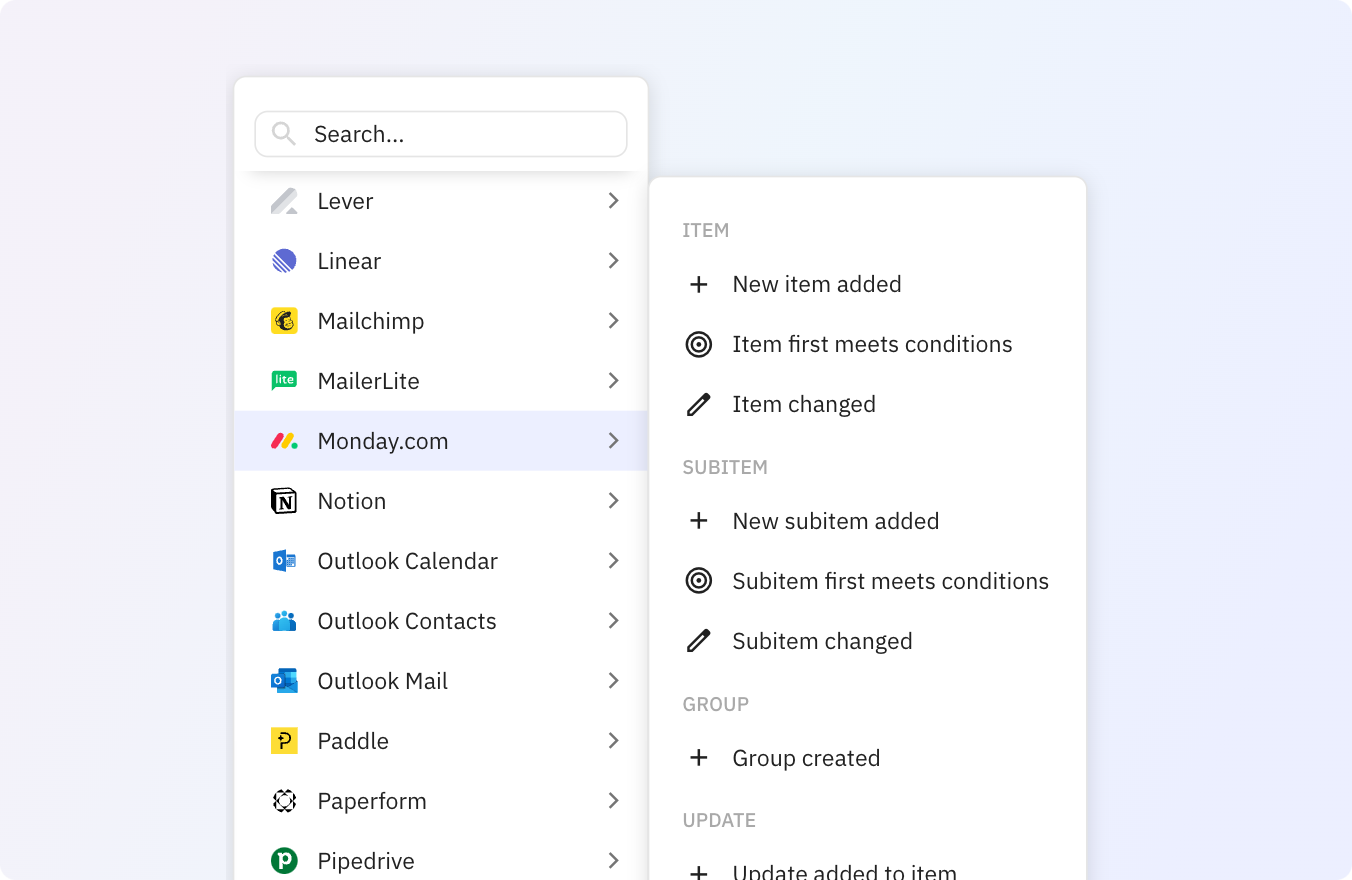
Triggers
Group
add
Group created
Item
edit
Item changed
target
Item first meets conditions
add
New item added
Subitem
add
New subitem added
edit
Subitem changed
target
Subitem first meets conditions
Update
add
Update added to item
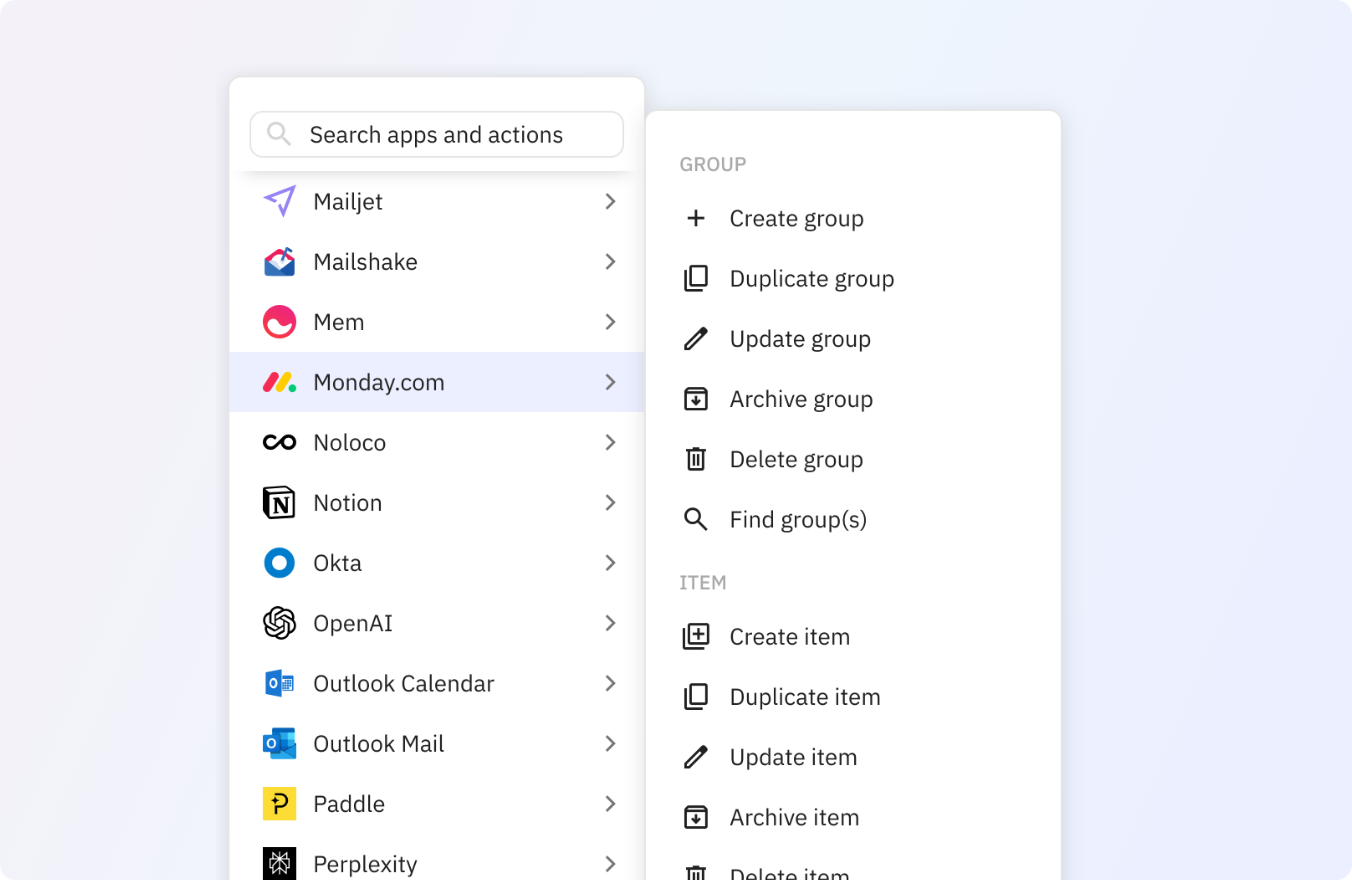
Actions
Group
archive
Archive group
add
Create group
delete
Delete group
content_copy
Duplicate group
search
Find group(s)
edit
Update group
Item
archive
Archive item
library_add
Create item
delete
Delete item
content_copy
Duplicate item
search
Find item(s)
move_up
Move item to group
edit
Update item
Subitem
archive
Archive subitem
add
Create subitem
delete
Delete subitem
search
Find subitem(s)
edit
Update subitem
Update
add_comment
Add update to item
thumb_up
Like update
reply
Reply to update
User
search
Find user(s)

Connect Monday.com to your other apps

1Password + Monday.com integrations
1Password
Automate ActiveCampaign + Monday.com
ActiveCampaign
Connect Airtable to Monday.com
Airtable
Integrate Anthropic with Monday.com
Anthropic
Sync Apify with Monday.com
Apify
Apollo + Monday.com automations
Apollo
How to use App Store + Monday.com
App Store
Asana + Monday.com integrations
Asana
Automate Ashby + Monday.com
Ashby
Connect AssemblyAI to Monday.com
AssemblyAI
Integrate Attio with Monday.com
Attio
Sync Axiom.ai with Monday.com
Axiom.ai
beehiiv + Monday.com automations
beehiiv
How to use bitly + Monday.com
bitly
Bloobirds + Monday.com integrations
Bloobirds
Automate Bluesky + Monday.com
Bluesky
Connect Box to Monday.com
Box
Integrate Brevo with Monday.com
Brevo
Sync Browse.ai with Monday.com
Browse.ai
BuildKite + Monday.com automations
BuildKite
How to use Cal.com + Monday.com
Cal.com
Calendly + Monday.com integrations
Calendly
Automate CallRail + Monday.com
CallRail
Connect Canva to Monday.com
Canva
Integrate Cartesia with Monday.com
Cartesia
Sync Chargebee with Monday.com
Chargebee
ClickSend + Monday.com automations
ClickSend
How to use ClickUp + Monday.com
ClickUp
Close + Monday.com integrations
Close
Automate Coda + Monday.com
Coda
Connect Codacy to Monday.com
Codacy
Integrate CodeScene with Monday.com
CodeScene
Sync Confluence with Monday.com
Confluence
ConvertKit + Monday.com automations
ConvertKit
How to use DeepSeek + Monday.com
DeepSeek
Deepsource + Monday.com integrations
Deepsource
Automate Dialpad + Monday.com
Dialpad
Connect Discord to Monday.com
Discord
Integrate Documint with Monday.com
Documint
Sync DocuSign with Monday.com
DocuSign
Dovetail + Monday.com automations
Dovetail
How to use Drip + Monday.com
Drip
Dropbox + Monday.com integrations
Dropbox
Automate ElevenLabs + Monday.com
ElevenLabs
Connect Facebook Lead Ads to Monday.com
Facebook Lead Ads
Integrate Fathom with Monday.com
Fathom
Sync Fathom with Monday.com
Fathom
Fibery + Monday.com automations
Fibery
How to use Figma + Monday.com
Figma
Fillout + Monday.com integrations
Fillout
Automate Fireflies.ai + Monday.com
Fireflies.ai
Connect Folk to Monday.com
Folk
Integrate Follow Up Boss with Monday.com
Follow Up Boss
Sync Freshdesk with Monday.com
Freshdesk
Front + Monday.com automations
Front
How to use GitHub + Monday.com
GitHub
Gmail + Monday.com integrations
Gmail
Automate Gmelius + Monday.com
Gmelius
Connect GoHighLevel to Monday.com
GoHighLevel
Integrate Gong with Monday.com
Gong
Sync Google Calendar with Monday.com
Google Calendar
Google Contacts + Monday.com automations
Google Contacts
How to use Google Docs + Monday.com
Google Docs
Google Drive + Monday.com integrations
Google Drive
Automate Google Forms + Monday.com
Google Forms
Connect Google Gemini to Monday.com
Google Gemini
Integrate Google Groups with Monday.com
Google Groups
Sync Google Meet with Monday.com
Google Meet
Google My Business + Monday.com automations
Google My Business
How to use Google Play Store + Monday.com
Google Play Store
Google Sheets + Monday.com integrations
Google Sheets
Automate Google Slides + Monday.com
Google Slides
Connect Google Tasks to Monday.com
Google Tasks
Integrate Granola with Monday.com
Granola
Sync Greenhouse with Monday.com
Greenhouse
Groq + Monday.com automations
Groq
How to use Gumroad + Monday.com
Gumroad
Harmonic + Monday.com integrations
Harmonic
Automate Harvest + Monday.com
Harvest
Connect Help Scout to Monday.com
Help Scout
Integrate HeyGen with Monday.com
HeyGen
Sync HubSpot with Monday.com
HubSpot
ImgBB + Monday.com automations
ImgBB
How to use Instagram + Monday.com
Instagram
Instantly + Monday.com integrations
Instantly
Automate Intercom + Monday.com
Intercom
Connect Jira to Monday.com
Jira
Integrate Jotform with Monday.com
Jotform
Sync Kit (ConvertKit) with Monday.com
Kit (ConvertKit)
LambdaTest + Monday.com automations
LambdaTest
How to use Lemlist + Monday.com
Lemlist
Lemon Squeezy + Monday.com integrations
Lemon Squeezy
Automate Lever + Monday.com
Lever
Connect Linear to Monday.com
Linear
Integrate LinearB with Monday.com
LinearB
Sync LinkedIn with Monday.com
LinkedIn
Loops + Monday.com automations
Loops
How to use Luma + Monday.com
Luma
Mailchimp + Monday.com integrations
Mailchimp
Automate MailerLite + Monday.com
MailerLite
Connect MailerSend to Monday.com
MailerSend
Integrate Mailjet with Monday.com
Mailjet
Sync Mailshake with Monday.com
Mailshake
ManyChat + Monday.com automations
ManyChat
How to use Mem + Monday.com
Mem
Microsoft Excel + Monday.com integrations
Microsoft Excel
Automate Microsoft OneDrive + Monday.com
Microsoft OneDrive
Connect Microsoft Planner to Monday.com
Microsoft Planner
Integrate Missive with Monday.com
Missive
Sync Mistral with Monday.com
Mistral
Mixpanel + Monday.com automations
Mixpanel
How to use New Relic + Monday.com
New Relic
Northflank + Monday.com integrations
Northflank
Automate Notion + Monday.com
Notion
Connect olostep to Monday.com
olostep
Integrate OpenAI with Monday.com
OpenAI
Sync Outlook Calendar with Monday.com
Outlook Calendar
Outlook Contacts + Monday.com automations
Outlook Contacts
How to use Outlook Mail + Monday.com
Outlook Mail
Paddle + Monday.com integrations
Paddle
Automate PandaDoc + Monday.com
PandaDoc
Connect Paperform to Monday.com
Paperform
Integrate Perplexity with Monday.com
Perplexity
Sync Pipedrive with Monday.com
Pipedrive
Pipefy + Monday.com automations
Pipefy
How to use PostHog + Monday.com
PostHog
Qlty + Monday.com integrations
Qlty
Automate QuickBooks Online + Monday.com
QuickBooks Online
Connect QuickMail to Monday.com
QuickMail
Integrate Quo (OpenPhone) with Monday.com
Quo (OpenPhone)
Sync Qwen with Monday.com
Qwen
Railway + Monday.com automations
Railway
How to use Ramp + Monday.com
Ramp
Reddit + Monday.com integrations
Reddit
Automate Relay.app + Monday.com
Relay.app
Connect Retable to Monday.com
Retable
Integrate RingCentral with Monday.com
RingCentral
Sync Salesforce with Monday.com
Salesforce
SalesIntel + Monday.com automations
SalesIntel
How to use ScrapingBee + Monday.com
ScrapingBee
Sharepoint + Monday.com integrations
Sharepoint
Automate ShipHero + Monday.com
ShipHero
Connect Shopify to Monday.com
Shopify
Integrate Signeasy with Monday.com
Signeasy
Sync Skyflow with Monday.com
Skyflow
Slack + Monday.com automations
Slack
How to use Smartlead.ai + Monday.com
Smartlead.ai
SmartSuite + Monday.com integrations
SmartSuite
Automate Smartwaiver + Monday.com
Smartwaiver
Connect Snowflake to Monday.com
Snowflake
Integrate Square with Monday.com
Square
Sync Stripe with Monday.com
Stripe
Supabase + Monday.com automations
Supabase
How to use Syften + Monday.com
Syften
Tally + Monday.com integrations
Tally
Automate Teams + Monday.com
Teams
Connect Telegram to Monday.com
Telegram
Integrate Tella with Monday.com
Tella
Sync The Swarm with Monday.com
The Swarm
Things + Monday.com automations
Things
How to use TickTick + Monday.com
TickTick
TidyCal + Monday.com integrations
TidyCal
Automate Tiktok + Monday.com
Tiktok
Connect Todoist to Monday.com
Todoist
Integrate Toggl with Monday.com
Toggl
Sync Trello with Monday.com
Trello
Tremendous + Monday.com automations
Tremendous
How to use Twilio + Monday.com
Twilio
Typeform + Monday.com integrations
Typeform
Automate Wave + Monday.com
Wave
Connect Webflow to Monday.com
Webflow
Integrate WhatsApp notifications with Monday.com
WhatsApp notifications
Sync WooCommerce with Monday.com
WooCommerce
WordPress (Self-Hosted) + Monday.com automations
WordPress (Self-Hosted)
How to use Wordpress.com + Monday.com
Wordpress.com
X (Twitter) + Monday.com integrations
X (Twitter)
Automate xAI + Monday.com
xAI
Connect Xero to Monday.com
Xero
Integrate Xodo Sign with Monday.com
Xodo Sign
Sync YouTube with Monday.com
YouTube
Zendesk + Monday.com automations
Zendesk
How to use Zite + Monday.com
Zite
Zoom + Monday.com integrations
Zoom
Automate Zoom Events + Monday.com
Zoom Events

Automate Monday.com in minutes with our how-to guides

See all how-to guides ➔
Automatically send DocuSign envelopes for new Monday.com itemsSync Airtable records with Monday.com itemsSync Monday.com items with ClickUp tasksCreate Monday.com items for new Google Calendar eventsKeep track of Cal.com bookings directly in Monday.comAutomatically add new records in Coda from new items in Monday.comAutomatically send an email notification in Gmail for new items in Monday.comTrack new Lemon Squeezy orders in Monday.comSend a Xodo Sign document using a template for signing when a specific item is added to Monday.comCreate a new Zendesk ticket from Monday.comAutomatically send Signeasy envelopes for each new Monday.com itemAutomatically schedule interviews in Ashby from new Monday.com itemsSync new Monday.com items with a Notion databaseCreate items in Monday.com from new Google Forms responsesAutomatically create items in Monday.com for new Mailchimp subscribersAutomatically add new Outlook emails to Monday.com itemsCreate new Monday.com items after every successful Paddle transactionSync Jira issues with Monday.com itemsSync new Monday.com items with Google TasksRecord new Outlook Calendar events in Monday.com itemsAutomatically create Outlook Calendar events for specific items on Monday.comCreate items on a Monday.com board triggered by new rows on Google SheetsCreate new Dropbox folders for each new group in Monday.comKeep track of new Stripe subscriptions by creating Monday.com itemsSync new Monday.com items to SmartSuiteAutomatically create folders in Google Drive for new Monday.com groupsHow automatically alert the team via Slack about new Monday.com itemsAdd new Trello lists to Monday.com as new groupsAutomatically add new Intercom tickets to Monday.com as new itemsSend a notification in Teams for each new item in Monday.comCreate Monday.com items from new QuickBooks Online invoicesAutomatically add Monday.com items to a Retable tableTrack lost deals in Pipedrive directly in Monday.com itemsTrack new Typeform entries in Monday.comAutomatically add scheduled meetings in Calendly as an item in Monday.comIntegrate HubSpot form submissions with Monday.com

FAQ

  • What is Relay.app?

    Relay.app is a modern, easy-to-use automation tool with deep integrations and rich workflow features. If you have a workflow that requires input from a teammate—like making a decision that requires human judgment, reviewing the output of an AI model, or approving a next step—Relay.app is the platform for you. Beyond its features, Relay.app’s user-friendly experience makes it an excellent tool for anyone on your team to pick up.

    Learn more about Relay.app's features.

  • How do I connect Monday.com to Relay.app?

    1. Create a free Relay.app account.
    2. Set up a trigger, which is what will start each workflow run.
    3. Choose one or more actions to run as part of your workflow.
    4. Connect and authorize Monday.com and any other apps you want to automate.
    5. Turn on your workflow, and start getting your repetitive tasks done without lifting another finger.

    Check above for some example workflows, or visit our help center for more details on how to get started.

  • Is Relay.app a Zapier alternative for automating Monday.com?

    Yes. Relay.app is a modern alternative to Zapier. Relay.app has deeper integrations, additional features, more flexibility, and better pricing.

    Zapier is a better fit for some use cases, as a featureful workflow automation tool that has been around for a long time. For example, if you need an integration with a less commonly used app, Zapier may already have the one you need.

    For a more detailed comparison, check out our article comparing Relay.app to Zapier or our comparison of Zapier alternatives.

    Of course we're biased, but we believe Relay.app is the best way to automate Monday.com—give it a try and let us know what you think.

See why people love Relay.app

Photo of Salama💯
Salama💯
@SalamaErgossum
X logo

Just ran my first automation workflow with @relay !

I wanted to send newsletters from Outlook to Notion, and it was so easy I almost cried—after struggling and giving up with other tools like Make.

Huge thanks to @relay for empowering non-tech folks like me!

Photo of Marco Elizalde
Marco Elizalde
Twitter verified logo
@marcoETmx
X logo

I discovered @relay and it is incredible

Photo of Peter Jauhal
Peter Jauhal
via email

Relay is a fantastic app. I keep finding new uses for it everyday. I am not a programmer but I can make some really complicated work flows work pretty quickly.

Photo of Lucas Grey
Lucas Grey
Twitter verified logo
@ImLucasGrey
X logo

Falling in love with @relay. Tried make and zapier and this uiux worked the simplest. It gets the job done.

Automated our waitlist collection and replying process.
Used gpt in the workflow to parse the replies to our waitlist email qtns & saved them into our notion database.

Photo of Rafa
Rafa
Twitter verified logo
@rafanocode
X logo

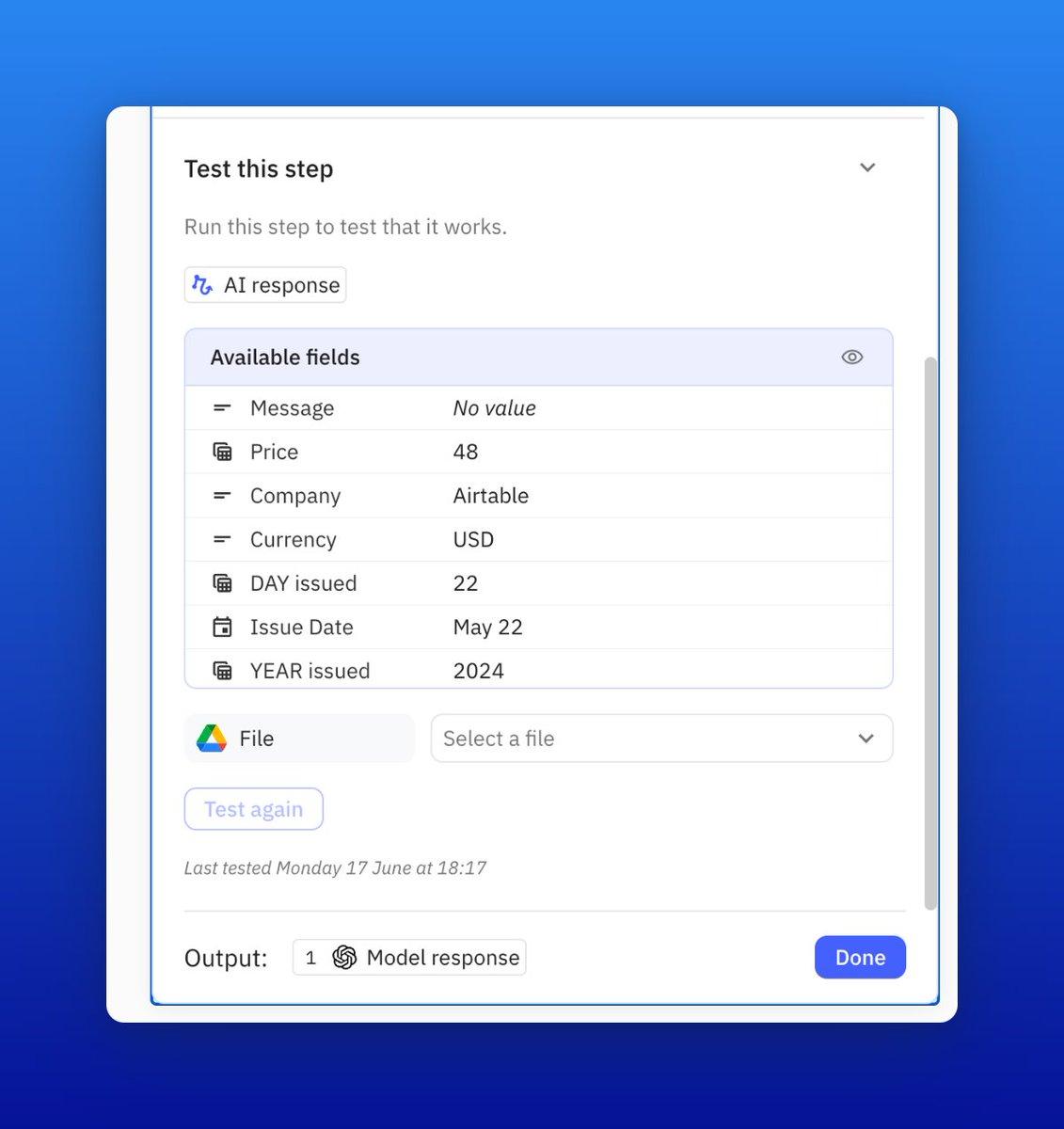
I truly appreciate how @relay presents testing info. You can easily see what you are testing, and the messages are very clear if there's an error.

They are definitely creating a fantastic tool!

Screenshot showing how to test a step in an automated workflow in Relay.app
Photo of Duke Dao
Duke Dao
@dummy_coder
X logo

.@relay is just straight out awesome. Give it a try

Photo of Benjamin Borowski👨‍🚒
Benjamin Borowski👨‍🚒
Twitter verified logo
@typeoneerror
X logo

Relay's "human in the loop" model is super effective for teams. Not only is this the best designed UI for automation building on the market, they've really thought about how not everything can be automated. Fantastic for building operationalized SOPs.

Photo of Notion Coach
Notion Coach
Twitter verified logo
@NotionCoach
X logo

Finally getting a chance to explore @relay and wow, UX feels leaps ahead of Zapier/Make.

Photo of Maayan
Maayan
Co-Founder at Elementary

You saved me thousands of dollars in engineering work.

Photo of Eva (Ziki) Zivanovic
Eva (Ziki) Zivanovic
Twitter verified logo
@ZikiDoesNotion
X logo

If you’re never heard of @relay you’re missing out BIG TIME.

Relay.app is an automation app that has been getting a lot of traction lately.
And for good reason.

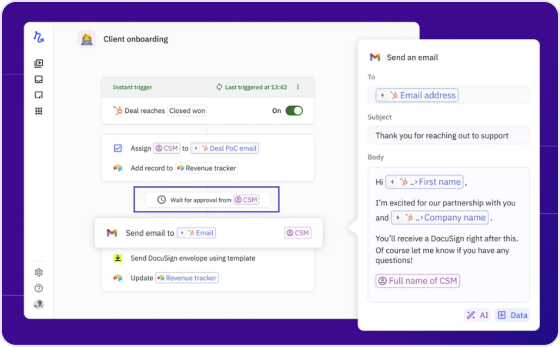
What makes them unique on the market is their Human-In-The-Loop functionality.

This functionality basically allows your company to add intermediate manual steps that can add unique judgment, context, and perspective.

Client onboarding workflow screenshot in Relay.app

New to Relay.app? Learn how to automate your first workflow

What will you automate?

Sign up and get started with your first Relay.app workflow today.
Background imageBackground image