The 10 best AI automation tools of 2026, ranked. Compare features, pricing, and ease of use to find the right fit for your workflows.

Take your workflow automation to the next level with AI
If you've been following the AI space, you've probably noticed there are a few different types of tools that let you put artificial intelligence to work. Some (like ChatGPT or Claude) are conversational assistants for research and on-demand answers. Others are in-product copilots, like GitHub Copilot or Notion AI, that help you work faster inside specific apps. But the most exciting category, in our view, is the rapidly maturing class of AI automation tools. These work on your behalf, often while you sleep, handling the repetitive, time-consuming tasks that slow your business down.
The landscape has shifted dramatically since we first wrote this guide. In 2026, agentic AI is the defining trend. Tools aren't just executing if-this-then-that logic anymore. They're pursuing goals, reasoning through multi-step tasks, and orchestrating work with minimal hand-holding. Open-source platforms have raised massive rounds (n8n closed $180M at a $2.5B valuation). MCP (Model Context Protocol) has become the standard for connecting AI agents to your tools. Desktop AI agents like Anthropic's Claude Cowork now offer computer use, scheduled tasks, and plugin ecosystems. And the line between "workflow automation" and "AI agent" keeps getting blurrier.
We wrote this guide to cut through the noise. Below, we break down the 10 best AI automation tools, grouped by use case, to help you find the right one. We'll start with what to look for, walk through the emerging categories, and then dive into our top picks.
TL;DR
Here's a quick overview of the complete list we'll be walking through:
AI-integrated workflow automation tools
Relay.app: The easiest-to-use AI workflow automation tool. Build, test, and optimize automations with the powerful chat-based AI assistant.
Gumloop: A powerful AI-first platform for building multi-agent workflows on a visual canvas.
Zapier: The largest integration library with 8,000+ apps.
n8n: Open-source and self-hostable, for technical teams who want code-level flexibility and full control.
Make: A visual-first automation platform with 3,000+ integrations, for power users who need granular control over complex automations.
Enterprise AI platforms
Cassidy: An AI agent platform built around a unified knowledge base that continuously syncs with your company's data, with SOC 2 Type II, GDPR, and HIPAA compliance.
Stack AI: An enterprise AI platform with HIPAA, SOC 2, GDPR, and ISO 27001 certifications, plus flexible deployment and white-glove support.
Open-source and budget-friendly
ActivePieces: An open-source, no-code platform with 670+ integrations, AI agents, and MCP toolkit. Cloud or fully self-hosted for unlimited tasks.
AI personal assistants and desktop agents
Lindy: An AI personal assistant that proactively manages your inbox, calendar, and meetings via iMessage/SMS, at a fraction of the cost of a human EA.
Claude Cowork: Anthropic's desktop AI agent that completes multi-step knowledge work using your local files, apps, connectors, and even computer use.
How I evaluated these platforms
The main goal of an AI automation tool is to save you time and money, but you have to pick the one that matches your use case. Here's what I looked for:
Ease of use: The best tools in 2026 let you describe what you want in plain language and get a working workflow back. No drag-and-drop required if you don't want it.
AI capabilities: Multi-model support (OpenAI, Anthropic, Gemini, DeepSeek), native AI agents, and MCP (Model Context Protocol) support are now table stakes.
Integrations and MCP: Seamless connections to your existing tools. MCP has changed what "integrations" means. AI agents can now call directly into automation platforms without traditional connectors.
Human oversight: Human-in-the-loop controls for reviewing AI actions before they execute. As agents take on higher-stakes tasks, this isn't optional anymore.
Security and compliance: SOC 2, HIPAA, GDPR certifications and self-hosting options for strict data residency requirements.
Agentic depth: Can the tool handle multi-step reasoning, tool use, memory, and branching, or is it just wrapping a single LLM call?
Scalability: Grows with your company without forcing a platform switch.
Cost transparency: Understanding task-based vs. credit-based vs. per-flow vs. execution-based pricing models matters more than ever.
Distinct categories have emerged within this space. The right one depends on your automation goals, scale, and technical capabilities.
🔀 AI-integrated workflow automation tools
These tools connect apps and automate complex workflows at scale with AI built into every step. You'll find established names like Zapier and Make alongside AI-first platforms like Relay.app and Gumloop, plus open-source options like n8n and ActivePieces for full data control.
Look here if you need:
Seamless integrations across a wide range of apps
Complex, multi-step workflows with more flexibility than narrow AI solutions
Multi-model AI support you can easily swap in and out
MCP support for connecting AI agents to your automation ecosystem
The option to self-host for full data control (n8n, ActivePieces)
🏢 Enterprise AI platforms
Purpose-built for organizations needing AI agents with deep business context, strict compliance, and flexible deployment. These connect to your documents, wikis, and data sources so AI agents always act on current internal information.
Look here if you need:
Centralized organizational knowledge accessible to AI agents
Compliance certifications (SOC 2, HIPAA, GDPR, ISO 27001) that are non-negotiable
Flexible deployment including VPC or on-premise
White-glove support and dedicated implementation teams
🤖 AI personal assistants and desktop agents
The newest category, and the fastest-growing. Instead of building workflows, these tools operate as intelligent assistants that handle tasks directly. They manage your inbox via text, complete work on your desktop, or even use your computer autonomously.
Look here if you need:
Help with inbox management, scheduling, and meeting prep
AI that works directly with your local files, organizing, analyzing, and generating documents
A personal productivity boost rather than team-wide workflow automation
An agent that can use your computer to navigate apps and complete tasks while you step away
Now that you have a better understanding of the AI automation landscape, let's dive into our list of the 10 best AI automation tools of 2026.
The 10 best AI automation tools of 2026
1.
Relay.app
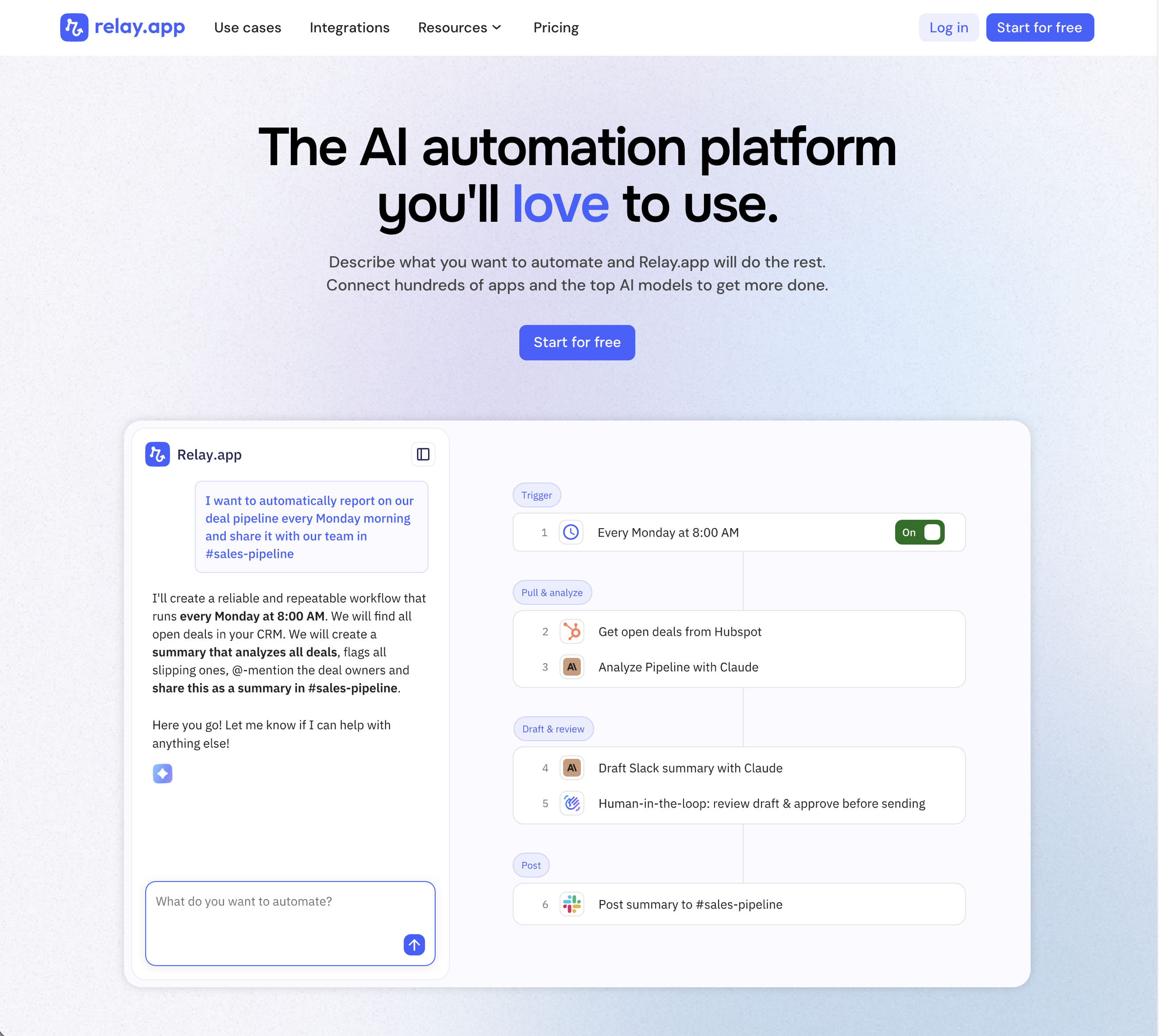
Relay.app is the most intuitive way to automate with AI. Just describe what you want to automate, and Relay.app will build a reliable, visual workflow for you. Relay.app connects with 200+ apps and all the top AI models. Non-technical users who have struggled with less user-friendly tools like Zapier or Make can easily create AI workflows in minutes, while longtime automation experts have all the advanced tools they need to build complex flows.
Product details
Designed to be intuitive to use: Relay.app is thoughtfully designed for individuals and teams of all technical abilities, from novice to expert.
An AI assistant optimized to build workflows for you: Chat with the AI assistant to build, test, and optimize workflows. It will proactively spot issues and make suggestions for you.
Hundreds of native integrations, plus custom API calls: 200+ deeply built, first-class native integrations. Don't see your app on the list? Just describe what you need and Relay.app's AI assistant will write a custom API call for you.
Collaborative building: Share workflows and app connections across your team for seamless multiplayer automation.
Human-in-the-loop oversight: Bring a teammate in when you need real life approvals, data entry, or manual review.
Universal AI credits for any AI model: Access the best models from OpenAI, Anthropic, and more using included AI credits.
Predefined processes for token efficiency: Set up a token-free structure for repeated work and limit AI tool calls to just the places you need them.
Technical power: Advanced users can go further with rich native tables, custom JavaScript steps, MCP servers, and custom HTTP requests.
Pricing
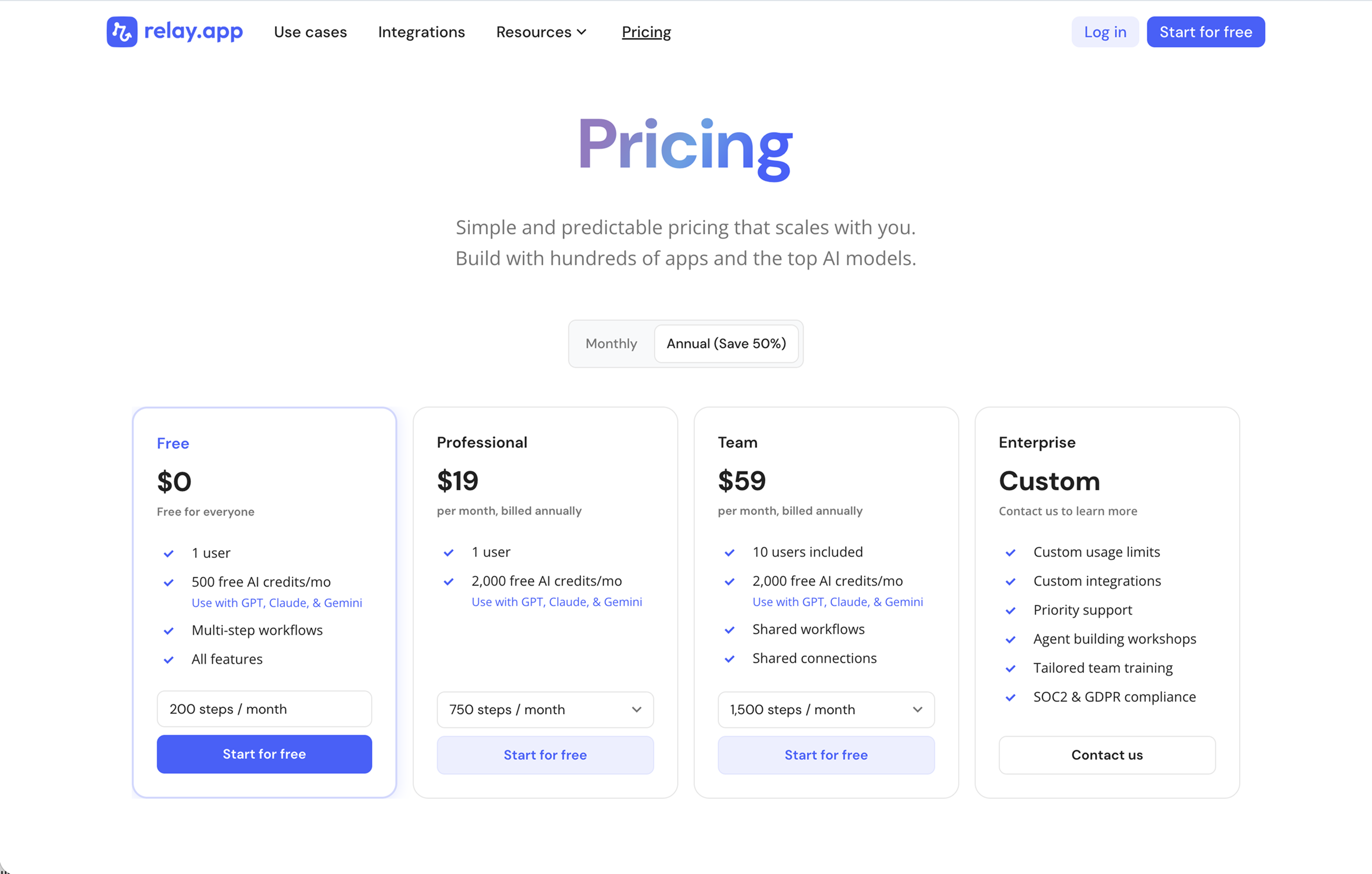
Relay.app's plans scale with your usage and team, starting with a generous free tier. All plans include free test runs that refresh every week so you can make sure everything works perfectly before you start paying.
Free: $0/month for 1 user, 200 steps, and 500 AI credits
Professional: $19/month (billed annually) for 1 user, 750 steps, and 2,000 AI credits
Team: $59/month (billed annually) for up to 10 users, 1,500 steps, and 2,000 AI credits
Enterprise: Custom pricing for organizations with advanced usage or security requirements
2.
Gumloop
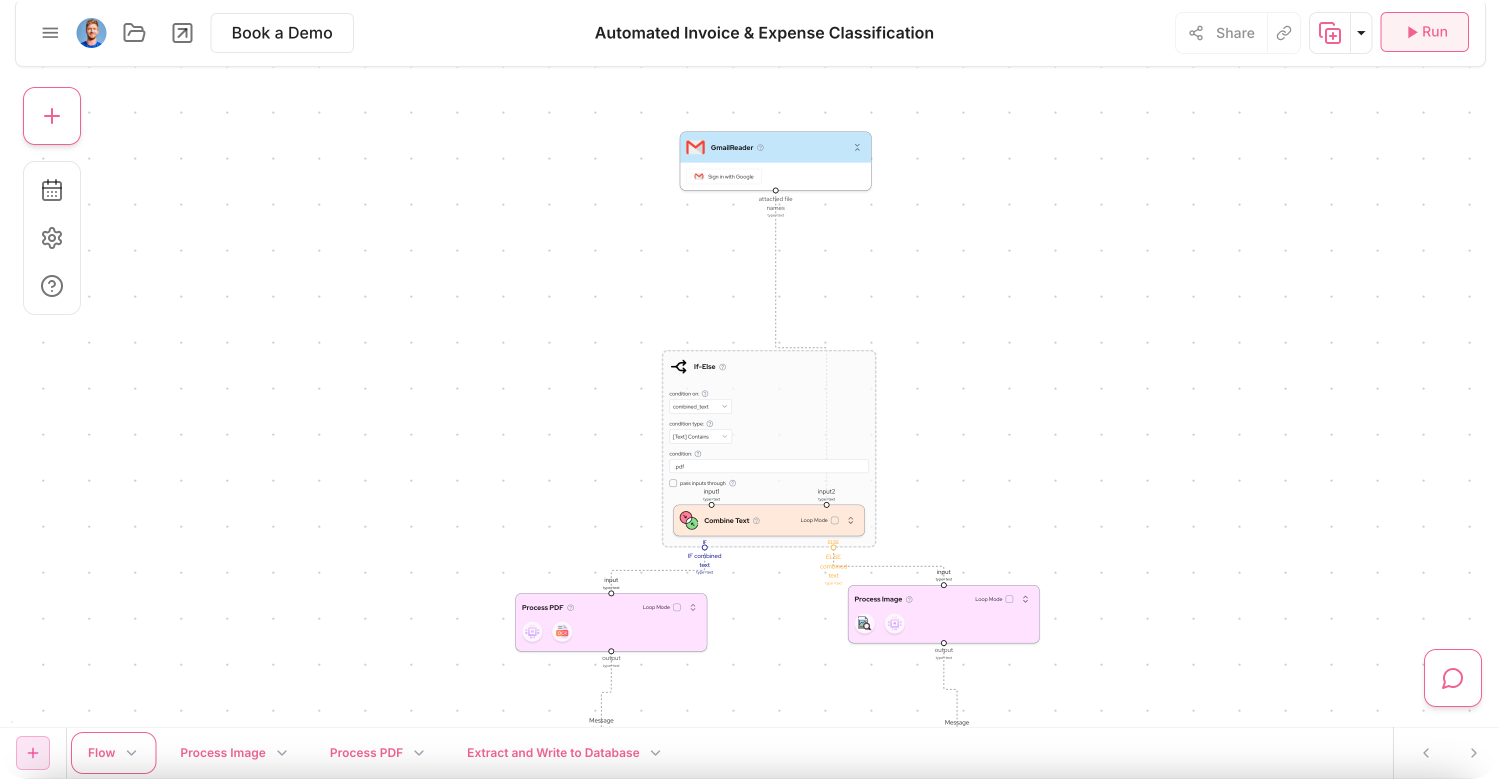
Gumloop is a no-code AI automation platform that enables teams to build, deploy, and manage specialized AI agents using a visual canvas. It lets users easily drag, drop, and connect modular nodes to orchestrate multi-agent workflows for functions like sales, support, and data analysis. The platform provides built-in access to multiple leading AI models without vendor lock-in and features native workspace integrations, MCP server support, and enterprise-grade security.
Product details
Multi-agent orchestration: Build and connect specialized AI agents using a visual drag-and-drop canvas.
AI model access: Access models from OpenAI, Anthropic, Gemini, and DeepSeek directly out of the box.
Workspace integrations: Interact with your built agents like co-workers directly within Slack or Microsoft Teams.
Enterprise security: Keep data secure with SOC 2 Type II compliance, VPC deployments, and role-based access control.
Gumstack AI gateway: Monitor, audit, and analyze AI chats and internal data access across your organization.
Data connectivity: Connect workflows to internal and external data sources like PostgreSQL, Snowflake, and Datadog.
MCP server support: Host or proxy Model Context Protocol servers to seamlessly trace and manage tool calls.
Usage monitoring: Track organization-wide credit usage in real time and implement budget controls.
Pricing
Gumloop offers a free tier to get started, with paid subscriptions scaling based on monthly credit usage and advanced features.
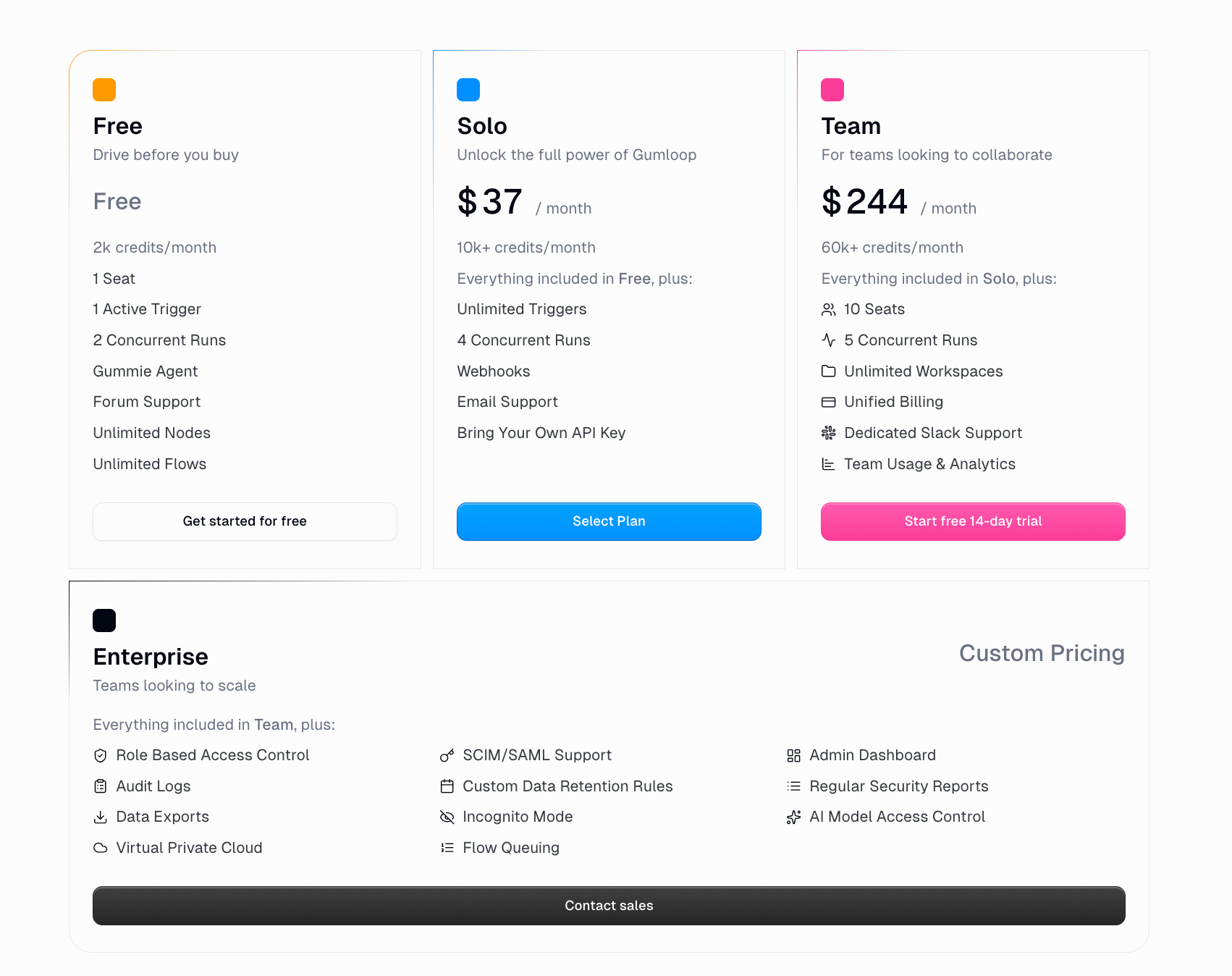
Free: $0/month for 5,000 credits, 1 seat, 1 active trigger, and 2 concurrent runs
Pro: $37/month for 20,000+ credits, unlimited seats, 5 concurrent runs, and MCP server proxying
Enterprise: Custom pricing for role-based access control, SCIM/SAML support, and virtual private cloud deployments
3.
Zapier
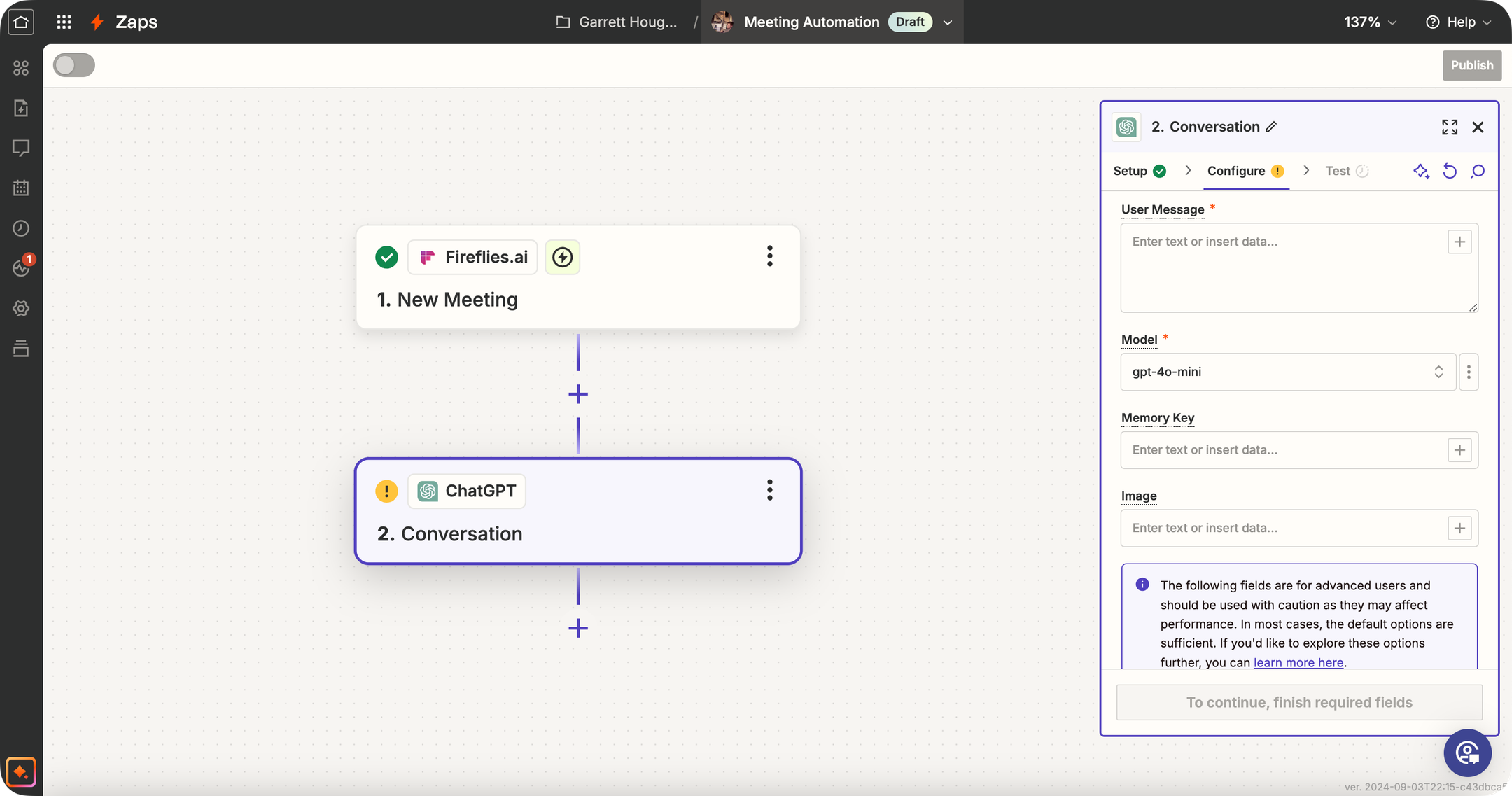
Zapier is one of the best-known automation tools (the "OG" of no-code workflows) that has significantly expanded its AI capabilities. Traditionally, Zapier connects your apps: "When X happens in app A, do Y in app B." Now, Zapier offers dedicated AI Agents, AI Chatbots, Canvas, and Model Context Protocol (MCP) support. While Zapier isn't an AI-specialized platform like some others, its primary strength is the 9,000+ app integrations it supports. This means you can trigger AI agents based on almost any event (new email, form submission, CRM update, you name it) and then have the AI perform an action or generate content as part of the Zap.
Product details
Massive integration ecosystem: Zapier connects with over 9,000 apps, so your AI agent can interact with nearly any tool your business uses.
Mature product and platform: Zapier has a reputation for dependable execution of workflows, extensive documentation, and a lot of community support.
Extensive template library: Thousands of pre-built Zap templates (including many with AI) can help get you started quickly.
Expanding AI toolkit: Zapier offers dedicated AI Agents, Chatbots, Canvas, and MCP support alongside its core automation platform.
Enterprise-grade governance: Administrators can define strict action restrictions, manage connections, and bring their own AI models (BYOM) securely.
Legacy complexity: Being a long-time champion of the space means they have many years of added features, making it more difficult to evolve quickly compared to modern alternatives.
Pricing
Zapier offers task-based plans for workflow automation alongside separate usage tiers for AI Agents and Chatbots.
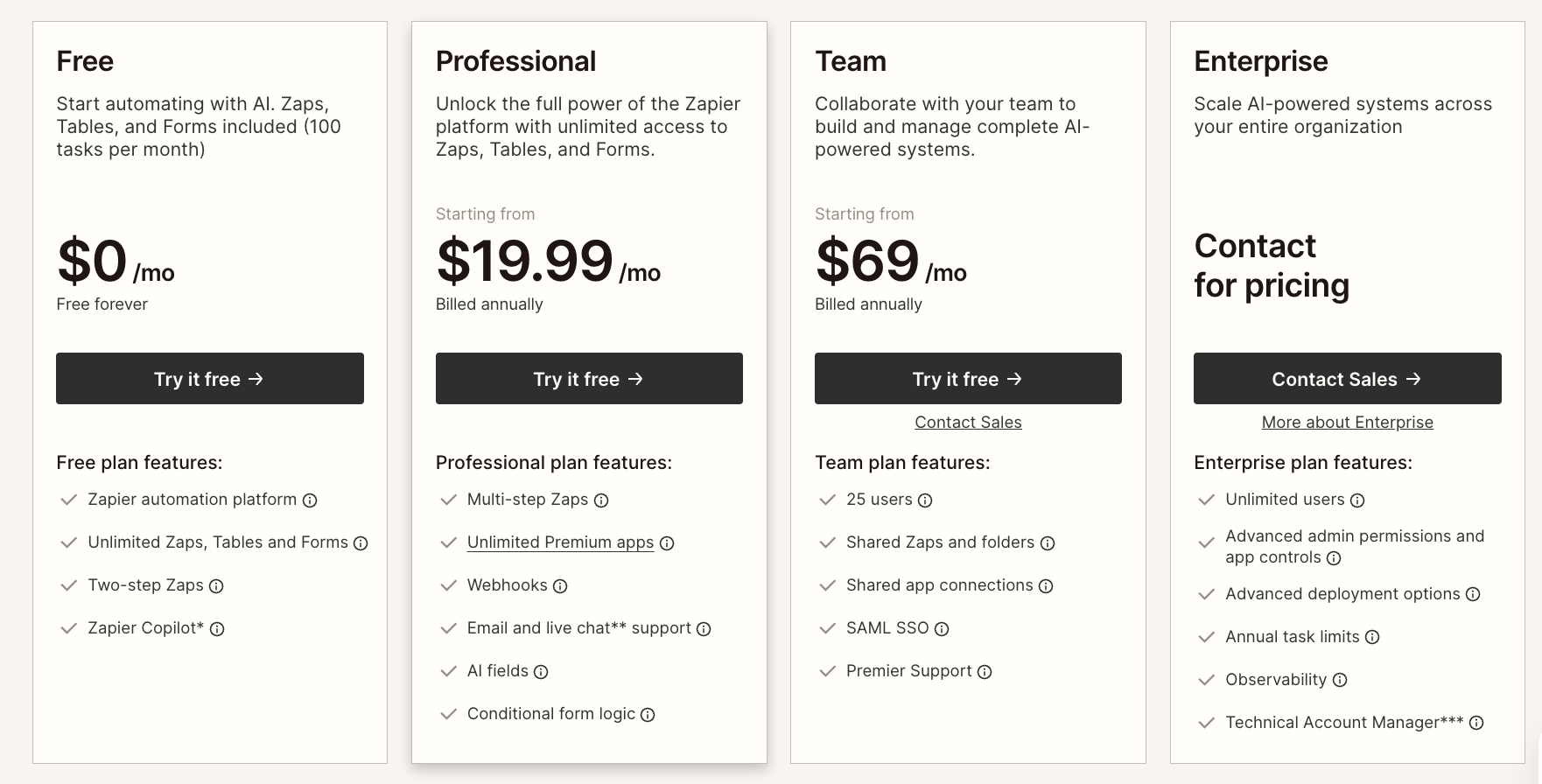
Free: $0/month for 100 tasks, two-step Zaps, Tables, Forms, and Zapier MCP
Professional: $19.99/month (billed annually) for multi-step Zaps, unlimited premium apps, and AI fields
Team: $69/month (billed annually) for 25 users, shared Zaps, and SAML SSO
Enterprise: Custom pricing for unlimited users, advanced admin controls, and observability
AI Agents: Free for 400 activities/month or $33.33/month for 1,500 activities
Chatbots: Free for 2 chatbots, $13.33/month for 5 chatbots, or $66.67/month for 20 chatbots
4.
n8n
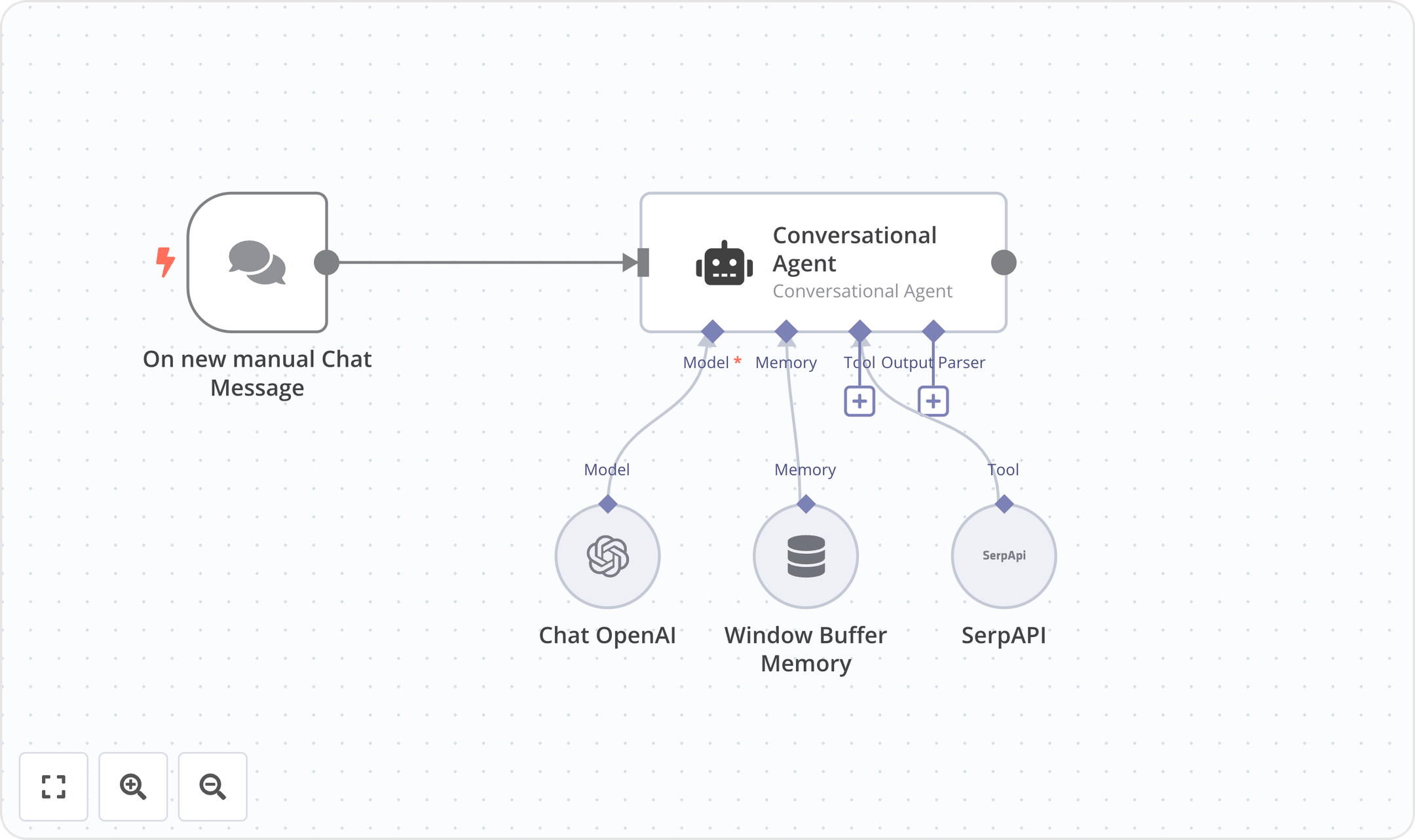
n8n is a source-available workflow automation platform designed specifically for technical teams and developers. It bridges the gap between visual workflow editors and custom code, allowing users to seamlessly blend drag-and-drop nodes with custom JavaScript or Python. By offering robust self-hosting capabilities via Docker alongside cloud-hosted options, n8n provides complete control over data privacy and compliance. Its execution-based pricing and advanced debugging tools make it highly scalable for orchestrating complex API integrations, AI-driven workflows, and mission-critical automated processes.
Product details
Code and no-code blend: Write custom JavaScript or Python directly alongside an intuitive visual workflow editor.
Self-hosting capabilities: Deploy on-premises with Docker and access the full source code on GitHub for complete data sovereignty.
Advanced developer tools: Leverage Git version control, isolated environments, global variables, and detailed execution logs.
AI workflow building: Utilize native AI credits and built-in evaluators to safely test and deploy AI-driven automations.
Predictable execution pricing: Pay per full workflow run rather than per individual step to make scaling costs highly predictable.
Granular debugging: Avoid endless debugging clicks by re-running single steps and viewing detailed execution histories.
Complex logic handling: Architect advanced multi-step workflows with deep internal API integrations and robust error handling.
Enterprise security: Maintain full compliance with SSO, external secret stores, and log streaming to security platforms.
Pricing
n8n offers a free self-hosted community edition alongside cloud-hosted and enterprise plans with execution-based pricing.
Community Edition: $0/month for standard, self-hosted deployments via GitHub
Starter: $20/month (billed annually) for 2.5K workflow executions and 50 AI Workflow Builder credits
Pro: $50/month (billed annually) for 10K workflow executions and 150 AI Workflow Builder credits
Business: €667/month (billed annually) for 40K workflow executions, self-hosted deployment, and Git version control
Enterprise: Custom pricing for custom workflow executions, unlimited shared projects, and dedicated support
Start-up Plan: 50% off the Business tier for eligible companies with under 20 employees

5.
Make
Make is a visual-first no-code automation platform that lets you design complex workflows on a canvas by connecting modules from 3,000+ apps. It supports advanced logic like branching, filtering, iteration, and error handling, making it popular with power users who need more control than simpler tools offer. Make has recently expanded into AI with beta AI Agents, an AI Toolkit, MCP server support, and 400+ AI app integrations including OpenAI, DeepSeek, and Perplexity. Make is well-suited for technical users and teams that need to build sophisticated, multi-step automations with granular control over every step.
Product details
Visual scenario builder: The canvas-based editor lets you see exactly how data flows through your automation, making it great for debugging and complex logic.
Advanced workflow logic: Supports branching, filtering, iteration, and error handling that most simpler tools can't match.
Strong integration library: Connects with 3,000+ apps, with deep action support across most of them.
AI agents and integrations: Connect 350+ AI apps, build and manage AI Agents, and use the Make MCP Server to connect AI from anywhere.
Generous pricing relative to complexity: Make offers more operations per dollar than Zapier, making it attractive for higher-volume automations.
Steep learning curve: Make's power comes at a cost, as non-technical users typically need 10 to 20 hours before feeling comfortable with concepts like routers and iterators.
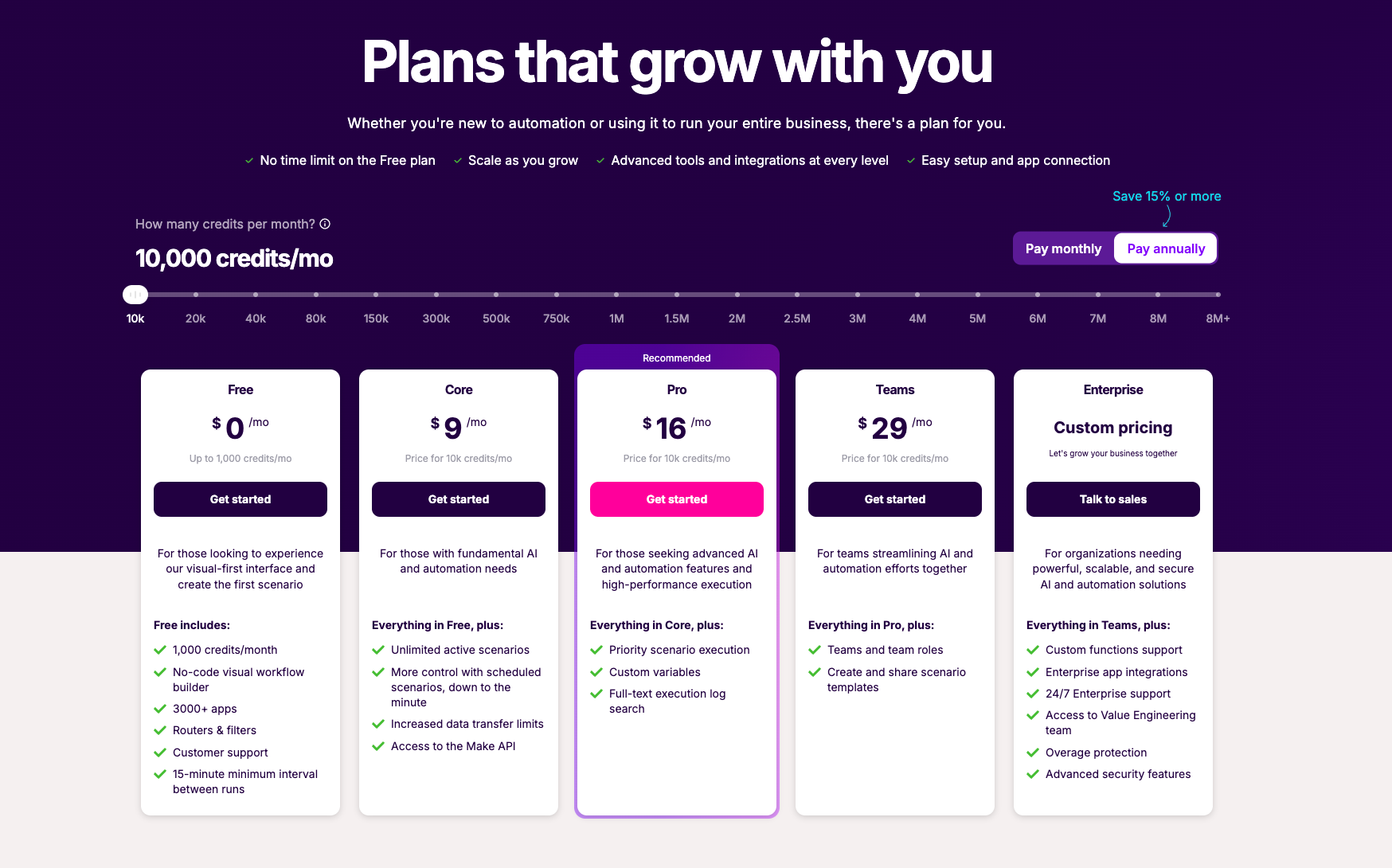
Pricing
Make offers a free tier for basic needs and paid plans based on monthly credit usage and advanced features.
Free: $0/month for 1,000 credits/month and a no-code visual workflow builder
Core: $12/month for 10,000 credits/month, unlimited active scenarios, and scheduled scenarios
Pro: $21/month for 10,000 credits/month, priority scenario execution, and custom variables
Teams: $38/month for 10,000 credits/month, teams and team roles, and scenario templates
Enterprise: Custom pricing for enterprise app integrations, 24/7 support, and advanced security
6.
Cassidy
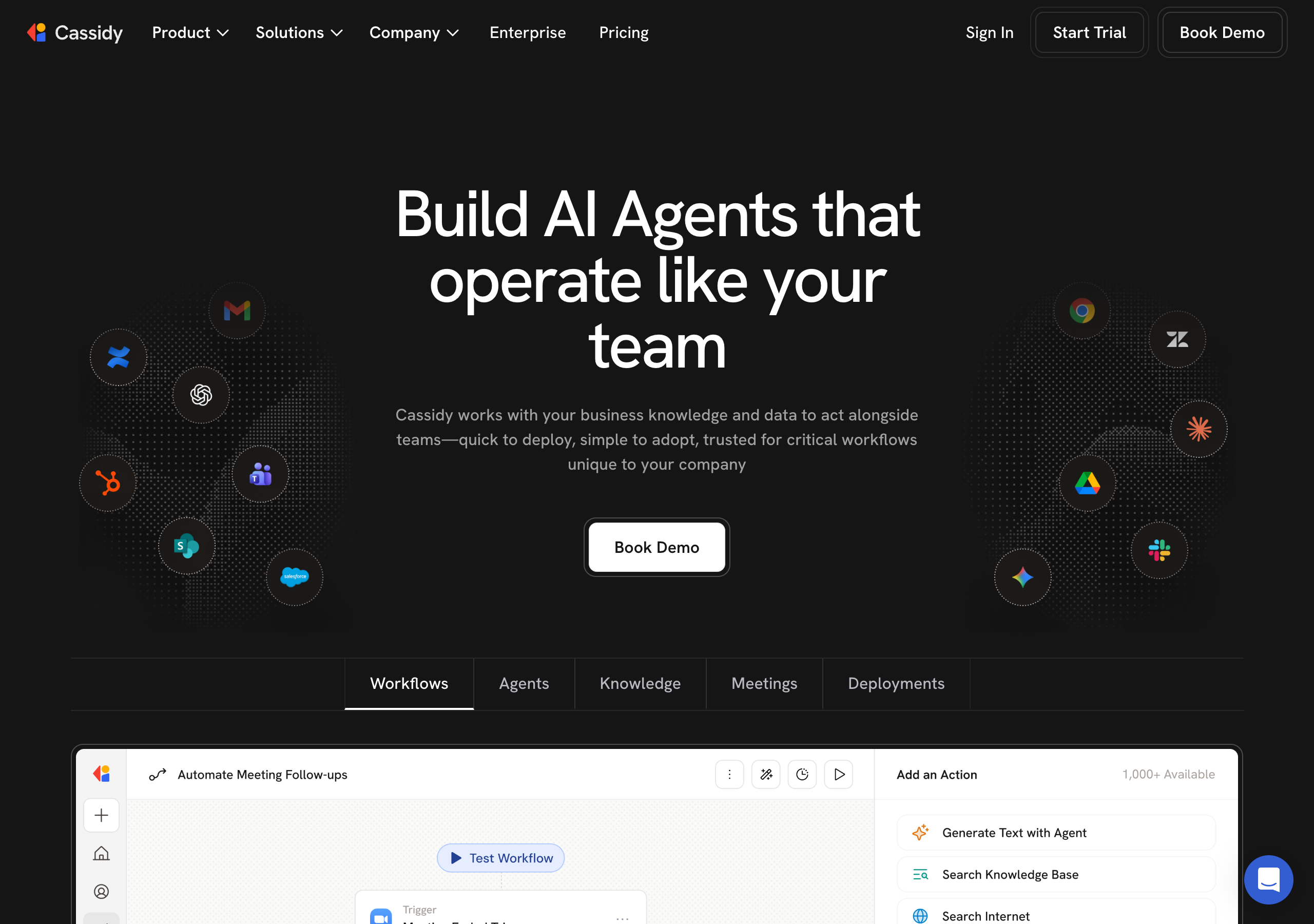
Cassidy is an AI agent platform focused on giving automations deep business context. It connects to your company's documents, wikis, and data sources through a unified knowledge base that continuously syncs, so AI agents always act on the latest information. Cassidy offers no-code workflow creation, agentic reasoning for handling complex logic and exceptions, and cross-system execution across tools like Salesforce, Slack, and Microsoft Teams. It includes human-in-the-loop steps and guardrails for control over business-critical work.
Product details
Unified knowledge base: Gain deep business context via a system that continuously syncs across your documents and data sources.
No-code creation: Enable non-technical teams to build and deploy robust AI agents without developer support.
Agentic reasoning: Handle nuance, complex logic, and exceptions with AI that makes decisions instead of following rigid scripts.
Cross-system execution: Execute actions across multiple systems in a single flow by connecting deeply with your software stack.
Precision and control: Keep full control over business-critical work using guardrails and human-in-the-loop checkpoints.
Seamless deployment: Deploy agents directly into Slack, Microsoft Teams, Google Chrome, and other tools your team already uses.
Enterprise-grade security: Maintain compliance with strict international security standards including SOC 2 Type II, GDPR, HIPAA, and SSO.
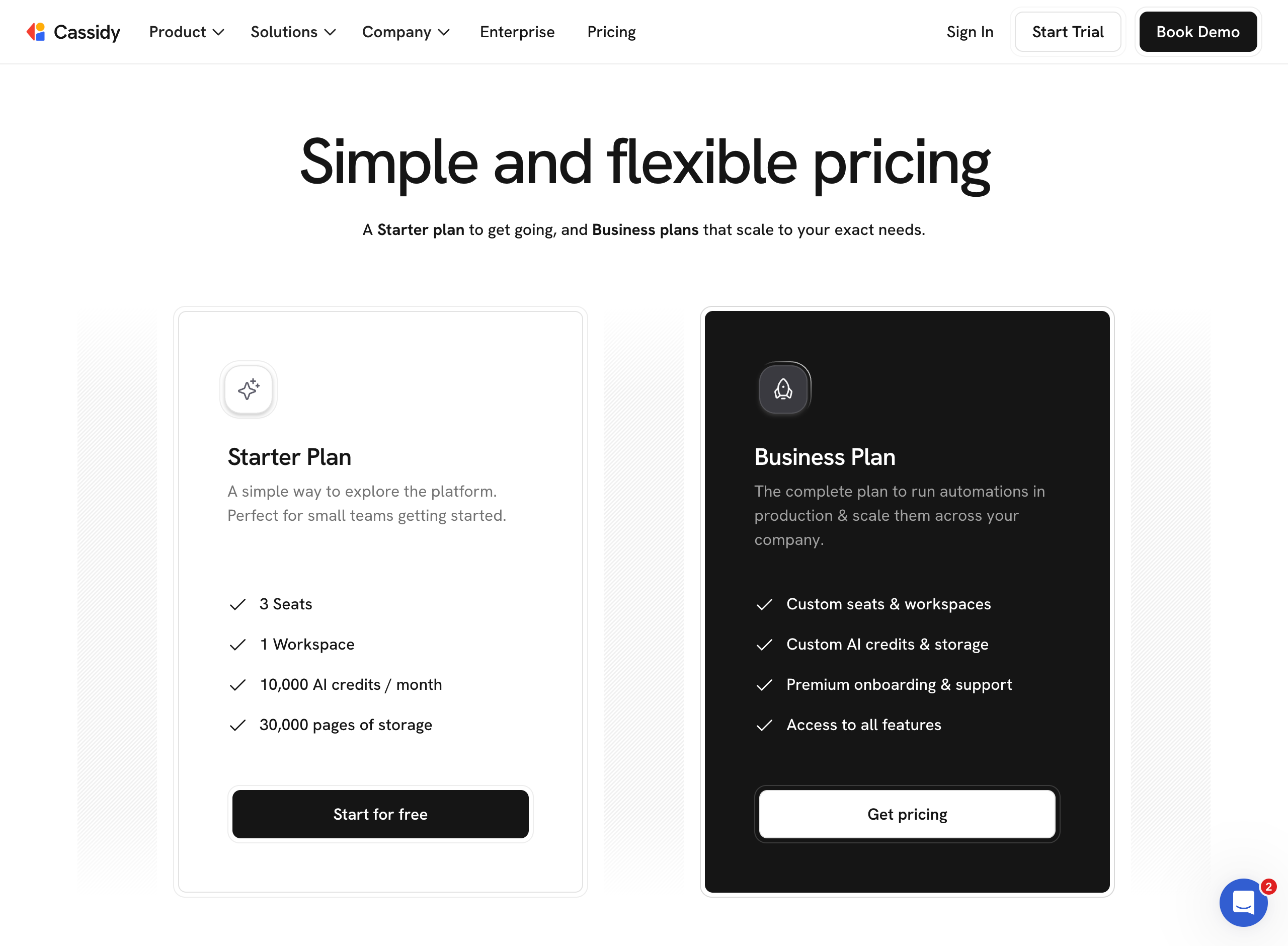
Pricing
Cassidy offers a free tier for small teams along with custom pricing for businesses needing advanced capabilities.
Starter: Free for 3 users, 5 agents, 5 workflows, 10K AI credits, basic integrations, and 24-hour data sync
Business: Custom pricing for tailored users, agents, workflows, instant sync, advanced integrations, SSO, and a dedicated success manager
7.
Stack AI
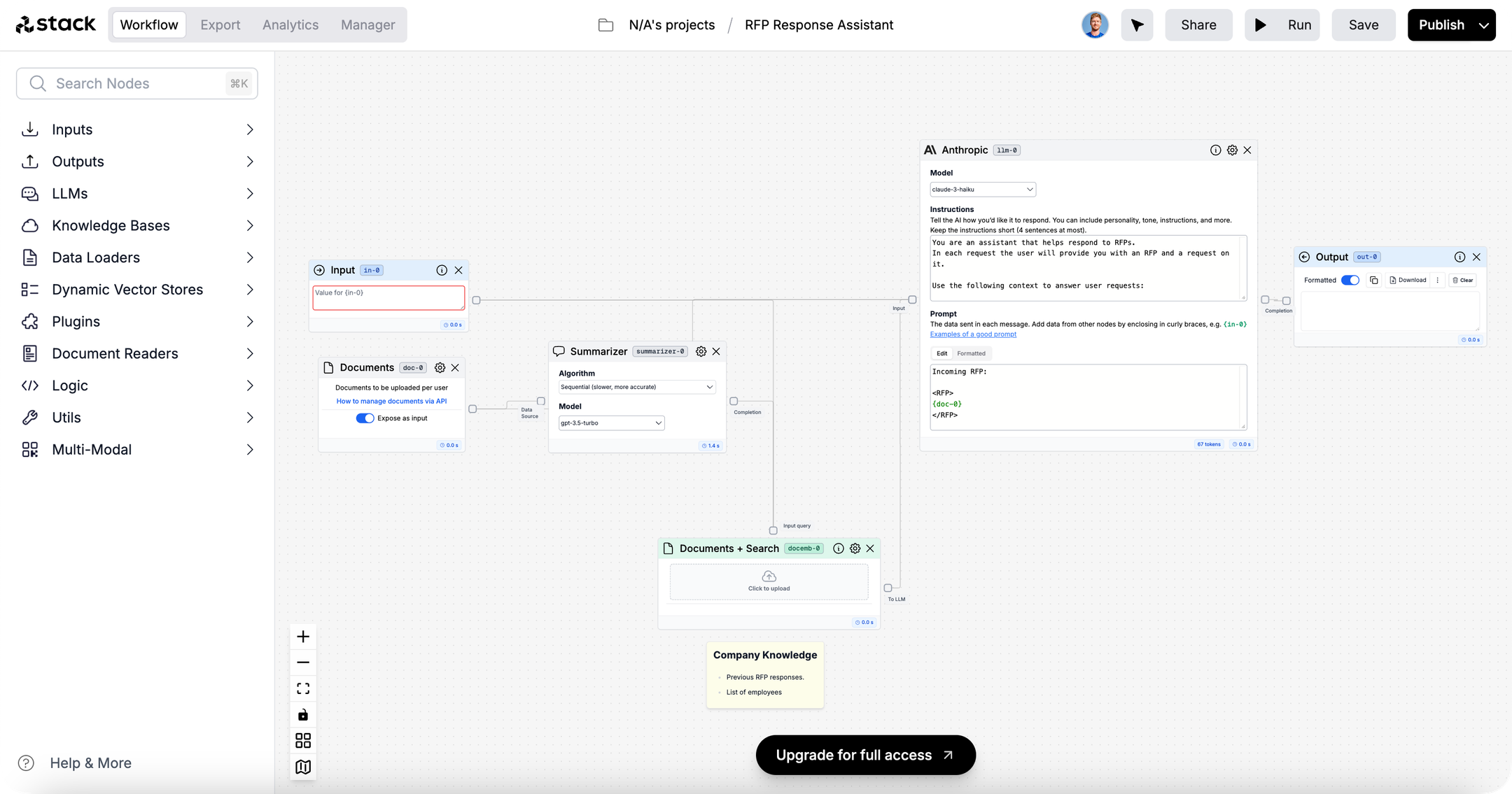
Stack AI is an enterprise-focused platform for building and deploying AI agents, recently acquired by Asana to bring human-agent workflows into a single place. It offers a visual workflow builder for creating agentic workflows, over 100 enterprise integrations, and flexible deployment options. The platform is certified for HIPAA, SOC 2 Type II, GDPR, and ISO 27001, making it an ideal fit for regulated industries like healthcare and finance. Stack AI positions itself as an AI transformation platform for IT and enterprise architecture teams, providing dedicated white-glove support from AI experts to help organizations scale their deployments.
Product details
Agentic workflows: Go from a time-consuming process to a working AI agent in minutes.
Flexible deployment: Supports multi-tenant cloud, VPC, and on-premise deployments to meet strict data residency needs.
Enterprise-grade security: Certified for HIPAA, SOC 2 Type II, GDPR, and ISO 27001 to protect sensitive data.
Human in the loop: Integrate human oversight into automated decision points for total process precision.
LLM agnostic: Deploy the best-performing language model for every specific task.
Extensive integrations: Connect AI agents to over 100 enterprise systems to read, write, and execute tasks.
White-glove experience: Receive dedicated support and hands-on guidance from AI experts.
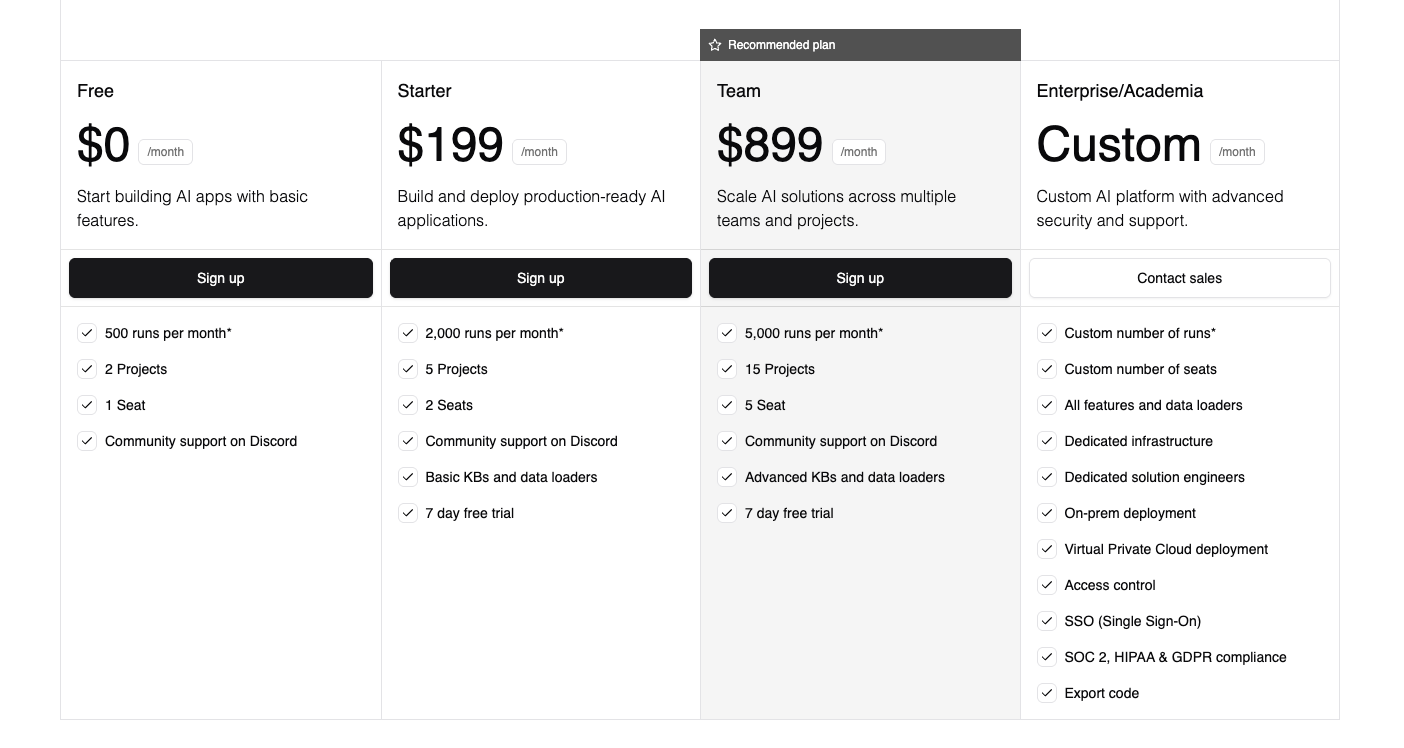
Pricing
Stack AI offers a free tier to get started and a custom enterprise plan for businesses that require advanced security, dedicated infrastructure, and premium support.
Free: $0/month for 500 runs per month, 2 projects, 1 seat, and community support
Enterprise: Custom pricing for custom runs, unlimited projects, dedicated infrastructure, on-prem deployment, and advanced compliance
8.
ActivePieces
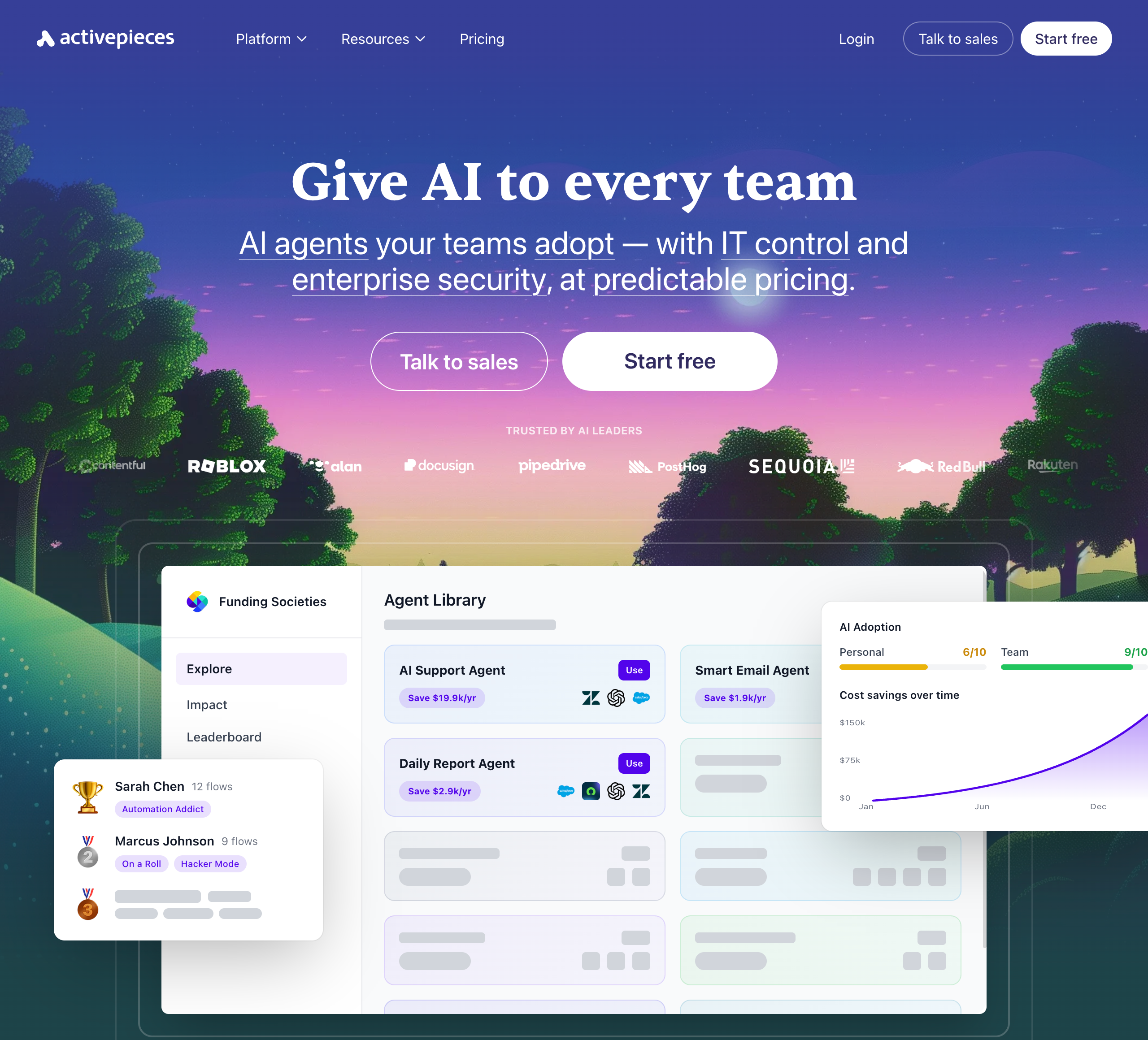
Activepieces is an open-source, AI-first automation platform that lets teams build AI agents and workflows without code. It offers hundreds of integrations, an AI agent builder with human approval steps, and an AI Adoption Stack designed to drive organization-wide AI usage. The platform emphasizes enterprise control, and its open-source core appeals to technical teams who want full control over their automation infrastructure. Its self-hostable focus and advanced governance features make it a strong choice for technical enterprise teams.
Product details
Open-source and self-hostable: Features an MIT-licensed core with Docker and Helm support, giving technical teams full control over their data and infrastructure.
Extensive integrations: Offers a broad connector library covering over 700 major applications like Gmail, Slack, HubSpot, Salesforce, and OpenAI.
AI Adoption Stack: Includes analytics, gamification, leaderboards, and a pre-built agent library to drive organization-wide AI usage.
AI agent builder: Allows users to build intelligent agents with custom logic, enterprise integrations, and human approval steps.
Enterprise governance: Provides SSO, SCIM, custom RBAC, audit logs, and SOC 2 Type II compliance for IT-controlled deployments.
Deployment flexibility: Available as a fully managed cloud service or as a self-hosted solution for strict compliance requirements.
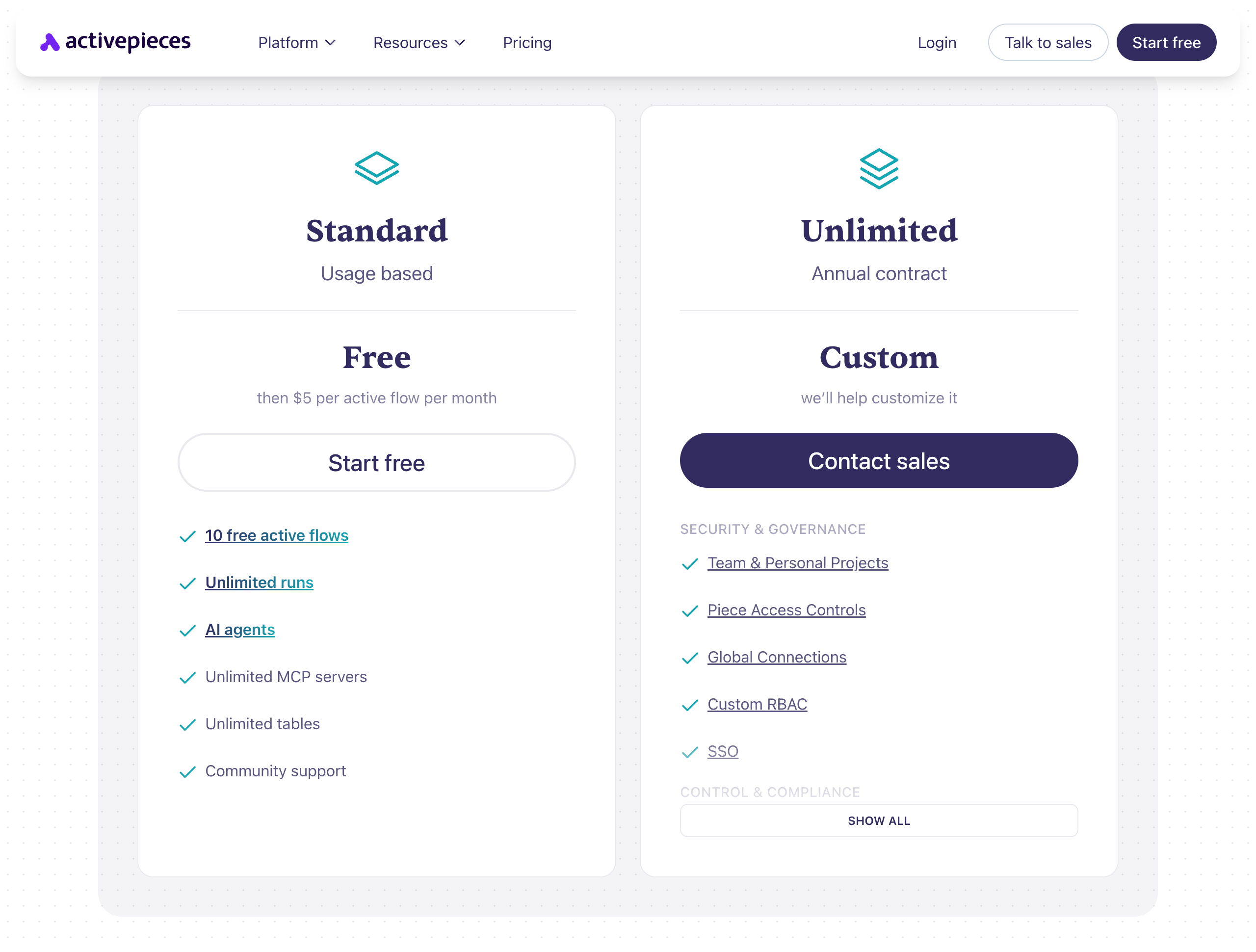
Pricing
Standard: $0/month for 10 active flows and unlimited runs, then $5/month per additional active flow
Unlimited: Custom pricing (billed annually) for advanced security, custom RBAC, SSO, and audit logs
Community Edition: $0/month for a free, MIT-licensed, self-hosted version that includes core features only
9.
Lindy
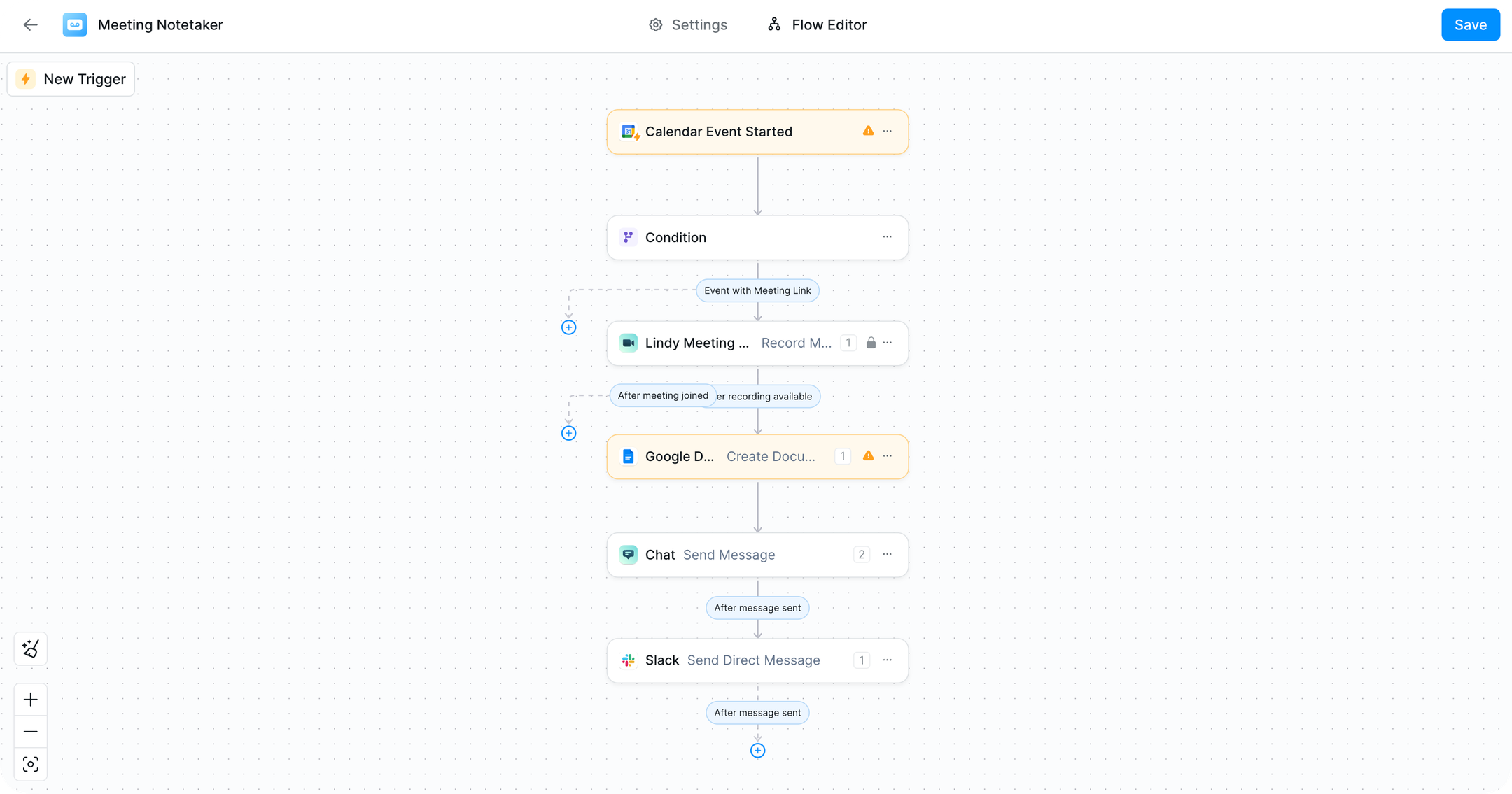
Lindy is an AI personal assistant designed to proactively manage your inbox, meetings, and calendar. Lindy operates as an always-on executive assistant you interact with primarily via iMessage or SMS: You text it requests, and it handles tasks like drafting emails, scheduling meetings, prepping you before calls, and triaging your inbox. It connects with hundreds of integrations (Gmail, Outlook, Google Calendar, Slack, Notion, and more) and learns your communication style and preferences over time. It's positioned as a replacement for a human executive assistant at a fraction of the cost.
Product details
Proactive assistant: Lindy can surface important context, share meeting prep, and flags items before you ask it.
iMessage/SMS interface: Works anywhere you can text, 24/7, no need to open a separate app or dashboard.
Learns your style over time: Adapts to your writing voice, priorities, and preferences through ongoing feedback and usage.
Enterprise-grade security: GDPR, SOC 2, HIPAA, and PIPEDA compliant with encryption and no data used for model training.
No longer a workflow automation builder: While Lindy's interface offered a visual workflow building experience in the past, the company has since pivoted to become a virtual agentic personal assistant.
Requires customization to work the way you want it to: In our team's testing, not all of the assistant's default proactive behavior was desired. You'll need to spend a bit of time talking with Lindy to understand exactly what it does for you and how to customize it.
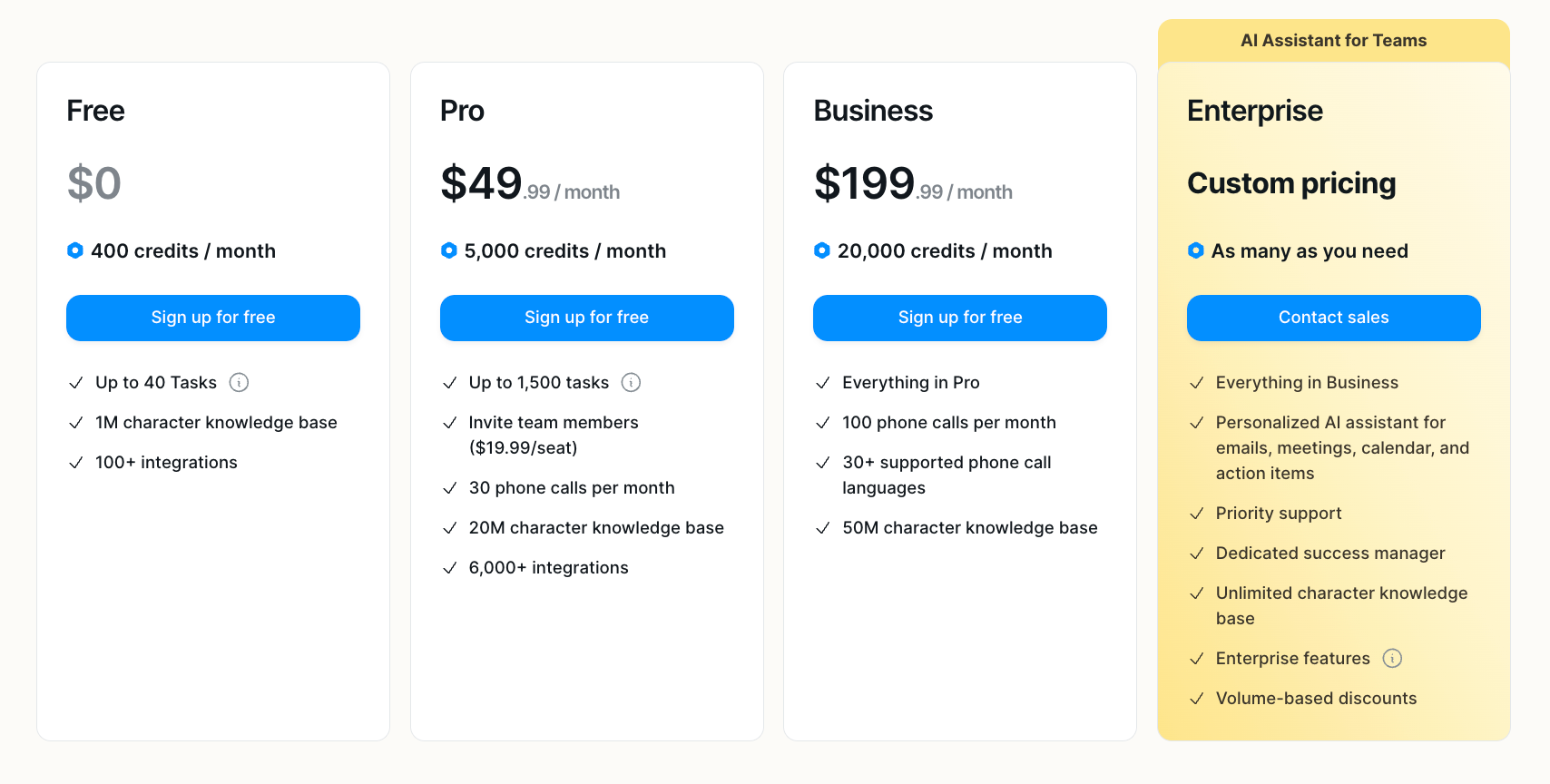
Pricing
Lindy has no free plan, but you can try it for a 7-day trial.
Plus: $49.99/month for standard usage, up to 2 inboxes, iMessage/SMS access 24/7, email drafting, meeting scheduling, meeting prep, and hundreds of integrations
Pro: $99.99/month for 3x the usage of Plus, up to 3 inboxes, and computer use
Max: $199.99/month for 7x the usage of Plus and up to 5 inboxes
Enterprise: Custom pricing for everything in Max, audit logs, SSO, SCIM, dedicated support, onboarding and enablement, and HIPAA compliance
10.
Claude Cowork
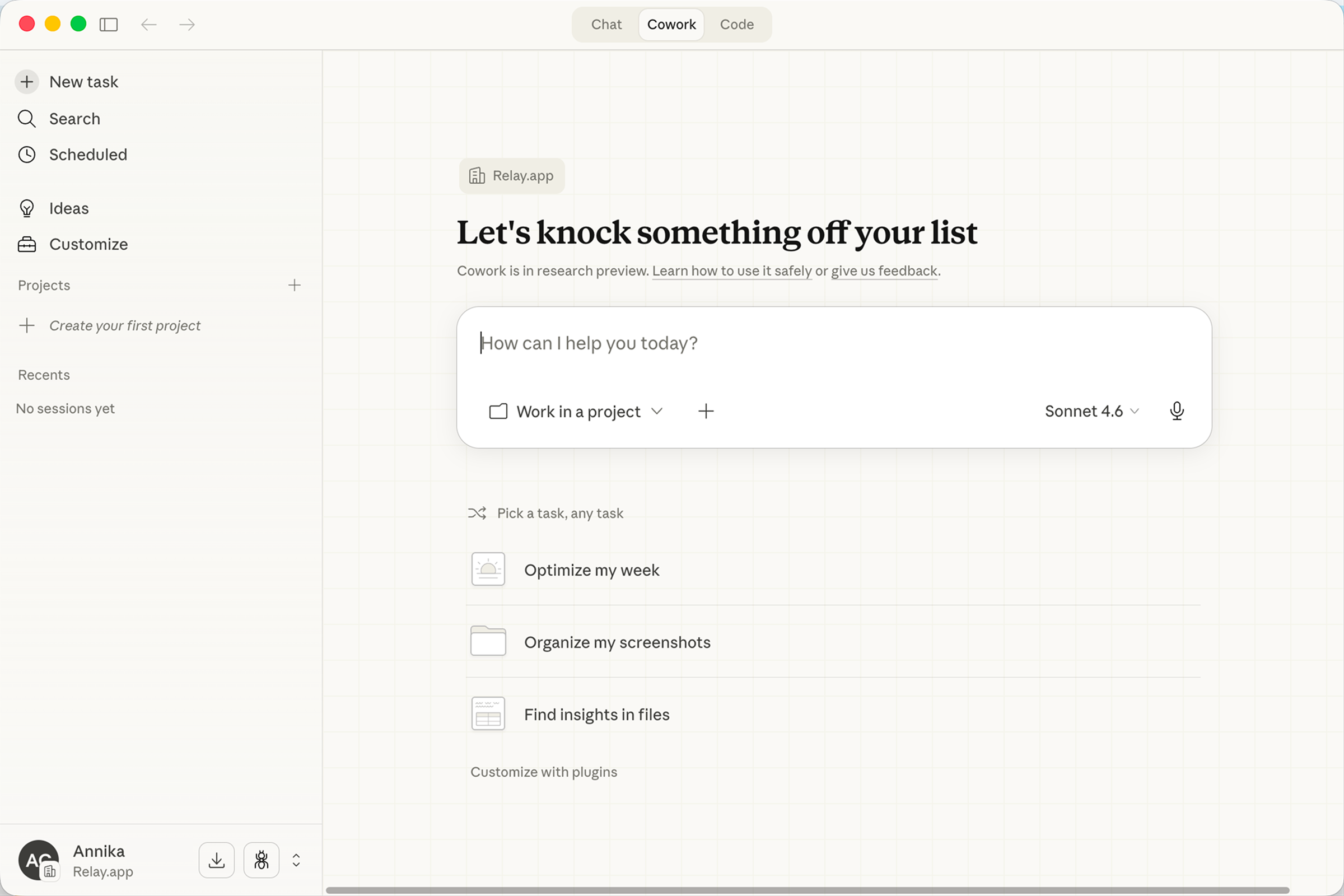
Claude Cowork is an agentic AI assistant built into Anthropic's Claude AI that allows users to delegate complex, multi-step tasks for autonomous execution. Cowork can read documents, extract key points, check calendars, build slide decks, and write summaries from a single prompt. It integrates seamlessly with popular tools like Google Workspace, Slack, Notion, Linear, and Microsoft 365 through robust connectors and remote MCP, while supporting custom Skills to create repeatable workflows.
Product details
Autonomous task execution: Delegate complex tasks like summarizing meetings, building decks, and writing reports.
Growing integration ecosystem: Connects to Google Workspace, Slack, Notion, Linear, Microsoft 365, and more through connectors and remote MCP.
Custom Skills: Create reusable instructions so Claude can repeat tasks consistently without re-prompting.
Cross-platform access: Available on web, desktop, iOS, and Android as part of the Claude experience.
Exclusive to Claude AI: Built into the Anthropic ecosystem as a fully integrated tool relying on its own models.
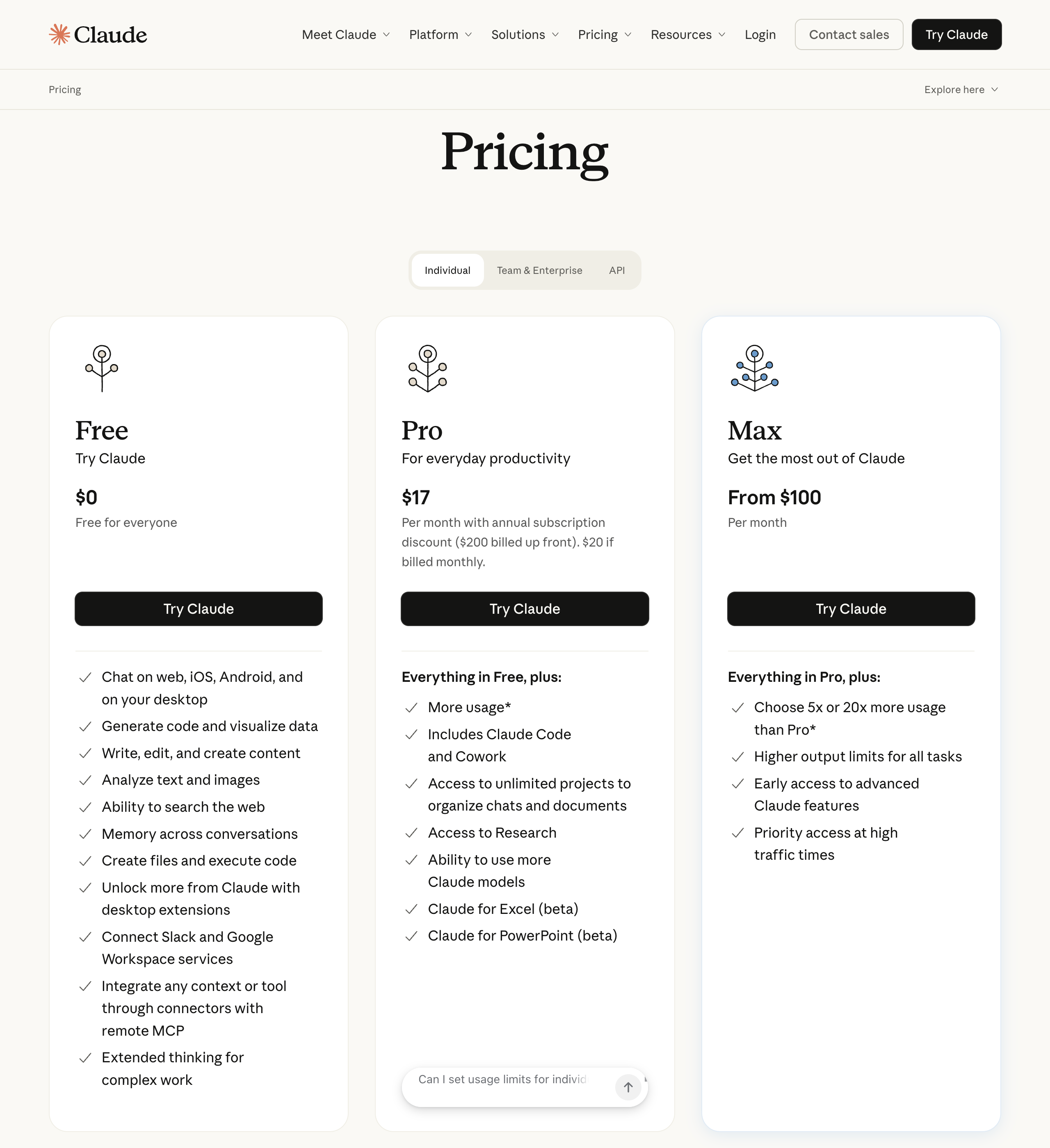
Pricing
Free: $0/month for chat, web search, code execution, desktop extensions, and connectors (does not include Cowork access)
Pro: $20/month ($17/month billed annually) for Cowork, Claude Code, unlimited projects, Research, and Microsoft 365 integrations
Max: Starting at $100/month for everything in Pro, plus 5x to 20x more usage, higher output limits, and priority access
Team: $25/seat/month ($20/seat billed annually) for standard seats with Cowork, SSO, enterprise search, and admin controls
Enterprise: $20/seat/month plus usage at API rates for Team features, SCIM, audit logs, custom data retention, and a HIPAA-ready offering
How to make your choice
Still not sure which platform to pick? Here are some questions to help you decide:
Question 1: What's your technical comfort level?
"I'm not technical" → Start with Relay.app. Build agents using natural language without touching any technical configuration.
"I can follow tutorials" → Consider Gumloop, Zapier, or Make. Visual builders that take some learning but don't require coding.
"I'm comfortable with code" → n8n or ActivePieces give you custom code alongside a visual builder, and you can self-host for free.
Question 2: How important is human oversight?
"Critical. AI can't act without my approval" → Relay.app has the best human-in-the-loop features. Require approval before any action executes.
"I want visibility but don't need to approve everything" → Most platforms work here. Prioritize based on other factors.
Question 3: What tools do you need to connect?
"Mostly common tools (Google Workspace, Slack, CRMs)" → Any platform on this list works. Choose based on ease of use and price.
"I need connections to obscure or legacy tools" → Zapier (8,000+ integrations) is your best bet. Make (3,000+) and n8n (500+ plus custom HTTP requests) are strong alternatives.
"I primarily need AI capabilities, integrations are secondary" → Gumloop or Claude Cowork focus more on AI power than integration breadth.
Question 4: Anything else you're optimizing for?
"Enterprise knowledge base with compliance" → Cassidy or Stack AI, with SOC 2, HIPAA, and GDPR baked in.
"Maximum cost control and data ownership" → n8n or ActivePieces can be self-hosted for free with unlimited tasks.
"An AI assistant for personal productivity" → Lindy manages your inbox and calendar via text. Claude Cowork handles desktop tasks directly on your local files, and now supports computer use, plugins, and scheduled recurring tasks.
"MCP connectivity is a priority" → n8n, ActivePieces, Make, Zapier, and Gumloop all support MCP. ActivePieces has the largest open-source MCP toolkit with ~400 servers.
The bottom line
When picking an AI automation tool, focus on your unique needs, workflow complexity, and the AI features that matter most. Dive into free tiers, explore, and don't hesitate to test tools across categories. The right tool won't just save time. It'll supercharge your business and give you a real edge in 2026's agentic AI landscape.
If you want to get started with AI-powered cross-app integrations, like automatically parsing emails and adding them to a Google Sheet, a tool like Relay.app stands out for its ease of use, flexibility, and power. With Relay.app's built-in AI actions and human-in-the-loop capabilities, you can automate everything from simple tasks to complex agentic workflows without extensive setup.
Ready to start scaling your business with Relay.app? Sign up for free today.
Jacob Bank
Founder/CEO at Relay.app

Jacob is the Founder and CEO of Relay.app. Prior to founding Relay.app, Jacob was a Director of Product Management at Google, where he led the product teams for Gmail, Google Calendar, and several other Google Workspace products. Before that, Jacob was the Co-founder and CEO of Timeful (acquired by Google in 2015), a smart calendar that leveraged insights from behavioral psychology and AI to help people spend time on their most important priorities. He has a BA in Computer Science from Cornell University and was pursuing a PhD in the AI Lab at Stanford before dropping out to found Timeful.
FAQs
What does human-in-the-loop mean?
Human-in-the-loop means adding checkpoints in your workflows where a person can review, approve, or provide input before the automation continues. This is particularly useful for AI-powered workflows, where an AI output needs human judgment for high-stakes decisions. Relay.app lets you add approval steps, data input forms, and AI output reviews anywhere in a workflow, all manageable from Slack or email.
Are AI automation tools expensive to run because of token costs?
They can be, but it depends on the platform's architecture. Agent-based tools that use AI to reason through every step tend to consume a lot of tokens, driving up costs quickly. Relay.app takes a more efficient approach: AI is used only in specific workflow steps where it adds value, while deterministic logic handles the rest (triggers, branching, app actions). This keeps token usage more predictable. Relay.app includes built-in AI credits on every plan (including the free tier), and also lets you bring your own API keys and choose between models like GPT, Claude, or Gemini, so you can optimize for cost or capability per step.
Which workflow automation tool has the best AI assistant for building and managing workflows?
Relay.app stands out with the most advanced chat-based AI assistant in the workflow automation space. Unlike other tools where AI is limited to a basic chatbot or building simple workflows, Relay.app's AI assistant can build workflows, edit them, proactively detect and fix issues, and answer questions about your past runs. It acts as a true copilot for your entire automation lifecycle, not just an initial "one shot prompt" setup.
How do OpenAI's workspace agents compare to workflow automation tools like Relay.app?
OpenAI's workspace agents are Codex-powered agents inside ChatGPT that can handle tasks like preparing reports, writing code, and responding to messages for teams. They run in the cloud and are designed to be shared within an organization. However, they operate primarily within the ChatGPT ecosystem and require a ChatGPT Business, Enterprise, or Edu plan. Relay.app is a dedicated workflow automation platform that connects to 200+ external apps, triggers automatically based on real-world events, and includes built-in human-in-the-loop approvals. If you need deep cross-app automation with structured approval workflows, Relay.app is purpose-built for that. Workspace agents are better suited for ad-hoc knowledge tasks within ChatGPT.
How does using smaller AI models for simple tasks in a workflow help reduce token costs?
Not every step in a workflow needs a frontier AI model. Simple tasks like classifying a support ticket, extracting a name from an email, or generating a short summary can be handled by smaller, cheaper models while reserving powerful models for complex reasoning. Relay.app lets you mix and match AI models like GPT, Claude, and Gemini within a single workflow, so you can assign the right model to each step based on complexity (and if you don't know models, the AI assistant will just pick the best one for you). This targeted approach can significantly lower your total token costs compared to AI agent builders that route everything through a single large model.