Ready to build a reliable automated customer support process? Here's how to automate ticket triage, replies, and escalations with AI and human-in-the-loop approvals.

Customer support processes are perfect for AI automation. Tickets follow common patterns, responses often repeat, and most delays come from triage and handoffs rather than producing an answer. With the right workflow, you can classify every incoming ticket, draft a reply, route urgent issues to the right person, and keep your CRM updated without anyone doing manual work.
The trick is doing it without losing the human touch. You want AI to handle the busywork (categorizing, summarizing, drafting) while your team stays in control of anything that goes out to a customer.
Here's how you can automate your processes without losing the human touch in Relay.app.
Building a customer support automation in Relay.app
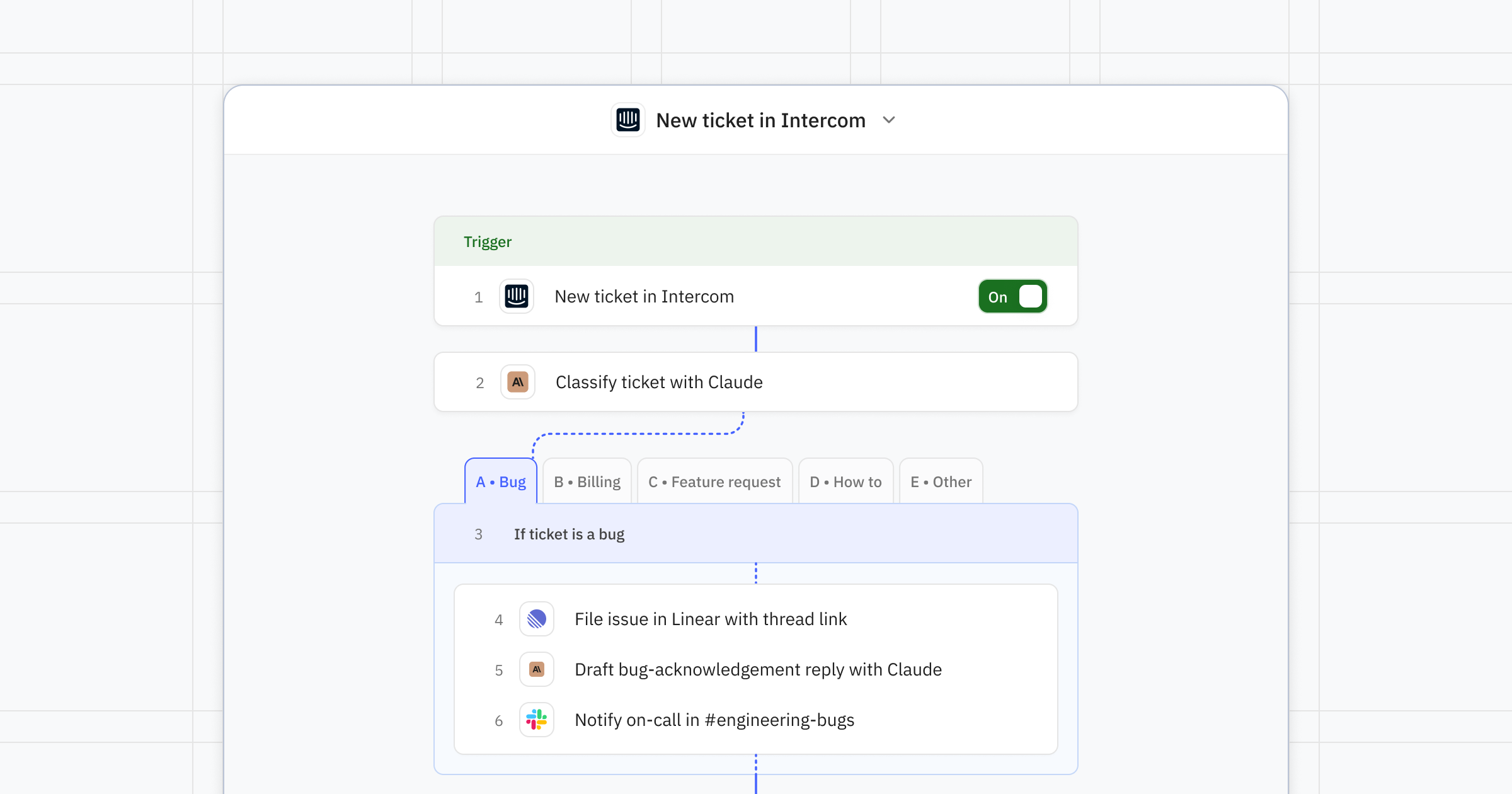
A solid support automation usually follows this pattern. You can get this set up in minutes with the starter prompt template here.
1. Trigger on a new ticket or email
Start the workflow when an email hits your support inbox, a ticket is created in Zendesk or Intercom, or a customer submits a form. However you typically get reports from customers.
2. Classify and summarize with AI
Use an AI step to detect intent (bug, refund, billing, feature request), sentiment, and urgency. Pull out the customer's name, account, and a one-line summary.
3. Look up context about the customer
Query your CRM (HubSpot, Salesforce), billing tool (Stripe), or internal database to enrich the ticket with the customer's plan, lifetime value, and recent activity.
4. Route the ticket based on rules
Here's where your workflow branches: Bug reports get logged in Linear or Jira, simple FAQs get auto-drafted replies, and VIP customers go straight to a senior rep in Slack.
5. Draft a reply with AI
Use an AI step to generate a personalized response. You can reference your help center documentation, past tickets, and optionally the customer's account information for context to write a better email.
6. Get human-in-the-loop approval from a teammate before the response goes out
Send the text of the draft to an agent in Slack or email. They can approve, edit, or reject before anything reaches the customer.
7. Send the response and log the communication
Once approved, send the reply through your help desk and update the ticket status, tags, and CRM record.
Scenarios where this pays off
Answering common questions. Auto-answer common questions like password resets, billing dates, or shipping status using your knowledge base, with a human review step for new question types.
Urgent escalations for VIP customers. Detect angry or churn-risk language with AI sentiment analysis and ping a manager in Slack within seconds.
Frontline bug triage. Extract reproduction steps from a ticket, create a Linear issue, and reply to the customer with a tracking link automatically.
Speed up refund requests. Pull the customer's order from Stripe, check eligibility against your policy, and route to finance for one-click approval.
Build on the basics
Once you've got your basic customer success process set up, there is so much you can do to build on it! And you don't have to work too hard to add onto your workflow; just describe your idea to the Relay.app AI agent, and it will work with you to make it happen.
Add knowledge and context lookups relevant to each ticket category. Since your workflow branches in a few paths, you can optimize each path for the specific query. You might find it useful to look up relevant documentation for "how do I…" questions, or search for related bugs to tag for new bug reports.
Learn where a human-in-the-loop isn't needed. As your process matures and you optimize your prompts, you may find that select AI-generated communications can be sent automatically, without a person always checking the response. You can send a pre-formatted response when AI can confidently choose the right template, or go all in and allow AI to reply when it's highly confident in its response. (Tip: Be transparent and tell the customer the response is AI generated and to reply if it made a mistake!) Have a team member periodically review the responses in bulk (with AI to help) for a quality check.
Use AI to decode feedback patterns. Your customer support tickets contain a real wealth of knowledge. Summarize themes across last week's tickets and post a digest to your product team in Notion or Slack every Monday.
Rate your AI's responses to improve them over time. There are several ways you can approach this, such as: 1) maintaining a record of good responses the AI can reference, 2) asking teammates to submit feedback on the AI answer during the approval step and logging the feedback to give to the Relay.app AI agent, or 3) giving the Relay.app AI agent feedback directly when a response isn't quite right.
About
Relay.app
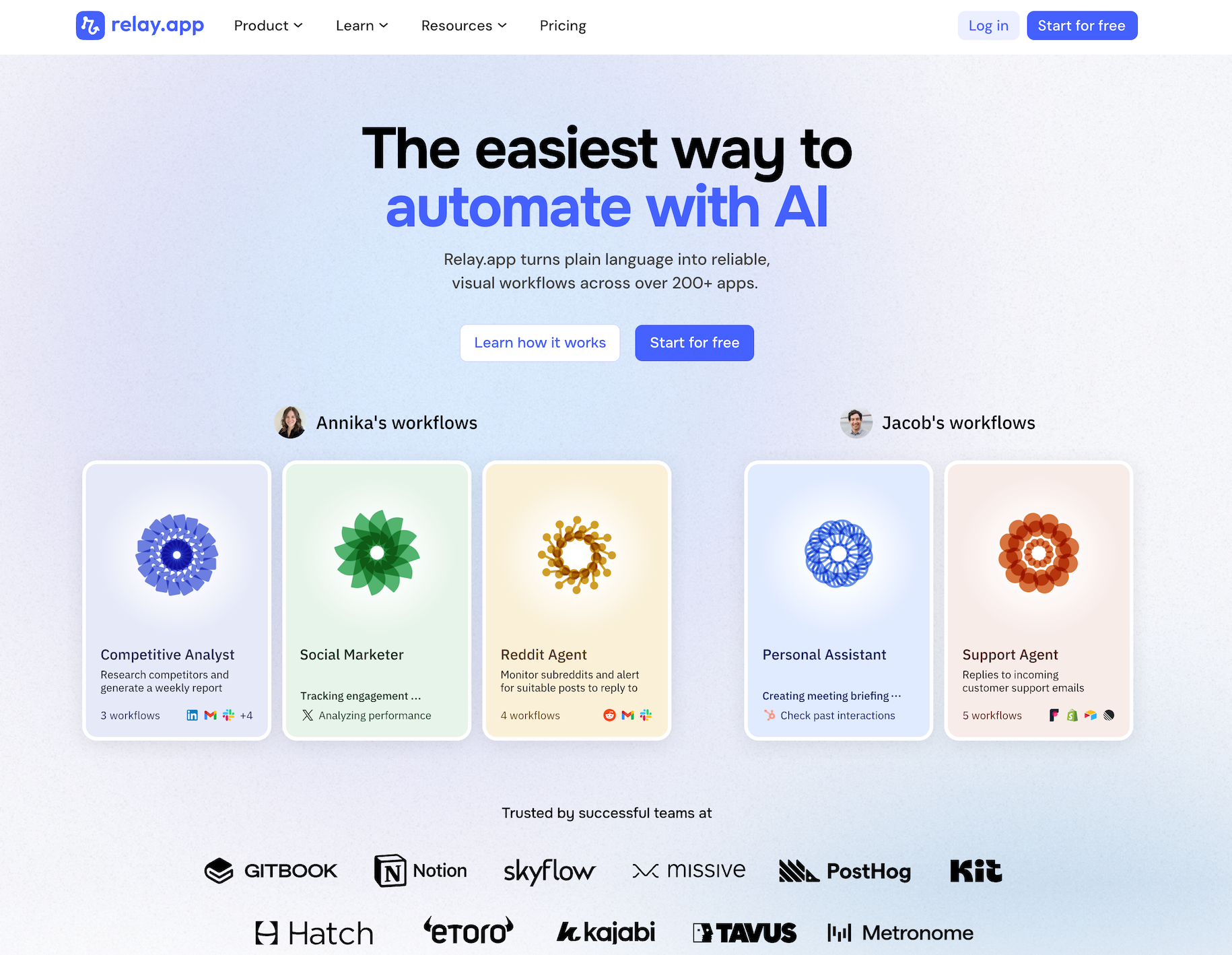
Relay.app is the easiest way to automate with AI. It turns plain language into reliable, visual workflows — with 200+ deeply built native integrations, plus an AI assistant that can write a connection to virtually any app with an API on the fly. Non-technical users who have struggled with complex tools like Zapier or Make can create reliable AI workflows in minutes just by using plain language. Relay.app handles everything from creation to analysis, while built-in human-in-the-loop features ensure that you stay in control when the stakes are high.
Product details
Ease of use: Relay.app is designed for teams of all technical abilities to automate in minutes.
AI Agent creation: Use natural language to build and improve complex AI workflows effortlessly.
200+ native integrations: Deeply built, first-class with popular tools like Notion, Gmail, and HubSpot.
Connect to anything else: Don't see your app on the list? Just describe what you need and Relay.app's AI assistant writes the API call for you — no docs-diving or code required. If it has an API, Relay.app can talk to it.
Human-in-the-loop: Add checkpoints to pause workflows for human approval or data entry when needed.
Collaborative features: Share workflows and app connections across your team for seamless multiplayer automation.
Built-in AI models: Access the best models from OpenAI, Anthropic, and more using included AI credits.
Stateful data with Tables: Store and update structured data directly within Relay.app to use across flows.
Technical power: Advanced users can go further with custom JavaScript, MCP servers, and custom HTTP requests.
Pricing
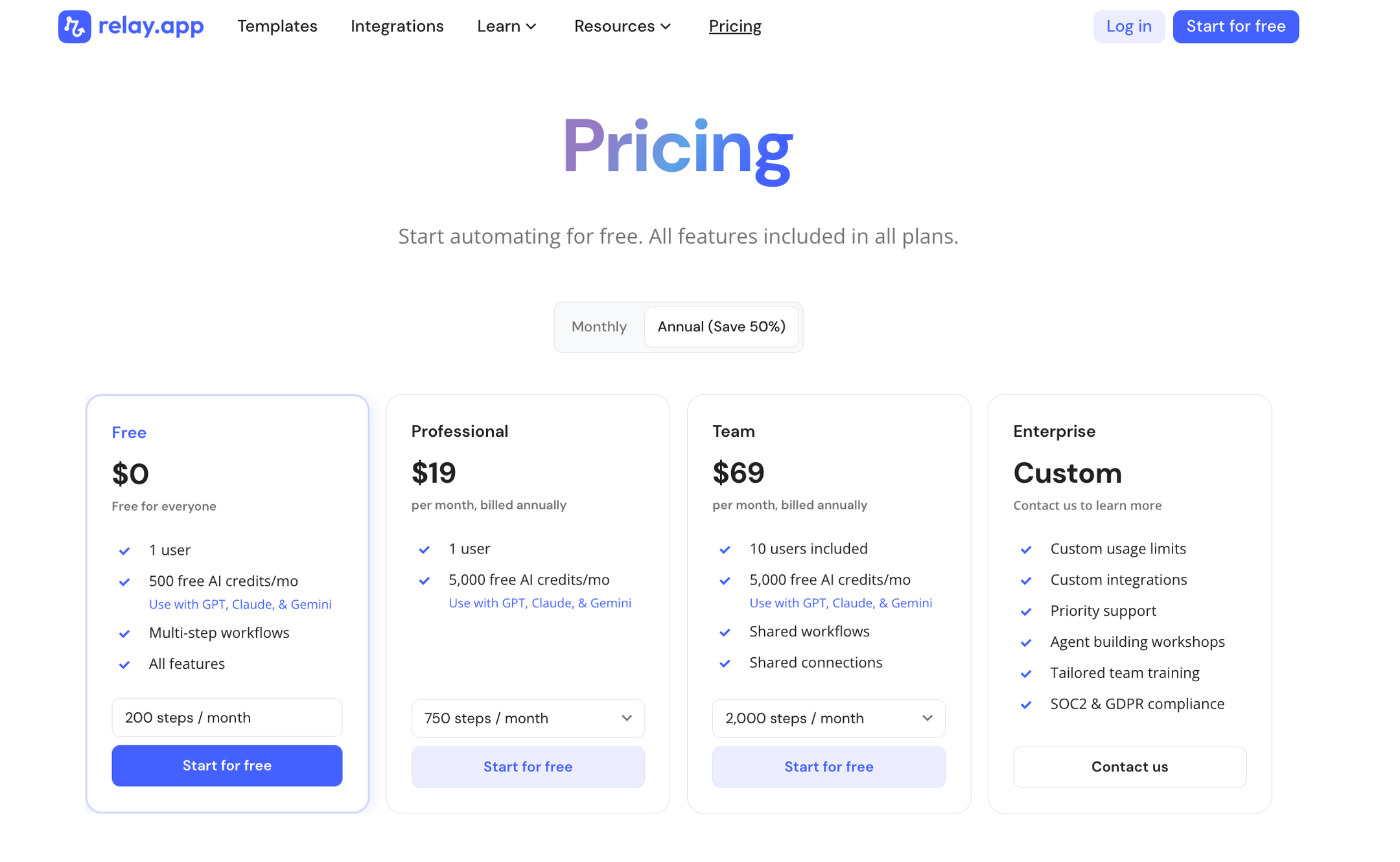
Relay.app offers a range of plans including a generous free tier. All plans include free test runs so you can validate your workflows before they go live.
Free: $0/month for 1 user, 200 steps, and 500 AI credits
Professional: $19/month (billed annually) for 1 user, 750 steps, and 2,000 AI credits
Team: $59/month (billed annually) for up to 10 users, 1,500 steps, and 2,000 AI credits
Enterprise: Custom pricing for organizations with advanced usage or security requirements
Build it in Relay.app
Customer support automation works best when AI handles the mechanics and humans handle judgment. Relay.app gives you both in one workflow, plus the integrations to plug it into your existing help desk, CRM, and team chat.
With the Relay.app AI agent, getting started building this workflow isn't hard. Just start with a prompt, test out various scenarios, and build from there. Try Relay.app for free and start automating your customer support today.






Annika Crowley
Founding Designer

Annika is the Founding Designer at Relay.app. Prior to Relay.app, Annika led design for Gmail & Google Chat, where she designed AI tools like Smart Compose. Before Google, Annika worked at startups including an AI calendar company called Timeful.
FAQs
Which Relay.app plan should I start with?
What does human-in-the-loop mean?
Can Relay.app handle specific use cases better than a general AI agent like ChatGPT or Claude?
Do I need technical skills to debug and maintain automations in Relay.app?
Can Relay.app's AI assistant help me edit and fix my workflows?
