Should you use an AI skill or an AI workflow? This simple guide will help you understand the difference (and choose the right approach for whatever you're automating today).

Skills vs workflows. You've seen these two concepts popping up recently. Both capture the logic of repeated tasks so AI can execute on them consistently across multiple requests.
So what's the difference? Which one should you be experimenting with next for your next AI automation?
The difference is how the AI goes about doing the work each time.
TL;DR
A quick summary if you only have a minute: Skills and workflows both let AI handle repeated tasks, but they work differently and suit different situations.
Skills are open-ended instructions an AI interprets fresh each time. They're flexible and great for infrequent, messy, or unpredictable tasks. If a task is infrequent and benefits from AI improvisation, use a skill.
Workflows are predefined sequences that run the same way every time. They're reliable, fast, and cheaper for high-volume repeated processes. If a task happens frequently and needs to be consistent, use a workflow.
What is an AI skill?
Think of a skill as an open-ended job description. It's a set of written instructions that tell an AI agent how to behave, what persona to adopt, and what general steps to follow.
The catch is that every single time you use this skill, the underlying language model reads those instructions again from scratch. It reads your prompt, interprets what you want right in that exact moment, and decides how to execute the task. It is a fresh interpretation every time.
What is an AI workflow?
A workflow operates more like an assembly line. It is a predefined flowchart of steps that runs automatically the moment a specific trigger happens.
The system executes step one, then step two, then step three in the exact same order every single time. There can still be AI processing and decision making within these steps, and logic branches within the flow too, but the overall process structure is set.
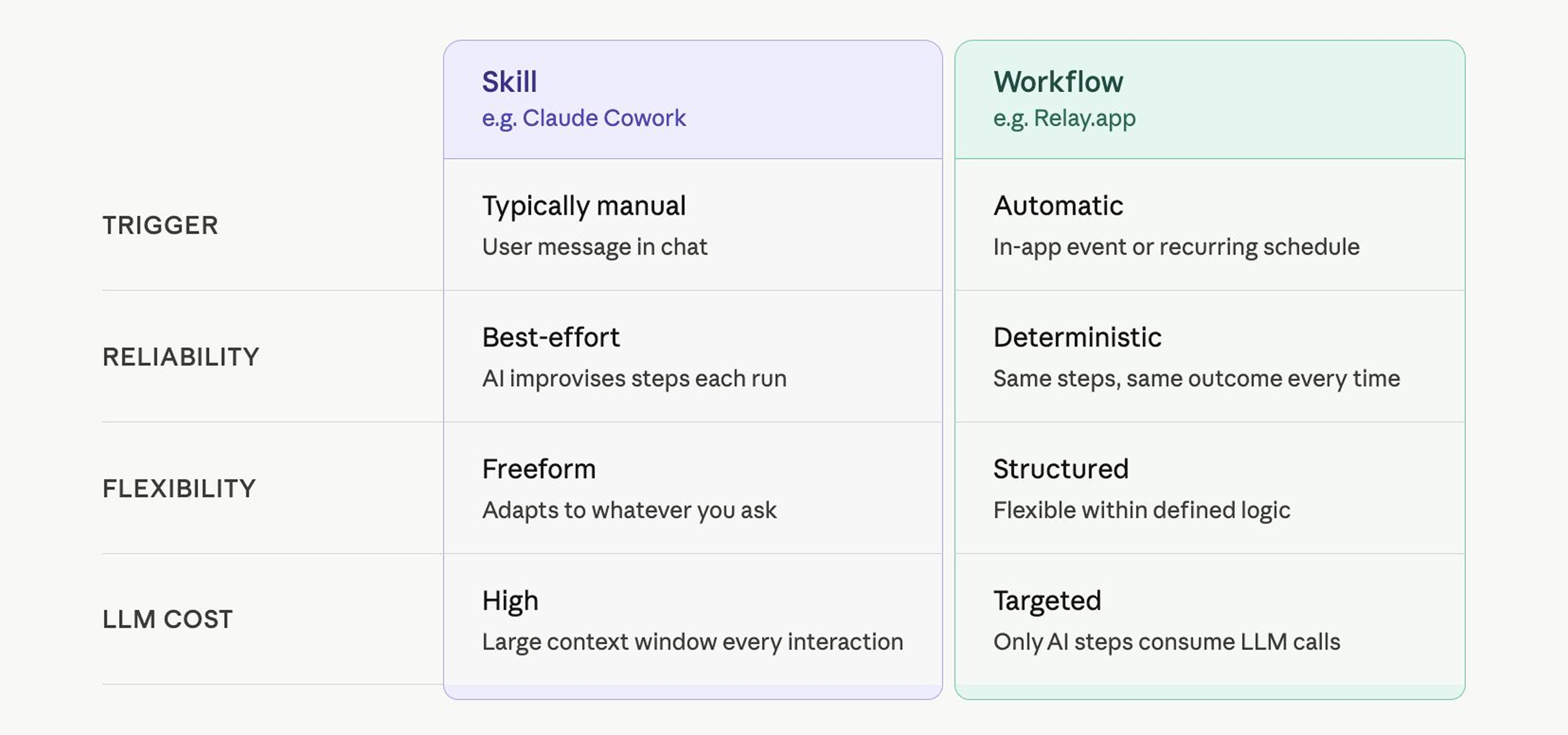
The trade-off: Flexibility vs reliability
Because skills and workflows operate differently behind the scenes, they bring very different strengths to the table!
Skills are incredibly flexible. Because the AI rereads the instructions every time, it can handle a lot of variation. If you throw a totally unexpected file format at it or ask a slightly different question, the AI can usually improvise and figure out what to do. The downside is that a fresh interpretation each time is slower and consumes more computing power. Meaning, it can be more expensive to run repeated work with skills at a high volume.
Workflows are your ticket to reliability. The path is already mapped out. There is no risk of the AI getting distracted or hallucinating a completely new sequence of events. Because you are only paying the AI to perform specific tasks within the process rather than analyzing the entire process from top to bottom, workflows are also significantly cheaper and faster.
Examples
A good use case for an AI workflow
Imagine you manage a customer support inbox: Every time a new ticket arrives, the issue needs to be categorized, prioritized, and assigned. This could happen hundreds of times a day or month. You don't want creativity here! You want strict consistency. An AI workflow is the way to handle this.
A good use case for a skill
Imagine you are holding a quarterly roadmapping session: Let's say that once a quarter, your team holds an all-hands brainstorming session. You want an AI to organize the resulting chaos of whiteboard images and sticky notes into a neat, readable strategy document. This task happens infrequently and the input data is messy and looks completely different every time you do it. You need flexibility to process whatever the output might be this time around. A skill is the perfect fit here!
How do I set these things up?
All of the major LLM providers have or are working on a way to support skills. I'm a fan of Claude in particular. You can create .md files as instructions for Claude to reference whenever you need to do a task again.
For AI workflows, you need a good workflow builder.
About
Relay.app
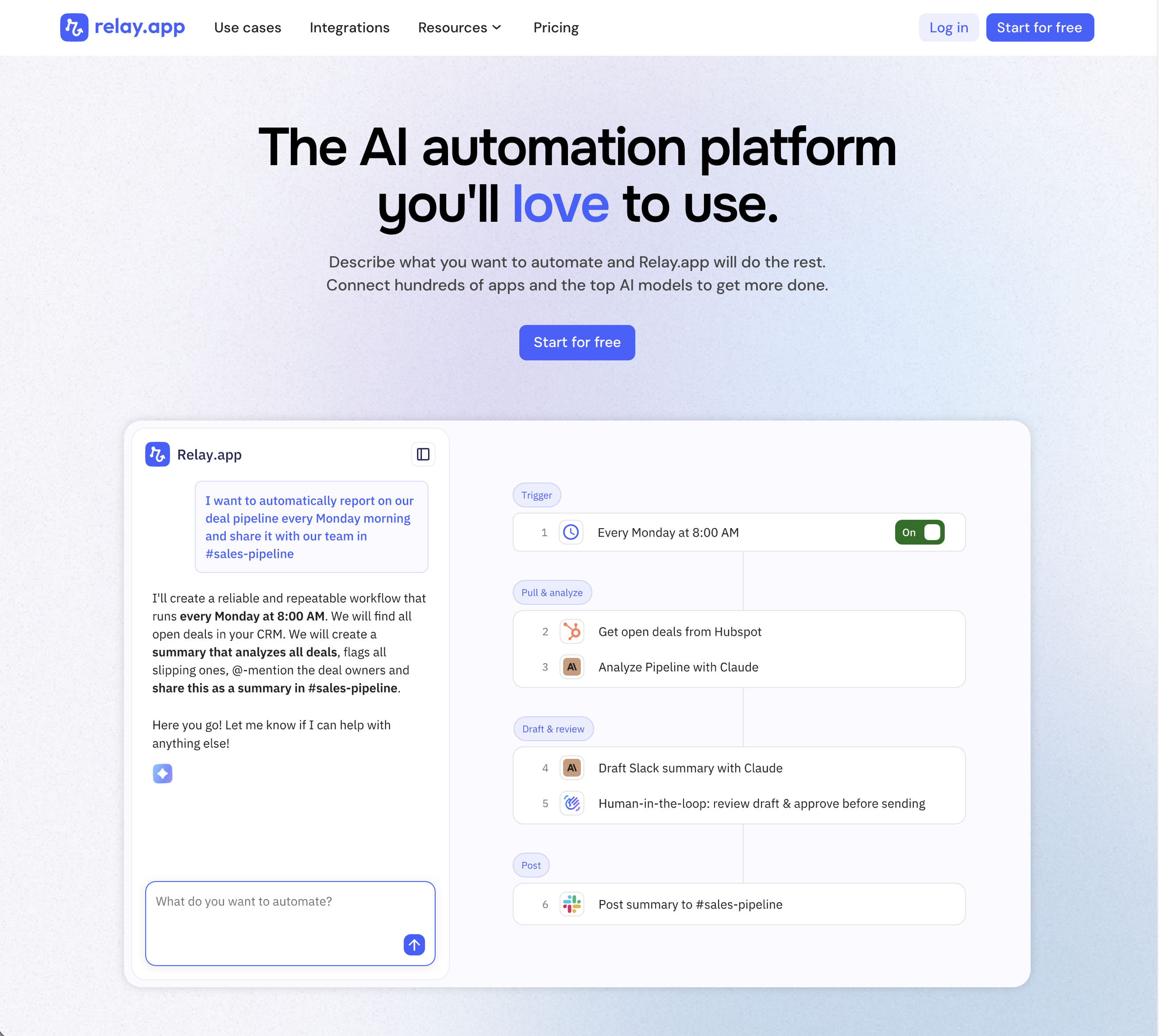
Relay.app is the most intuitive way to automate with AI. Just describe what you want to automate, and Relay.app will build a reliable, visual workflow for you. Relay.app connects with 200+ apps and all the top AI models. Non-technical users who have struggled with less user-friendly tools like Zapier or Make can easily create AI workflows in minutes, while longtime automation experts have all the advanced tools they need to build complex flows.
Product details
Designed to be intuitive to use: Relay.app is thoughtfully designed for individuals and teams of all technical abilities, from novice to expert.
An AI assistant optimized to build workflows for you: Chat with the AI assistant to build, test, and optimize workflows. It will proactively spot issues and make suggestions for you.
Hundreds of native integrations, plus custom API calls: 200+ deeply built, first-class native integrations. Don't see your app on the list? Just describe what you need and Relay.app's AI assistant will write a custom API call for you.
Collaborative building: Share workflows and app connections across your team for seamless multiplayer automation.
Human-in-the-loop oversight: Bring a teammate in when you need real life approvals, data entry, or manual review.
Universal AI credits for any AI model: Access the best models from OpenAI, Anthropic, and more using included AI credits.
Predefined processes for token efficiency: Set up a token-free structure for repeated work and limit AI tool calls to just the places you need them.
Technical power: Advanced users can go further with rich native tables, custom JavaScript steps, MCP servers, and custom HTTP requests.
Pricing
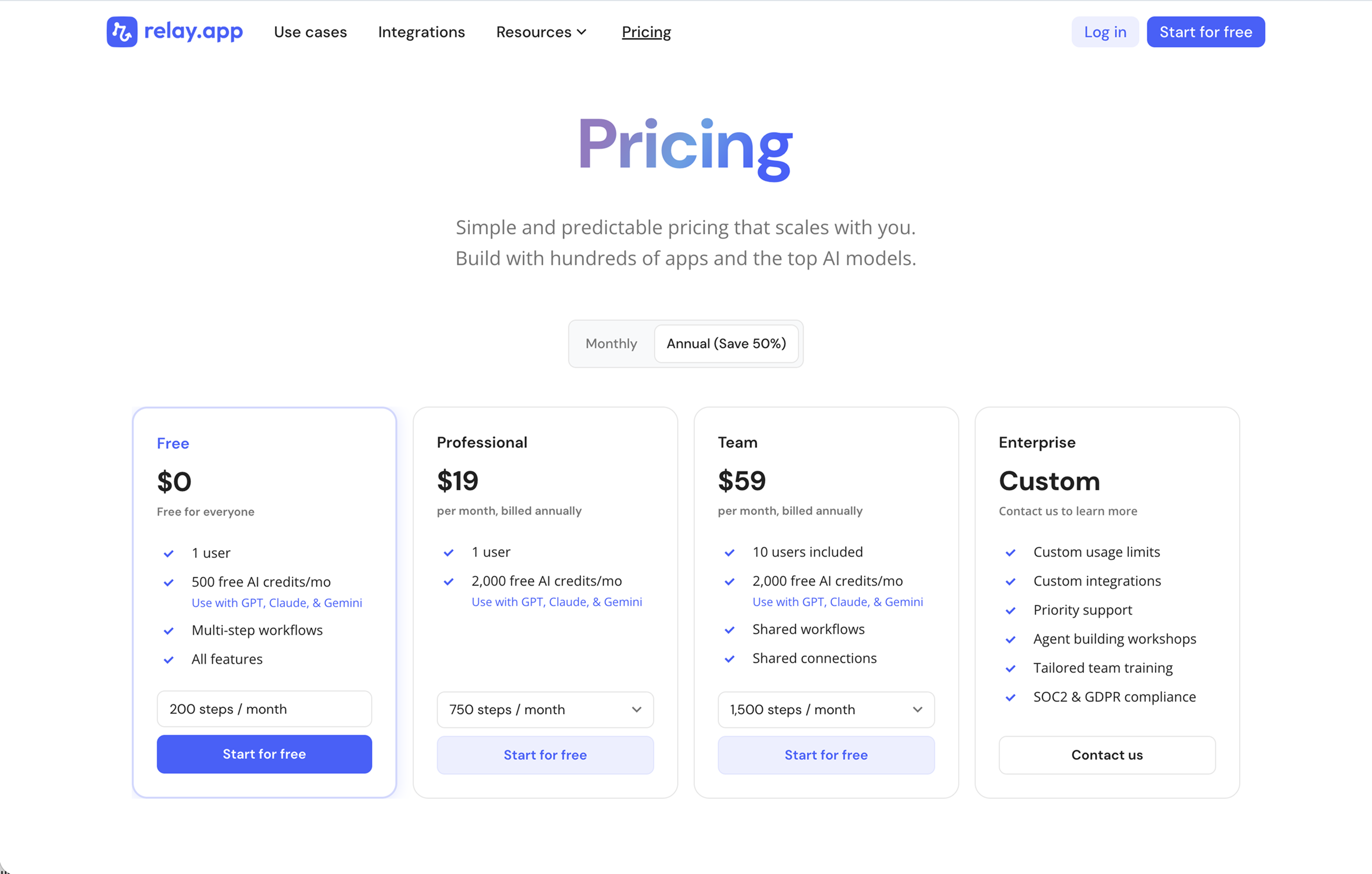
Relay.app's plans scale with your usage and team, starting with a generous free tier. All plans include free test runs that refresh every week so you can make sure everything works perfectly before you start paying.
Free: $0/month for 1 user, 200 steps, and 500 AI credits
Professional: $19/month (billed annually) for 1 user, 750 steps, and 2,000 AI credits
Team: $59/month (billed annually) for up to 10 users, 1,500 steps, and 2,000 AI credits
Enterprise: Custom pricing for organizations with advanced usage or security requirements
One quick rule
To summarize, here's a helpful rule for when to use skills versus a workflow:
If a task happens frequently and demands consistency, rely on a workflow.
If a task is infrequent and benefits from on-the-fly improvisation, build an AI skill.
By matching the right tool to the task, you will get the best results every time.
Jacob Bank
Founder/CEO at Relay.app

Jacob is the Founder and CEO of Relay.app. Prior to founding Relay.app, Jacob was a Director of Product Management at Google, where he led the product teams for Gmail, Google Calendar, and several other Google Workspace products. Before that, Jacob was the Co-founder and CEO of Timeful (acquired by Google in 2015), a smart calendar that leveraged insights from behavioral psychology and AI to help people spend time on their most important priorities. He has a BA in Computer Science from Cornell University and was pursuing a PhD in the AI Lab at Stanford before dropping out to found Timeful.
FAQs
Which automation platforms don't require coding to use?
Relay.app is one of the easiest options because you can create workflows by explaining what you need to their AI Agent and it will build it for you. Other no-code options include Zapier (which offers the most integrations) and Lindy (focused on personal productivity and AI assistant use cases).
Why would I use Relay.app instead of Claude Cowork?
Use Relay.app for repeatable cross-app business processes and Claude Cowork for hands-off knowledge work on your desktop. Relay.app and Claude Cowork solve different problems. Claude Cowork is a desktop AI agent that works with your local files and applications to complete knowledge work like research synthesis, file organization, and document creation. While it now supports scheduled and recurring tasks, it runs on your computer and is designed for individual productivity. Relay.app is a cloud-based workflow automation platform that runs whether or not you're at your computer, connects to 200+ apps, and includes built-in human-in-the-loop approvals. Chances are you have use cases for both!
Should I use a general-purpose AI agent or a workflow automation tool for my business?
It depends on the task. General-purpose AI agents are flexible and great for open-ended work like research or drafting, but they can be unpredictable and expensive for repetitive processes. Workflow automation tools are purpose-built for structured, repeatable tasks (think lead routing, customer onboarding, or approval chains) where you need consistency and reliability every time. For most business operations, a platform like Relay.app gives you the best of both worlds: It's an AI agent builder with powerful workflow automation, human-in-the-loop controls, and MCP support, so you get AI intelligence where you need it, with predictable execution.
What's the difference between AI agents and workflows?
AI agents (like Claude Cowork or OpenClaw) handle open-ended, one-off tasks by dynamically deciding what to do next. Automated workflows (like those built in Relay.app) follow structured, repeatable steps that trigger automatically and run the same way every time. For most repeated business processes, like lead routing, onboarding, and reporting, you want the consistency of a workflow. For ad-hoc knowledge work like research or drafting, an AI agent is better. You can use both together!