Relay.app is AI-native and built for non-technical teams with natural language workflow creation and human-in-the-loop controls. n8n is open-source, self-hostable, and designed for developers. Here's how to choose between them in 2026.

These are two of the best workflow automation tools out there. But they're built for very different people.
Relay.app is an AI-native automation platform designed for non-technical users and teams. It's got a clean visual workflow builder, built-in AI models from top model providers like OpenAI and Anthropic (no API keys needed), agentic workflows, human-in-the-loop controls, native database tables, MCP server support, and a brilliant AI agent that sets it all up for you. If you want to build powerful, reliable AI workflows fast without writing code or needing to wire up a bunch of nodes ("whatever those are!"), Relay.app is hard to beat.
n8n is an open-source, developer-first automation platform. It has over 400 integrations, self-hosting via Docker, JavaScript/Python code nodes, and execution-based pricing that keeps costs predictable. With the release of n8n 2.0, it's gotten meaningful upgrades around security, scalability, and governance. If your team thinks in APIs, webhooks, and JSON, n8n will give you incredible power and flexibility.
TL;DR
Here's the quick take: Both Relay.app and n8n are powerful workflow automation tools, but they're built for very different users.
Choose Relay.app if your goal is to create predictable, reliable AI workflows quickly. It's more intuitive to set up with the chat-based AI assistant, has built-in AI models with no API keys required, and offers human-in-the-loop controls. (And despite being easy to use, it also supports advanced use cases like custom code, branching logic, and webhooks for technical users.)
Choose n8n if you're a developer or technical team that wants to self-host, write code inside workflows, and have maximum flexibility and data control. Its open-source Community Edition is also free to run on your own infrastructure.
For most individuals and small-to-medium businesses, Relay.app is the better starting point. If self-hosting, deep code customization, or a very large integration library are non-negotiables for your team, n8n is the right call.
Let's break it down 👇
Relay.app vs. n8n: Which automation tool is right for you in 2026?
What is
Relay.app
?
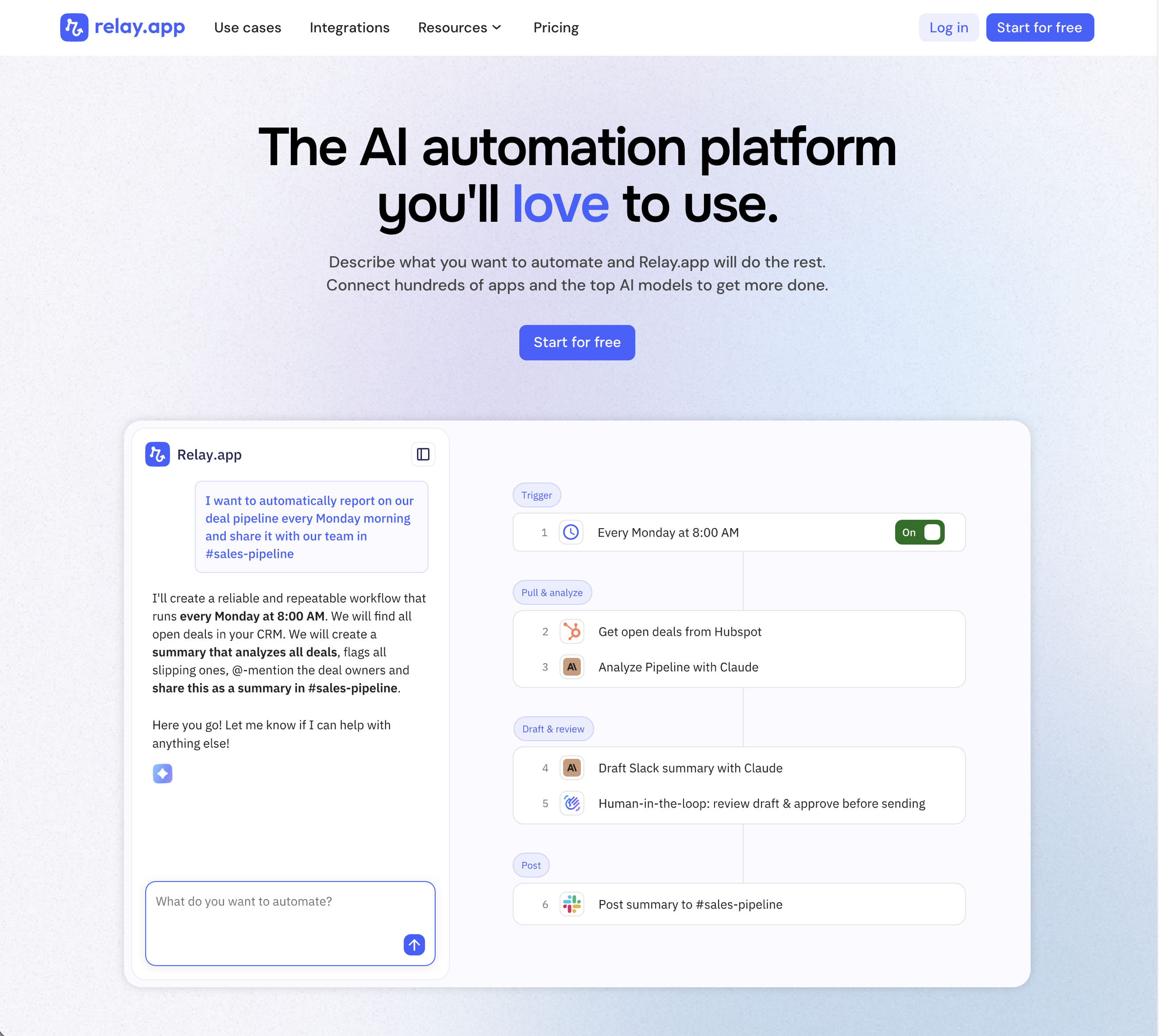
Relay.app is the most intuitive way to automate with AI. Just describe what you want to automate, and Relay.app will build a reliable, visual workflow for you. Relay.app connects with 200+ apps and all the top AI models. Non-technical users who have struggled with less user-friendly tools like Zapier or Make can easily create AI workflows in minutes, while longtime automation experts have all the advanced tools they need to build complex flows.
Product details
Designed to be intuitive to use: Relay.app is thoughtfully designed for individuals and teams of all technical abilities, from novice to expert.
An AI assistant optimized to build workflows for you: Chat with the AI assistant to build, test, and optimize workflows. It will proactively spot issues and make suggestions for you.
Hundreds of native integrations, plus custom API calls: 200+ deeply built, first-class native integrations. Don't see your app on the list? Just describe what you need and Relay.app's AI assistant will write a custom API call for you.
Collaborative building: Share workflows and app connections across your team for seamless multiplayer automation.
Human-in-the-loop oversight: Bring a teammate in when you need real life approvals, data entry, or manual review.
Universal AI credits for any AI model: Access the best models from OpenAI, Anthropic, and more using included AI credits.
Predefined processes for token efficiency: Set up a token-free structure for repeated work and limit AI tool calls to just the places you need them.
Technical power: Advanced users can go further with rich native tables, custom JavaScript steps, MCP servers, and custom HTTP requests.
Pricing
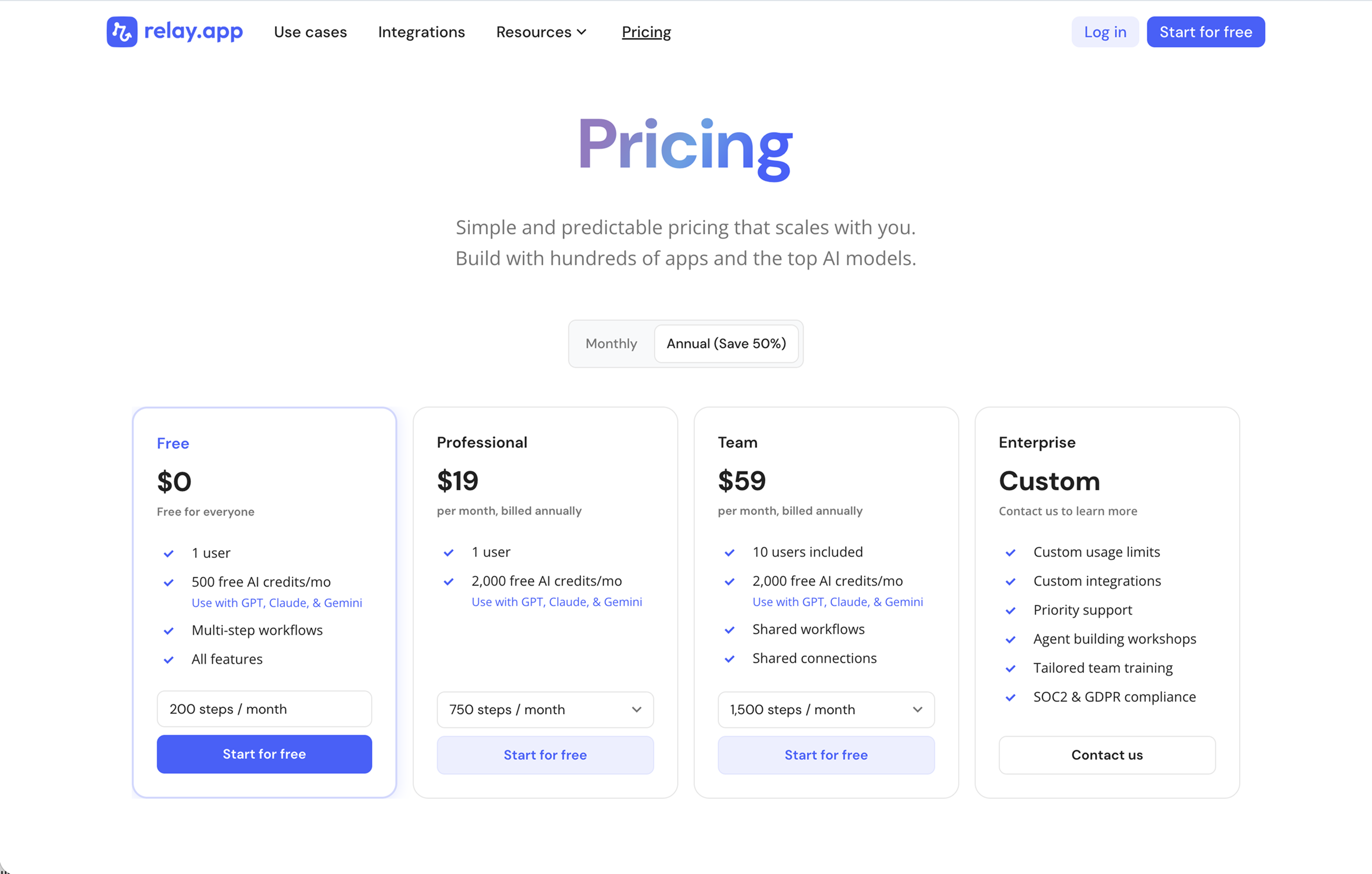
Relay.app's plans scale with your usage and team, starting with a generous free tier. All plans include free test runs that refresh every week so you can make sure everything works perfectly before you start paying.
Free: $0/month for 1 user, 200 steps, and 500 AI credits
Professional: $19/month (billed annually) for 1 user, 750 steps, and 2,000 AI credits
Team: $59/month (billed annually) for up to 10 users, 1,500 steps, and 2,000 AI credits
Enterprise: Custom pricing for organizations with advanced usage or security requirements
What is
n8n
?
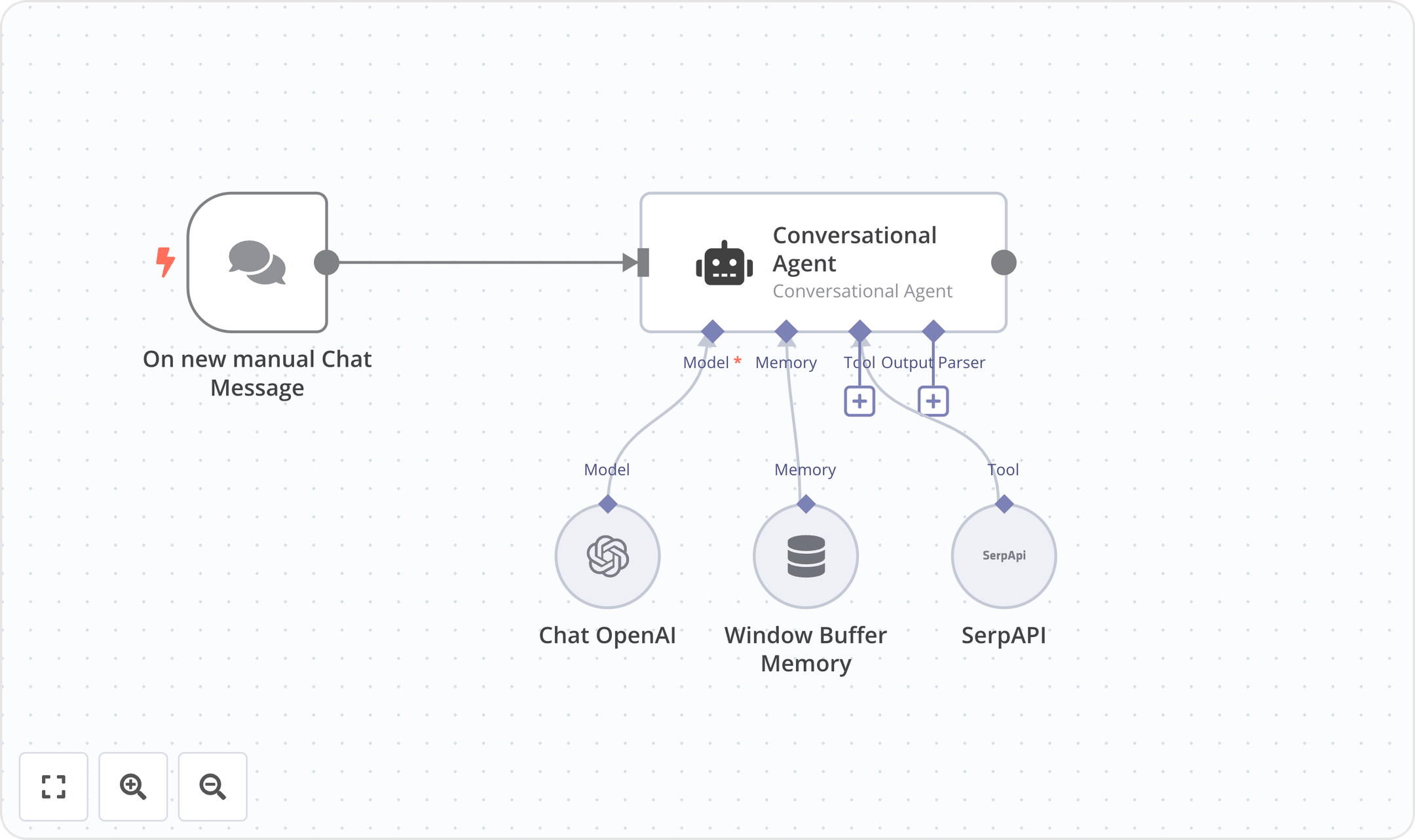
n8n is a source-available workflow automation platform designed specifically for technical teams and developers. It bridges the gap between visual workflow editors and custom code, allowing users to seamlessly blend drag-and-drop nodes with custom JavaScript or Python. By offering robust self-hosting capabilities via Docker alongside cloud-hosted options, n8n provides complete control over data privacy and compliance. Its execution-based pricing and advanced debugging tools make it highly scalable for orchestrating complex API integrations, AI-driven workflows, and mission-critical automated processes.
Product details
Code and no-code blend: Write custom JavaScript or Python directly alongside an intuitive visual workflow editor.
Self-hosting capabilities: Deploy on-premises with Docker and access the full source code on GitHub for complete data sovereignty.
Advanced developer tools: Leverage Git version control, isolated environments, global variables, and detailed execution logs.
AI workflow building: Utilize native AI credits and built-in evaluators to safely test and deploy AI-driven automations.
Predictable execution pricing: Pay per full workflow run rather than per individual step to make scaling costs highly predictable.
Granular debugging: Avoid endless debugging clicks by re-running single steps and viewing detailed execution histories.
Complex logic handling: Architect advanced multi-step workflows with deep internal API integrations and robust error handling.
Enterprise security: Maintain full compliance with SSO, external secret stores, and log streaming to security platforms.
Pricing
n8n offers a free self-hosted community edition alongside cloud-hosted and enterprise plans with execution-based pricing.
Community Edition: $0/month for standard, self-hosted deployments via GitHub
Starter: $20/month (billed annually) for 2.5K workflow executions and 50 AI Workflow Builder credits
Pro: $50/month (billed annually) for 10K workflow executions and 150 AI Workflow Builder credits
Business: €667/month (billed annually) for 40K workflow executions, self-hosted deployment, and Git version control
Enterprise: Custom pricing for custom workflow executions, unlimited shared projects, and dedicated support
Start-up Plan: 50% off the Business tier for eligible companies with under 20 employees

Comparing Relay.app and n8n
Ease of use
Ease of use is where the gap is biggest. Relay.app is widely regarded as one of the easiest automation tools on the market. Non-technical users can build their first workflow in minutes without code. Just chat with the Relay.app Agent in natural language to create, edit, debug, and improve AI workflows. The visual workflows you'll build are clean and intuitive, so you can see exactly what will happen when they run.
n8n is powerful, but it has a real learning curve. Setting up more complex workflows requires comfort with code, and if you're self-hosting, you'll need server management skills too. n8n has improved its UI over the years and added an AI workflow builder, but it's still clearly built for technical teams first.
Winner: Relay.app ✅
AI capabilities
Relay.app was built AI-native from the start. You can drop AI automations using OpenAI and Anthropic directly into your workflows, with built-in AI credits included on every plan. If you want to automate recurring AI tasks like summarizing emails, classifying tickets, drafting responses, and extracting data, you can do that in Relay.app. No API key needed (though you can use yours if you have one already). Relay.app even lets you pick a specific model or let the platform choose the best one for the job.
n8n has added LLM nodes and AI agent support, including integrations with OpenAI and Anthropic. But you'll need to bring your own API keys, manage token costs yourself, and configure everything manually. n8n also offers AI Builder credits on paid plans, but the setup is more hands-on. It's flexible, but it's more work.
Winner: Relay.app ✅
Human-in-the-loop
This is one of Relay.app's signature features. If your workflow is critical or sensitive, with Relay.app you have the ability to add human oversight checkpoints to pause workflows for human review, approvals, manual data input, and task assignments before critical actions execute. Need someone to sign off on a customer email before it sends? Done. Need a manager to approve a deal before it moves stages? Easy. You can enable human-in-the-loop review on any AI step with a single click.
n8n has recently added Chat node actions that support basic human-in-the-loop interactions, including sending messages and waiting for user responses or approval button clicks. It's a solid step forward, but it's tied to the Chat Trigger and requires more configuration than Relay.app's native approach. For structured approval workflows across teams, Relay.app's implementation is far more polished and accessible.
Winner: Relay.app ✅
Integrations
n8n has the edge here with over 400 native integrations plus the ability to connect to virtually any API via HTTP request nodes and custom code. If an integration doesn't exist, you can build it yourself.
Relay.app connects to over 200 apps including Gmail, Slack, HubSpot, Notion, Salesforce, and Google Sheets. The gap has narrowed significantly over the past year, and Relay.app's native integrations are rich and intentionally designed to be as easy to use as possible. If Relay.app doesn't have an app you really need, you can use webhooks, HTTP requests, and MCP servers to make custom connections.
Winner: n8n ✅
Self-hosting and data control
Relay.app is cloud only. Your data lives on Relay.app's infrastructure. Relay.app has SOC 2 and GDPR compliance, and Enterprise plans offer custom security requirements, but there's no self-hosted option.
This is n8n's strongest suit. The Community Edition is free, with unlimited workflows, unlimited executions, and full access to all 400+ integrations. You run it on your own infrastructure, own your data, and pay nothing to n8n. With n8n 2.0, self-hosted deployments also get improved security features like task runner isolation and enhanced role-based access controls. For teams with strict data privacy requirements or the technical chops to manage their own servers, this is a massive advantage.
Winner: n8n ✅
Customization and power
Relay.app supports conditional logic, paths, loops, iterators, data transforms, custom JavaScript steps, MCP servers, and native Tables for storing structured data across workflows. Sequences let you create reusable sub-workflows that stay in sync everywhere they're used. This is plenty for most business workflows and even many advanced use cases. But if you need deep code-level control across every step or highly complex data transformations, n8n has more raw flexibility.
n8n lets you write JavaScript and Python inside workflows, create custom nodes, handle complex branching/looping/error handling, and build workflows that would require an engineering team on other platforms. With git-based version control, isolated environments, and workflow diffs on higher tiers, n8n gives developer teams serious infrastructure. If you need to transform data, call internal APIs, or handle edge cases, go with n8n.
Winner: n8n ✅
Team collaboration
Relay.app was built for teams. Shared workflows, shared app connections, human-in-the-loop task assignments, and real-time visibility into what's running, what's waiting, and what needs attention. Sequences make it easy to standardize common patterns across the whole team.
n8n now includes unlimited users on all plans, and has been adding collaboration features like shared projects, custom project roles, and version control. But many of these features are gated behind higher tiers. It's more focused on individual or developer-led workflows than team-wide operational automation.
Winner: Relay.app ✅
Myth busting: Relay.app isn't just for beginners
With all this talk about ease of use, there is one thing we have to call out: Just because non-technical users choose Relay.app for its usability, this doesn't mean that it's just a tool for beginners!
It's a common misconception that people think that n8n is just for advanced functionality and Relay.app is just for beginners. In fact, Relay.app has much of the same advanced functionality for technical users who need it, including:
Custom JavaScript code
Subworkflows and reusable sequences
Branching and looping logic
Webhooks and custom HTTP calls
MCP servers for connecting to external AI tools
Native Tables for stateful, structured data
With these advanced tools, many technical users of Relay.app are able to accomplish everything they need. Just still no self-hosting; you still need n8n for that.
The bottom line
Pick Relay.app if:
You're a non-technical SMB team or solopreneur
You value ease of use, clean UX, and team collaboration over raw flexibility
You value being able to get everything done (building, editing, fixing, improving) using natural language editing
You want built-in AI without managing API keys
Human-in-the-loop checkpoints are important to your workflows
You want to be up and running in minutes, not hours
Pick n8n if:
You're a developer, DevOps team, or technically savvy
You want to self-host for data control and cost savings
You need a lot of integrations or custom API connections
You want to write code inside your workflows for total flexibility and customization
You need complex logic, branching, and error handling at scale
Both Relay.app and n8n are excellent tools! They just serve different audiences. If you're not sure, start with Relay.app's free plan and see if it covers your needs. If you find yourself wanting code nodes and self-hosting, n8n is waiting for you.
Jacob Bank
Founder/CEO at Relay.app

Jacob is the Founder and CEO of Relay.app. Prior to founding Relay.app, Jacob was a Director of Product Management at Google, where he led the product teams for Gmail, Google Calendar, and several other Google Workspace products. Before that, Jacob was the Co-founder and CEO of Timeful (acquired by Google in 2015), a smart calendar that leveraged insights from behavioral psychology and AI to help people spend time on their most important priorities. He has a BA in Computer Science from Cornell University and was pursuing a PhD in the AI Lab at Stanford before dropping out to found Timeful.
FAQs
Which workflow tool should I use if I'm not really technical?
Relay.app is widely regarded as the easiest workflow automation tool for non-technical users. It has a chat-based AI assistant that can do the building, editing, and improvements for you. The workflow builder is also clean and intuitive so you can see visually what the workflow will do every time it runs. You don't need to be a coder or have technical expertise (though it's great for technical users as well).
How does Relay.app compare to n8n for non-technical users?
Relay.app is significantly easier to use than n8n for non-technical users. n8n is a powerful open-source tool, but it requires self-hosting (or paying for their cloud version) and has a steeper learning curve suited to developers. Relay.app is fully cloud-based, has a visual drag-and-drop builder, and includes AI and human-in-the-loop steps out of the box - making it ideal for ops, marketing, and support teams who want to automate without writing code.
Do I need technical skills to debug and maintain automations in Relay.app?
No. Relay.app's AI assistant can proactively detect issues in your workflows and suggest fixes, so you don't need to understand error codes or API responses. You can also chat naturally with the AI assistant and ask questions about what happened in any past run. This makes Relay.app one of the easiest platforms to maintain long-term, even for non-technical users.
Can Relay.app's AI assistant help me edit and fix my workflows?
Yes! Relay.app has the most capable AI assistant of any workflow automation platform. It doesn't just help you build workflows from scratch; it can also edit existing workflows, proactively identify and fix errors, and suggest improvements. This means you can spend less time debugging and more time perfecting the output you want.