Relay.app vs. Claude Cowork: one is a cloud-based workflow automation platform, the other is an AI desktop agent. Here's when to use each in 2026.

Claude Cowork has been on a tear since launch, and for good reason. Download the Claude desktop app, switch to Cowork mode, and you can immediately start delegating real tasks to Claude.
There are three things that make Claude Cowork awesome relative to just using the Claude chatbot:
You can delegate larger, multi-step tasks to it and it will break them down, spin up sub-agents, and work as long as it needs to achieve its goal.
Claude Cowork can directly read and write files on your local machine, organize folders, build spreadsheets, and create presentations.
Claude Cowork can work directly in your browser and apps through connectors, plugins, and computer use, navigating interfaces just like you would.
I love Claude Cowork and I use it every day for things like filling out tedious online forms, tracking content on social media, and more. Anthropic has shipped a ton of updates in 2026, including scheduled recurring tasks, a plugin marketplace, Dispatch (so you can trigger tasks from your phone), and Routines for cloud-hosted automation. So is Claude Cowork the only AI tool you need? Not quite.
Claude Cowork is primarily built around your desktop. Scheduled tasks and Dispatch still require your computer to be on and the Claude app to be open. Routines (cloud-hosted) are in research preview but limited in scope. And for business-critical processes that need to run reliably, trigger automatically across dozens of apps, and involve team collaboration, you want something purpose-built for that.
That's where Relay.app comes in. It's an AI workflow automation platform that runs 24/7 in the cloud, triggers automatically when it has work to do, and takes care of your important business processes in a predictable, reliable way.
So back to the original question: Should you use Claude Cowork or Relay.app? The answer is both. And we'll show you why.
TL;DR
First, here's the quick take: If you're using AI to streamline and automate your work, Relay.app and Claude Cowork are two products that complement each other.
Use Relay.app for repeated business processes that rely on multiple apps and need to run predictably and reliably 24/7 in the cloud, like lead routing, customer onboarding, approvals, and reporting.
Use Claude Cowork for ad-hoc, judgment-heavy knowledge work on your desktop, like research synthesis, building presentations, organizing files, or any task that's too unstructured for a workflow, but too time-consuming to do manually.
In short, Relay.app is the backbone for your automated business processes; Cowork is your AI assistant for everything else.
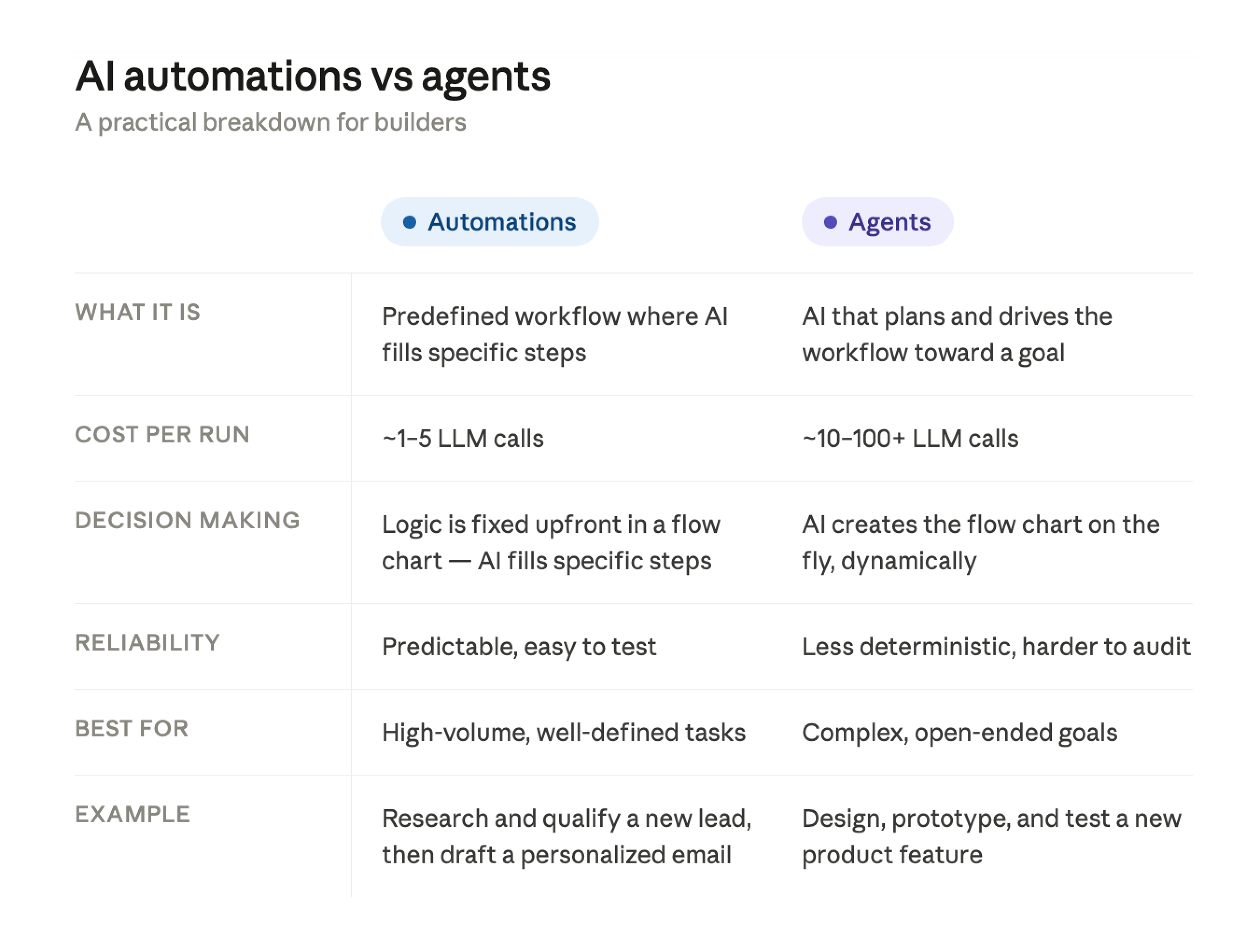
Cloud workflow automation vs. AI desktop agent
What is
Relay.app
?
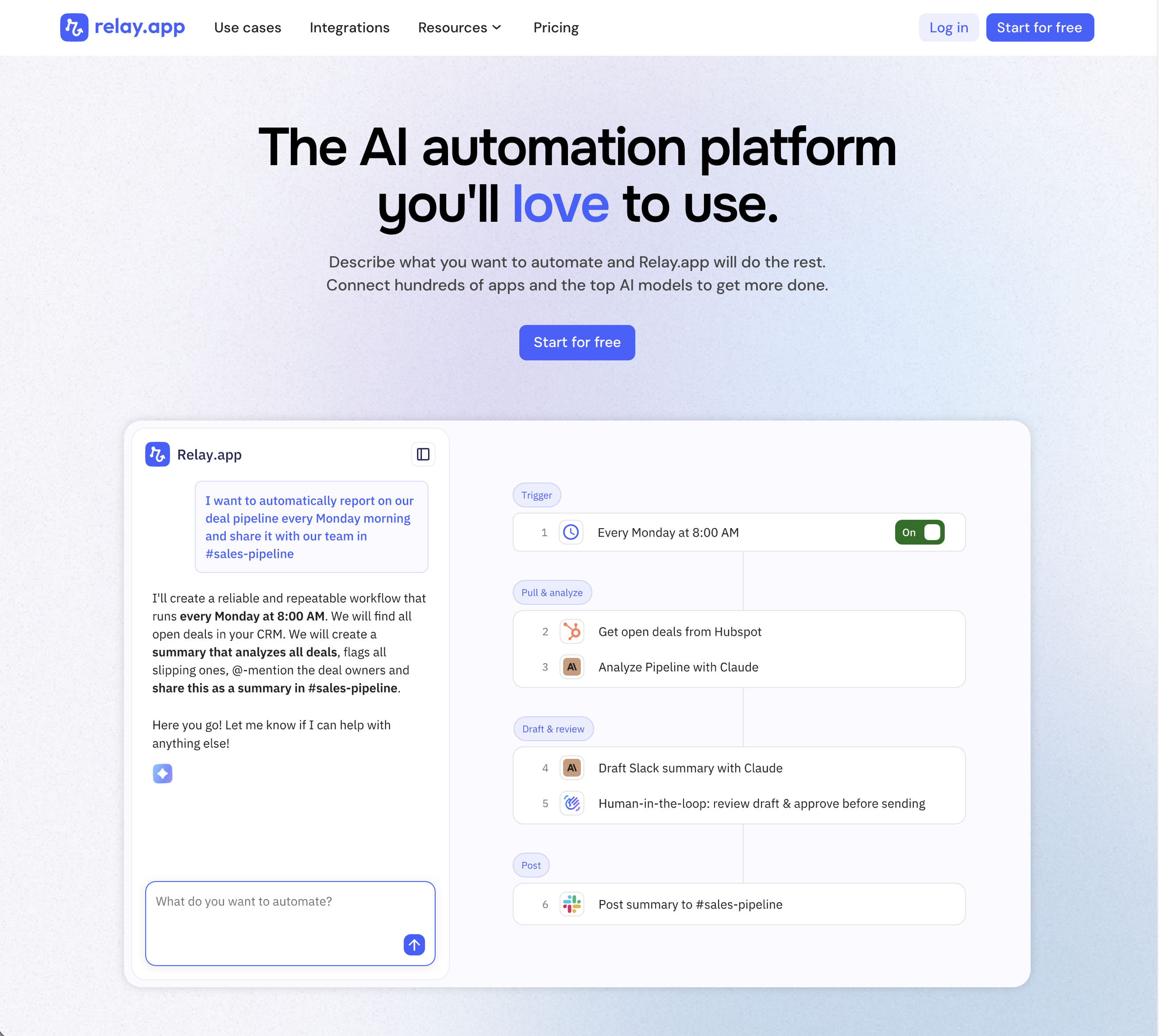
Relay.app is the most intuitive way to automate with AI. Just describe what you want to automate, and Relay.app will build a reliable, visual workflow for you. Relay.app connects with 200+ apps and all the top AI models. Non-technical users who have struggled with less user-friendly tools like Zapier or Make can easily create AI workflows in minutes, while longtime automation experts have all the advanced tools they need to build complex flows.
Product details
Designed to be intuitive to use: Relay.app is thoughtfully designed for individuals and teams of all technical abilities, from novice to expert.
An AI assistant optimized to build workflows for you: Chat with the AI assistant to build, test, and optimize workflows. It will proactively spot issues and make suggestions for you.
Hundreds of native integrations, plus custom API calls: 200+ deeply built, first-class native integrations. Don't see your app on the list? Just describe what you need and Relay.app's AI assistant will write a custom API call for you.
Collaborative building: Share workflows and app connections across your team for seamless multiplayer automation.
Human-in-the-loop oversight: Bring a teammate in when you need real life approvals, data entry, or manual review.
Universal AI credits for any AI model: Access the best models from OpenAI, Anthropic, and more using included AI credits.
Predefined processes for token efficiency: Set up a token-free structure for repeated work and limit AI tool calls to just the places you need them.
Technical power: Advanced users can go further with rich native tables, custom JavaScript steps, MCP servers, and custom HTTP requests.
Pricing
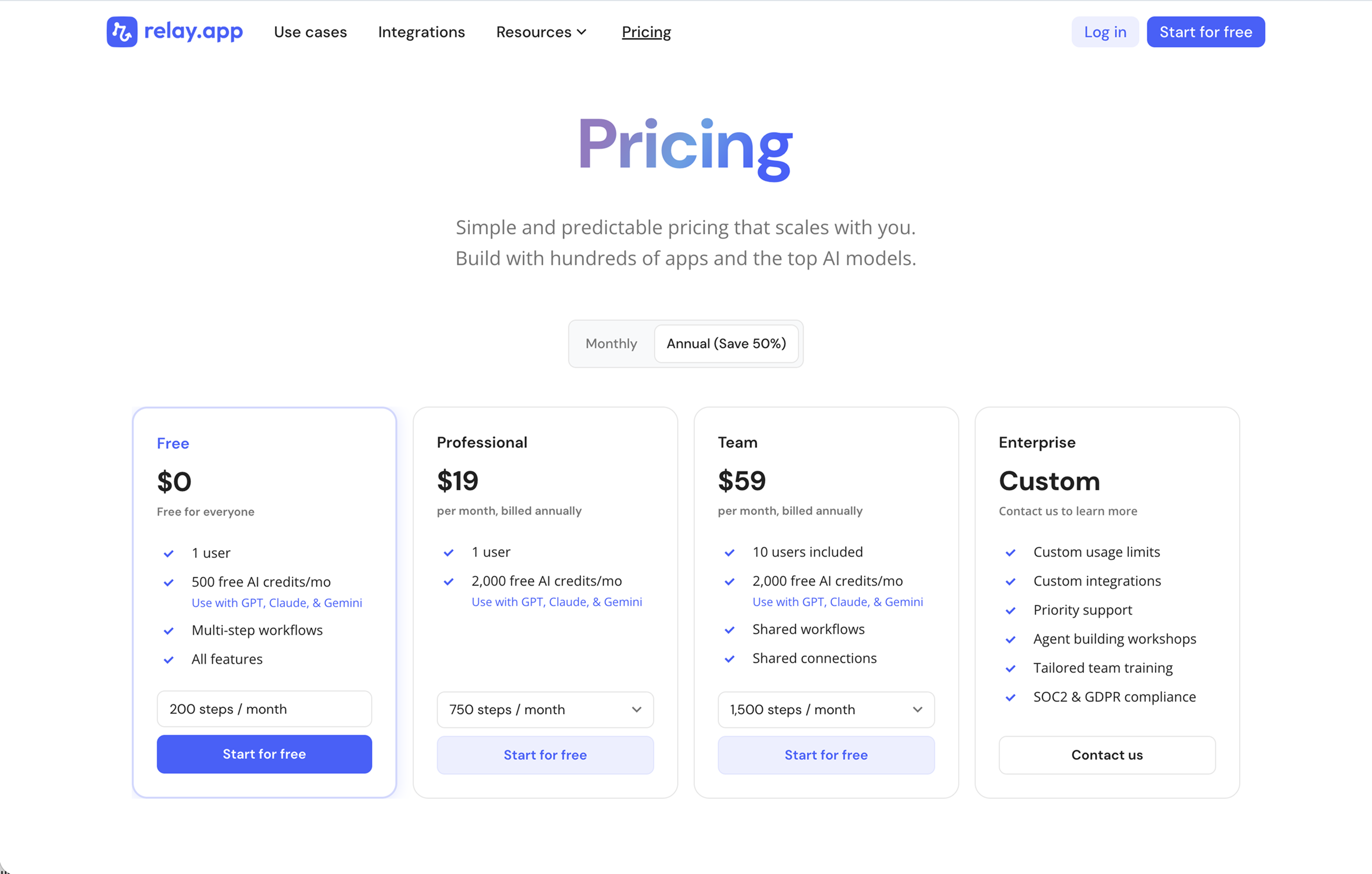
Relay.app's plans scale with your usage and team, starting with a generous free tier. All plans include free test runs that refresh every week so you can make sure everything works perfectly before you start paying.
Free: $0/month for 1 user, 200 steps, and 500 AI credits
Professional: $19/month (billed annually) for 1 user, 750 steps, and 2,000 AI credits
Team: $59/month (billed annually) for up to 10 users, 1,500 steps, and 2,000 AI credits
Enterprise: Custom pricing for organizations with advanced usage or security requirements
What is
Claude Cowork
?
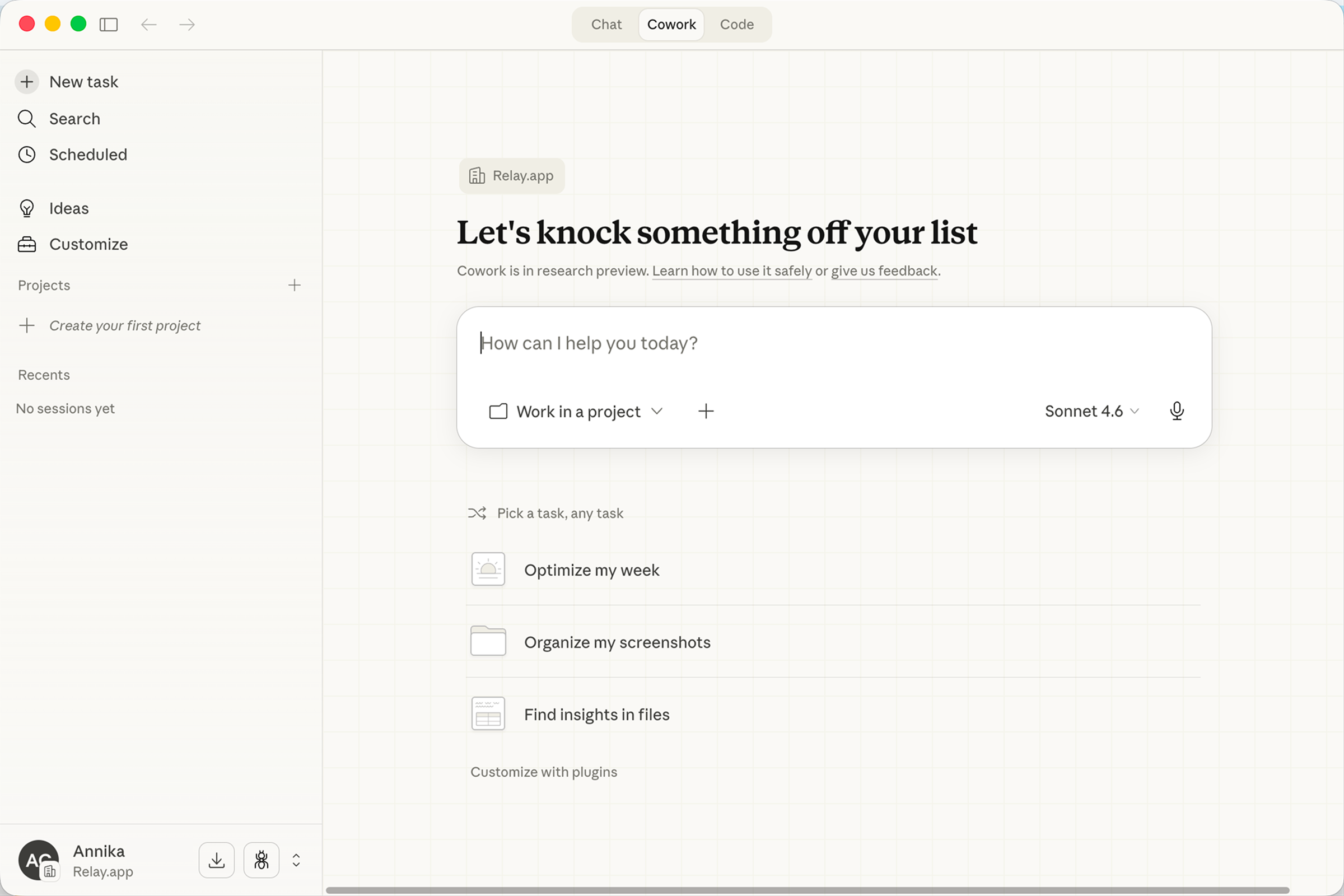
Claude Cowork is an agentic AI assistant built into Anthropic's Claude AI that allows users to delegate complex, multi-step tasks for autonomous execution. Cowork can read documents, extract key points, check calendars, build slide decks, and write summaries from a single prompt. It integrates seamlessly with popular tools like Google Workspace, Slack, Notion, Linear, and Microsoft 365 through robust connectors and remote MCP, while supporting custom Skills to create repeatable workflows.
Product details
Autonomous task execution: Delegate complex tasks like summarizing meetings, building decks, and writing reports.
Growing integration ecosystem: Connects to Google Workspace, Slack, Notion, Linear, Microsoft 365, and more through connectors and remote MCP.
Custom Skills: Create reusable instructions so Claude can repeat tasks consistently without re-prompting.
Cross-platform access: Available on web, desktop, iOS, and Android as part of the Claude experience.
Exclusive to Claude AI: Built into the Anthropic ecosystem as a fully integrated tool relying on its own models.
Pricing
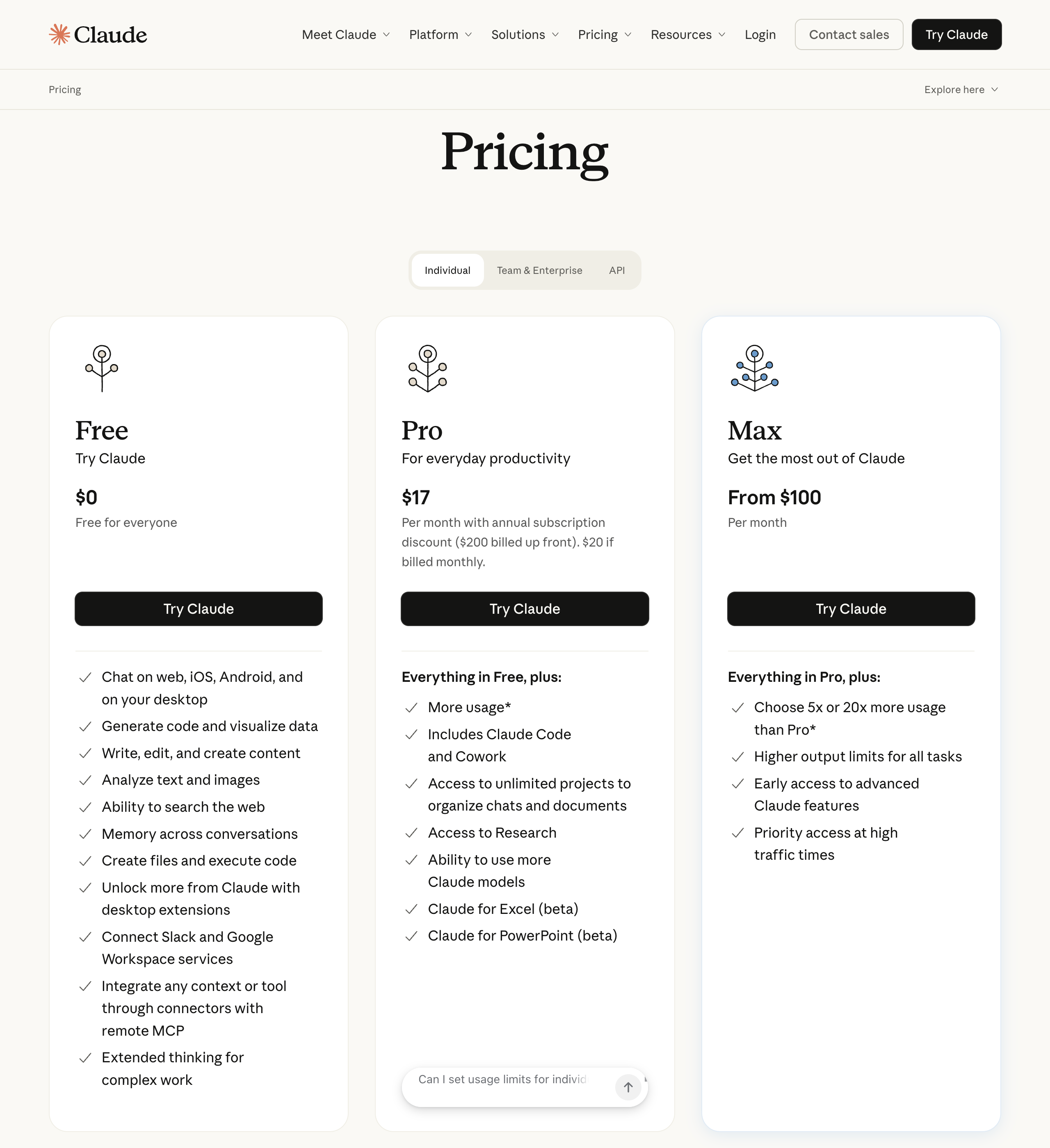
Free: $0/month for chat, web search, code execution, desktop extensions, and connectors (does not include Cowork access)
Pro: $20/month ($17/month billed annually) for Cowork, Claude Code, unlimited projects, Research, and Microsoft 365 integrations
Max: Starting at $100/month for everything in Pro, plus 5x to 20x more usage, higher output limits, and priority access
Team: $25/seat/month ($20/seat billed annually) for standard seats with Cowork, SSO, enterprise search, and admin controls
Enterprise: $20/seat/month plus usage at API rates for Team features, SCIM, audit logs, custom data retention, and a HIPAA-ready offering
Head-to-head comparison
🔧 Automation approach
Relay.app uses structured, visual workflows. A trigger fires, steps execute in order, paths branch based on conditions, and people step in when needed. It's predictable, auditable, and repeatable. You build it once, and it runs the same way every time.
Claude Cowork takes a goal-oriented approach. You describe what you want done, and Claude plans and executes the steps dynamically. It can now handle recurring tasks through scheduled tasks and the newer Routines feature. This is powerful for knowledge work, but less predictable for business-critical processes where consistency matters.
Bottom line: If you need the same process to run reliably hundreds of times a month across multiple apps, Relay.app wins. If you need a one-off research synthesis, file reorganization, or ad-hoc desktop task, Cowork is faster.
🔗 Integrations and app connections
Relay.app connects to 200+ apps with deep, native integrations that give you triggers, actions, and structured data across all the tools you use. Every integration is available on every plan, including the free tier. If there's an integration Relay.app doesn't have yet, you can use custom HTTP requests to connect your tools.
Claude Cowork connects to external services through connectors (Google Workspace, Slack, Notion, Linear, Microsoft 365, and more) and can interact with desktop apps via computer use. Anthropic's plugin marketplace is growing fast with department-specific plugins for sales, marketing, HR, and more. That said, integrations are more shallow. Cowork interacts with apps the way a person would, navigating interfaces rather than using structured APIs.
Bottom line: Relay.app gives you deeper, more reliable app-to-app connectivity for automated data flows. Cowork is more flexible for desktop-based and browser-based tasks, but less precise for structured, repeatable data movement.
🤖 AI capabilities
Relay.app embeds AI directly into workflow steps. You can summarize emails, classify support tickets, generate draft responses, or extract data from documents as part of a larger automated process. You get access to multiple AI models (GPT, Claude, Gemini, and others) through built-in AI credits, or you can use your own API keys.
Claude Cowork is the AI. The entire experience is powered by Claude's reasoning (currently Sonnet 4.6 by default, with Opus available for complex tasks). It can handle complex, multi-step knowledge work like research synthesis, report generation, data analysis, and creating polished deliverables. It's stronger for open-ended, judgment-heavy tasks. But you're locked into Claude's models only.
Bottom line: Relay.app is better for AI as one step in a larger automatable process, with your choice of model. Cowork is better when AI is the process and you need deep reasoning on a single task.
👥 Human-in-the-loop
This is where Relay.app really stands apart. Human-in-the-loop isn't an add-on. It's a core principle of the product. You can insert approval steps, data input requests, and manual task assignments anywhere in a workflow. Assignees get notified to respond over Slack or email, with due dates, reminders, and escalation rules.
Claude Cowork is designed with human oversight in mind. Before acting, it shows you its plan and waits for approval. You can redirect or refine at any step. But the interaction model is different. You're reviewing what Claude is doing in a single session, not gating specific steps in a repeatable, multi-person process.
Bottom line: If your workflows require structured human checkpoints (compliance, approvals, quality control) across a team, Relay.app is purpose-built for this. Cowork gives you personal oversight, but not curated control checkpoints for collaborative processes.
⏰ Availability and reliability
Relay.app runs in the cloud, 24/7. Your workflows execute whether you're at your desk, asleep, or on vacation. Triggers fire the moment conditions are met, and nothing depends on your local machine.
Claude Cowork primarily runs on your desktop. Scheduled tasks require your computer to be awake and the Claude app to be open. If your machine is off, tasks get skipped (they auto-run when you reopen the app). Anthropic recently introduced Routines, which can run in the cloud, but this is still in research preview and limited in scope compared to a dedicated automation platform.
Bottom line: For always-on business automation, Relay.app is the clear choice. Cowork is catching up with Routines, but it's not there yet for mission-critical processes.
When to use Relay.app
You need automation that runs 24/7, regardless of whether anyone's at their desk
Your workflows require human approvals or compliance checkpoints
You're automating repeatable business processes (lead routing, onboarding, reporting, customer journeys)
You work with a team and need shared workflows with role-based assignments
You want AI as part of a larger workflow, not as the entire workflow
You need deep, structured integrations across 200+ apps
When to use Claude Cowork
You need to delegate desktop tasks like file organization, research synthesis, or report drafting
The work is ad-hoc or semi-structured, not the same process running hundreds of times
You want polished deliverables like formatted spreadsheets, presentations, or briefing docs
You're an individual knowledge worker who wants an AI assistant for hands-on work
Your tasks primarily involve local files, documents, and browser-based work
You want to schedule recurring personal tasks like daily briefings or weekly report prep
The verdict
Relay.app and Claude Cowork aren't really an either/or choice. They complement each other really well.
Use Relay.app when you need automation that's structured, reliable, collaborative, and always running. It's the backbone for your repeatable business processes, with AI baked in and humans in the loop where they need to be.
Use Claude Cowork when you need an AI agent to tackle messy, one-off knowledge work on your desktop. The kind of tasks that are too unstructured for a workflow but too time-consuming to do manually.
The right answer is to use both!
Jacob Bank
Founder/CEO at Relay.app

Jacob is the Founder and CEO of Relay.app. Prior to founding Relay.app, Jacob was a Director of Product Management at Google, where he led the product teams for Gmail, Google Calendar, and several other Google Workspace products. Before that, Jacob was the Co-founder and CEO of Timeful (acquired by Google in 2015), a smart calendar that leveraged insights from behavioral psychology and AI to help people spend time on their most important priorities. He has a BA in Computer Science from Cornell University and was pursuing a PhD in the AI Lab at Stanford before dropping out to found Timeful.
FAQs
Why would I use Relay.app instead of Claude Cowork?
Use Relay.app for repeatable cross-app business processes and Claude Cowork for hands-off knowledge work on your desktop. Relay.app and Claude Cowork solve different problems. Claude Cowork is a desktop AI agent that works with your local files and applications to complete knowledge work like research synthesis, file organization, and document creation. While it now supports scheduled and recurring tasks, it runs on your computer and is designed for individual productivity. Relay.app is a cloud-based workflow automation platform that runs whether or not you're at your computer, connects to 200+ apps, and includes built-in human-in-the-loop approvals. Chances are you have use cases for both!
Is a cloud-based automation tool like Relay.app better than a desktop AI agent?
For repeatable business processes, yes. Cloud-based tools like Relay.app run 24/7 on a server, so your workflows trigger and execute even when your computer is off. Desktop AI agents (like Claude Cowork) require the desktop app to stay open and your computer to stay awake. Scheduled tasks won't run if either is closed. While Cowork can work autonomously on complex tasks and even accept assignments from your phone via Dispatch, it still depends on your local machine being on. If you need automations that reliably fire at any hour (say, routing leads, sending follow-ups, or processing orders) a cloud-based platform like Relay.app is the better choice. Desktop agents are best for hands-on knowledge work like organizing files, generating reports, or completing tasks across local apps.
What's the difference between AI agents and workflows?
AI agents (like Claude Cowork or OpenClaw) handle open-ended, one-off tasks by dynamically deciding what to do next. Automated workflows (like those built in Relay.app) follow structured, repeatable steps that trigger automatically and run the same way every time. For most repeated business processes, like lead routing, onboarding, and reporting, you want the consistency of a workflow. For ad-hoc knowledge work like research or drafting, an AI agent is better. You can use both together!
What are alternatives to Claude Cowork if I need to automate repeated jobs?
Relay.app is a strong alternative if you're looking for always-on automation rather than desktop-based AI assistance. Manus is another good option in the cloud. If you're looking for something to run on your local computer try OpenClaw or Perplexity Personal Computer.