A practical guide to automating invoice capture, AI data extraction, approvals, and accounting entry with Relay.app. Replace manual data entry with AI workflows that keep a human in the loop.

Invoices show up in every format you can imagine. PDFs in email attachments, images dropped into Slack, vendor portals that send links, and the occasional paper copy someone scanned at 2am. Pulling out the line items, matching them against POs, getting them approved, and finally pushing the data into QuickBooks or Xero is the kind of work that quietly eats hours every week.
The good news: This whole workflow is a great fit for AI-powered automation! With Relay.app, you can build an end-to-end invoice workflow that reads incoming invoices, extracts the data, routes it for human approval, and files it into your accounting tool, all without copy-pasting.
Relay.app handles PDF, JPG, and PNG attachments out of the box, with built-in OCR so even scanned invoices get parsed cleanly. Here's what a typical automated invoice workflow looks like in Relay.app.
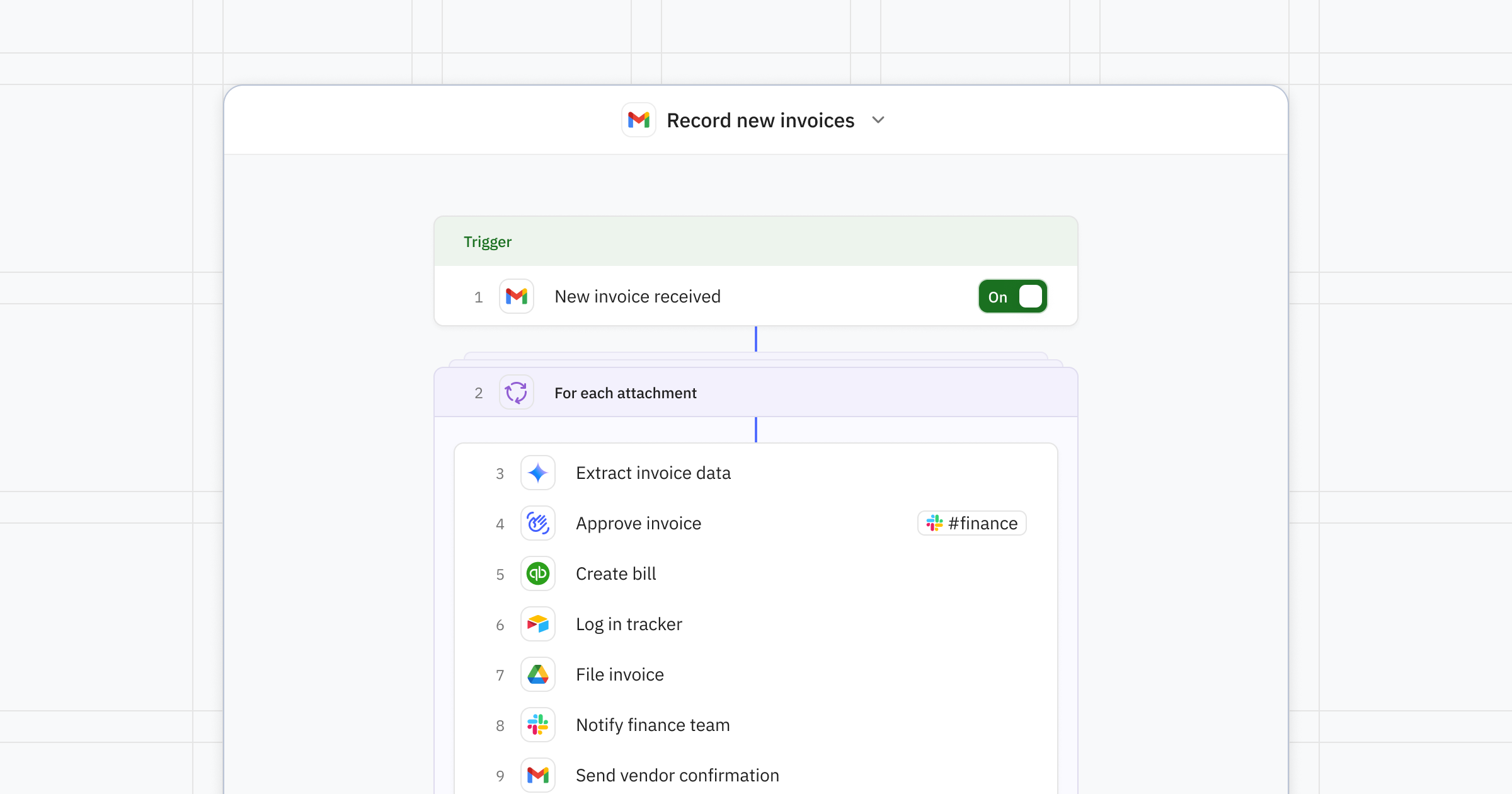
How to automate invoice management with Relay.app
A solid invoice automation workflow has four phases: Capture, extract, approve, and record.
1. Capture the invoice
Start with a trigger that fires the moment an invoice lands.
Gmail or Outlook: Trigger on new emails to invoices@yourcompany.com or emails tagged with a specific label.
Google Drive or Dropbox: Trigger when a new file is added to a selected folder, like "Invoices."
Slack: Trigger when a file is shared in your finance Slack channel.
2. Extract the data with AI
Drop in an AI step to pull structured fields out of the PDF or image, typically: Vendor name, invoice number, issue and due dates, line items, subtotal, tax, total, and PO number. Relay.app's AI step works with GPT, Claude, and Gemini out of the box, so you don't have to think about managing API keys and providers.
3. Add a human-in-the-loop approval
Instead of trusting the AI blindly, add a human approval step that posts the extracted summary to Slack, email, or a Relay.app inbox. The approver can edit any field before the workflow continues. For invoices above a threshold (say $1,000), route to a manager. Smaller ones can auto-approve.
Human-in-the-loop isn't just an approval. It's a safety net that keeps bad data out of your accounting software.
4. Record the invoice
Once approved, push the data downstream:
Create a bill in QuickBooks, Xero, or NetSuite.
Log the line items in a Google Sheet, Airtable, or Notion database for reporting.
File the original PDF in a structured Google Drive folder named by vendor and month.
Notify the vendor or post a confirmation in your finance Slack channel.
Example scenarios
Recurring SaaS bills: Auto-extract, match to the vendor record in a Relay.app Table, and post directly to Xero with no human review needed.
High-value contractor invoices: Route to the project owner for line-item review before the bill is created.
PO matching: Use an AI step to compare extracted line items against an open PO in Airtable and flag mismatches.
About
Relay.app

Relay.app is the easiest way to automate with AI. It turns plain language into reliable, visual workflows across over 200 apps. Non-technical users who have struggled with complex tools like Zapier or Make can create reliable AI workflows in minutes just by using plain language. Relay.app handles everything from creation to analysis, while built-in human-in-the-loop features ensure that you stay in control when the stakes are high.
Product details
Ease of use: Relay.app is designed for teams of all technical abilities to automate in minutes.
AI Agent creation: Use natural language to build and improve complex AI workflows effortlessly.
Human-in-the-loop: Add checkpoints to pause workflows for human approval or data entry when needed.
Collaborative features: Share workflows and app connections across your team for seamless multiplayer automation.
Built-in AI models: Access the best models from OpenAI, Anthropic, and more using included AI credits.
Stateful data with Tables: Store and update structured data directly within Relay.app to use across flows.
Technical power: Advanced users can leverage custom JavaScript, MCP servers, and custom HTTP requests.
200+ native integrations: Deeply connected with popular tools like Notion, Gmail, and HubSpot.
Pricing
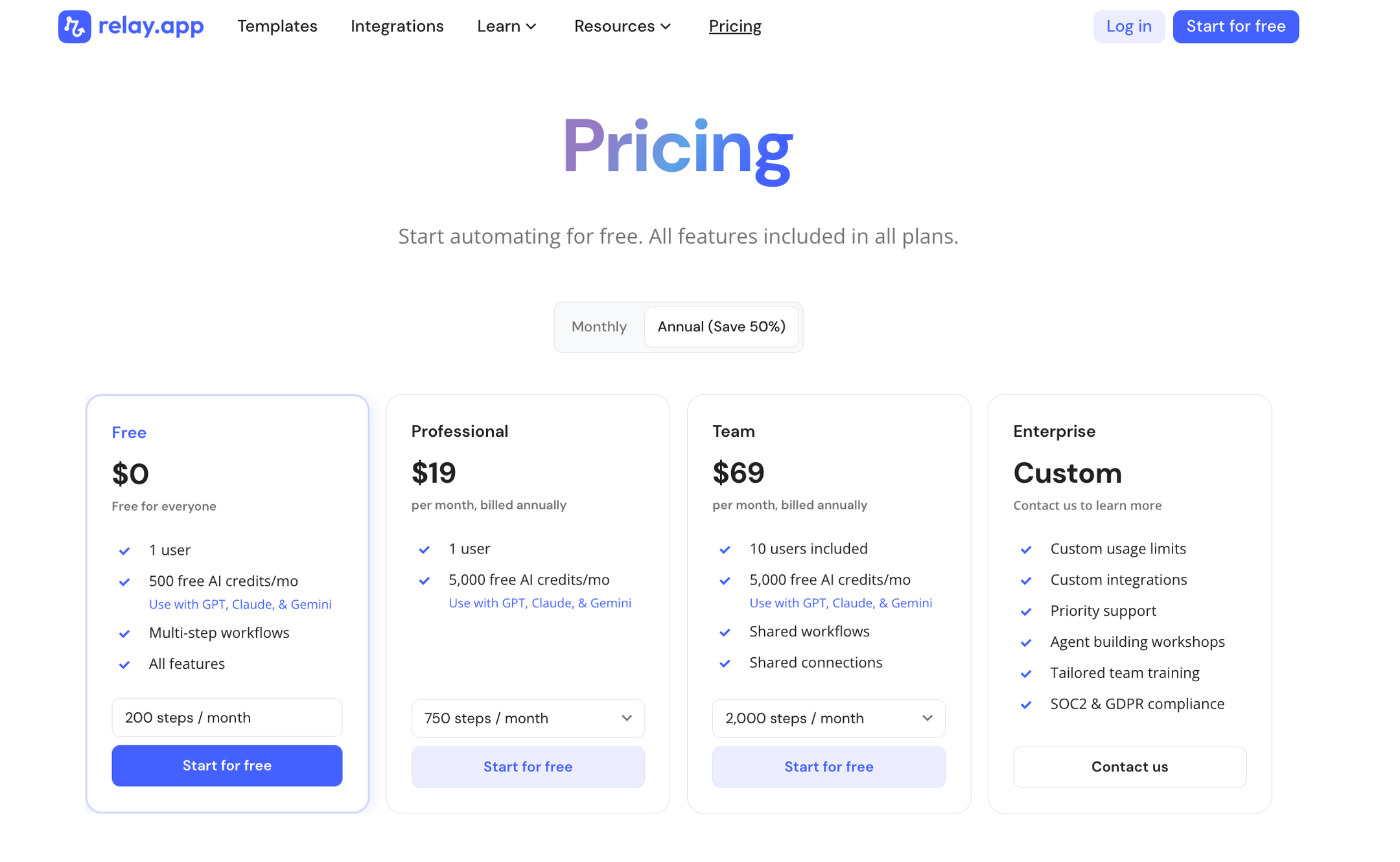
Relay.app offers a range of plans including a generous free tier. All plans include free test runs so you can validate your workflows before they go live.
Free: $0/month for 1 user, 200 steps, and 500 AI credits
Professional: $19/month (billed annually) for 1 user, 750 steps, and 2,000 AI credits
Team: $59/month (billed annually) for up to 10 users, 1,500 steps, and 2,000 AI credits
Enterprise: Custom pricing for organizations with advanced usage or security requirements
Get started
Invoice management is one of those workflows where every step you automate compounds into real time saved. You don't need to rebuild your entire Accounts Payable process on day one. Start with a single trigger, an AI extract step, and a human approval, then grow from there.
Sign up for Relay.app and build your first invoice workflow today.
Jacob Bank
Founder/CEO at Relay.app

Jacob is the Founder and CEO of Relay.app. Prior to founding Relay.app, Jacob was a Director of Product Management at Google, where he led the product teams for Gmail, Google Calendar, and several other Google Workspace products. Before that, Jacob was the Co-founder and CEO of Timeful (acquired by Google in 2015), a smart calendar that leveraged insights from behavioral psychology and AI to help people spend time on their most important priorities. He has a BA in Computer Science from Cornell University and was pursuing a PhD in the AI Lab at Stanford before dropping out to found Timeful.
FAQs
Which Relay.app plan should I start with?
What does human-in-the-loop mean?
How do Relay.app's AI credits work?
Do I need technical skills to debug and maintain automations in Relay.app?
How does Relay.app's AI workflow builder compare to Zapier's AI tools?
Can Relay.app's AI assistant help me edit and fix my workflows?
