Is your business overwhelmed by documents that need organizing? Here's how to use Relay.app and AI to automate your document filing to save hours a week.


Document filing is one of those tasks that feels small but can quietly eat hours of your week. Download the attachment, figure out what it is, rename it, drag it to the right folder, maybe log it in a spreadsheet. Multiply that by dozens of files a week and you've got a real productivity problem. The good news is that AI can handle this really well now!
I've been using Relay.app to automate document filing for my own team, and the difference is night and day. In this post, I'll walk you through how to build an AI workflow to classify, rename, and route files, by the handful or the hundreds.
TL;DR
A quick summary if you only have a minute: In Relay.app, you can build a document-filing automation that:
Triggers when a document arrives via email, Google Drive, Slack, or a form submission
Uses AI to classify the document type and extract key details like date, vendor, and reference number
Renames and routes the file to the right folder with a consistent naming convention
Logs metadata to a spreadsheet or database for easy searching later
Pauses for human review when the AI isn't confident, before anything gets filed
Why document filing is perfect for AI automation
Most document filing follows a pattern. Invoices go to the finance folder. Contracts go to legal. Onboarding docs go to HR. The logic is simple. Doing this manually is tedious and can lead to errors, but this it's exactly the kind of work that AI excels at. AI can:
Read and classify documents based on their content
Reliably extract key details like dates, names, amounts, and document types
Rename files using a consistent naming convention
Move or copy them to the correct folder in Google Drive, Dropbox, or wherever you store things
Log metadata in a spreadsheet or database for easy searching later
You don't need a fancy enterprise document management system to get started. A well built automation workflow handles 90% of what most teams need.
How to set this up in Relay.app
Here's the general approach I use. You can customize it based on your stack and filing system.
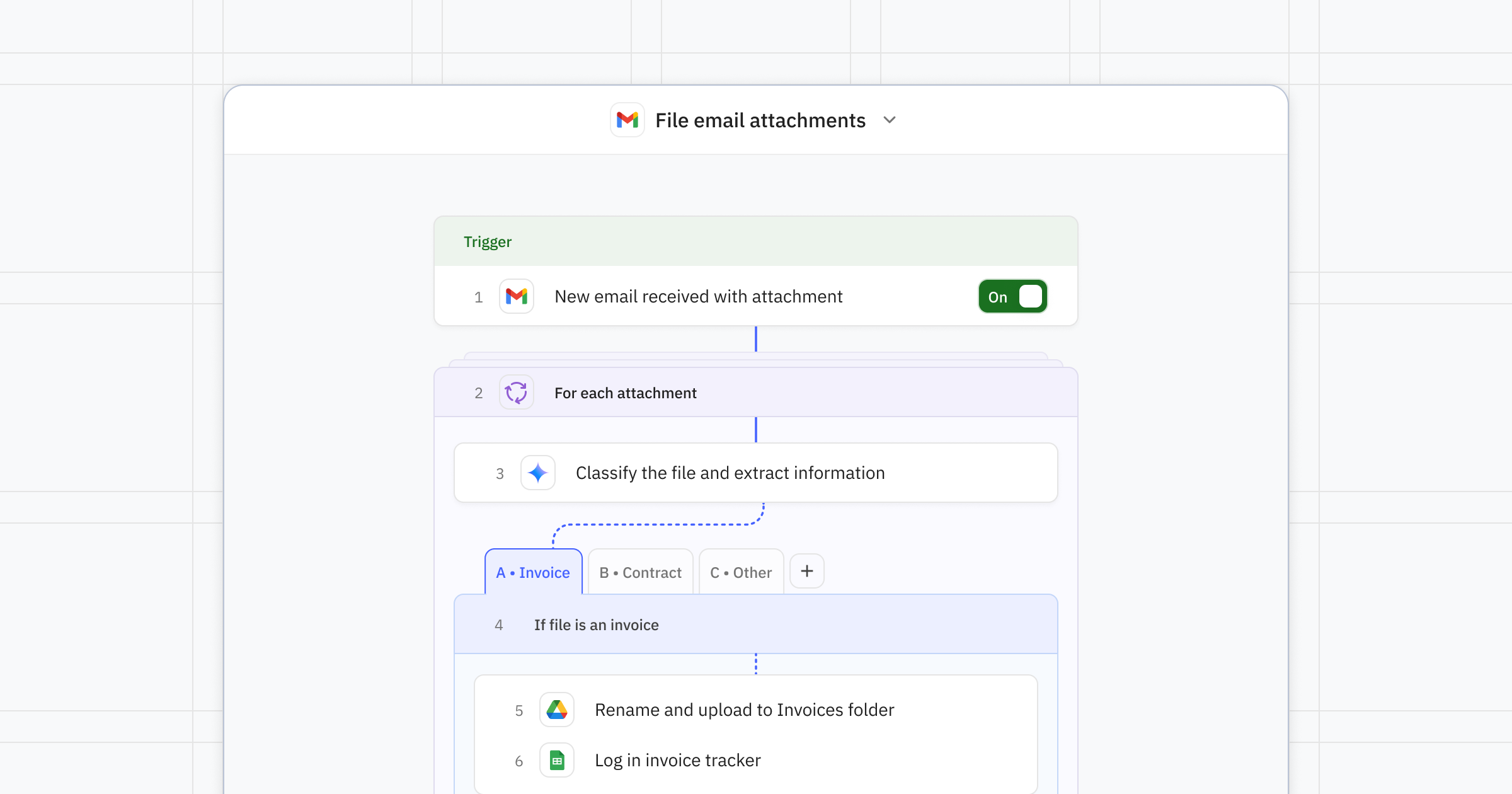
Step 1: Pick your trigger
Start by deciding where your documents come in. Common triggers include:
A new email with an attachment arrives in Gmail or Outlook
A file is uploaded to a specific Google Drive or Dropbox folder
A form submission comes through with attached files
A message with a document is posted in Slack
Step 2: Use AI to classify the document
Add an AI step in your Relay.app workflow that reads the document and determines what type it is. Prompt Relay.app with something like:
"Read this document and classify it as one of the following: Invoice, Contract, Receipt, Onboarding Form, or Other. Also extract the date, company name, and any relevant reference number."
Relay.app gives you access to top AI models from OpenAI, Anthropic, Google, and more using built in AI credits, and it picks the best one for your use case. No managing API keys, no juggling separate token bills, no needing to know which model is good at what.
Step 3: Route and rename the file
Use the AI output to decide where the file should go and what it should be called. Add a Google Drive, Dropbox, or OneDrive step that uploads the file into the right folder using a clean naming convention like 2026-05-01_Acme_Invoice_INV-1042.pdf. Relay.app's branching logic makes this easy: One path for invoices, another for contracts, another for receipts.
Step 4: Log it for easy retrieval or analysis later
Add a step to log the document details in a spreadsheet, Notion database, or Relay.app's own Tables feature. This gives you a searchable index of every document that's been processed. Include fields like document type, date, sender, file link, and any extracted amounts or reference numbers.
Step 5: Add a human in the loop for edge cases
Not every document is clear cut. Sometimes the AI isn't sure what category something falls into, or the stakes are high enough that you want a person to confirm the classification or extracted data before filing.
This is where Relay.app's human in the loop feature comes in. You can add a checkpoint that pauses the workflow and sends you or a teammate a notification to review the classification before the document gets filed. Human-in-the-loop checkpoints are a safety net when accuracy matters more than speed.
Once you approve, the workflow picks back up and files everything correctly. You get the best of both worlds: automation for the routine stuff, human judgment for the tricky stuff.
Tips to make your document filing workflow even better
Start simple, then expand. Get the basic classification and routing working first. You can always add more document types and smarter logic later.
Use Relay.app Tables to track everything. A central log of processed documents makes auditing and searching easy, and gives you a foundation to build more automations or analysis on top of later.
Set up separate workflows per channel. One for email attachments, one for Slack uploads, one for form submissions. Each flow stays simple, easy to debug, and easy for teammates to understand at a glance if you're building shared flows.
Test with real documents first. Use Relay.app's free test runs to validate your workflow with actual files before going live.
Collaborate with your team. Share workflows using Relay.app's collaborative features so teammates can refine prompts and add their own filing rules.
Use the Relay.app Assistant to build, test, and improve. You don't have to build this all alone. Just chat with the AI assistant to explain what you want. It builds the workflow for you and helps you test and ship it.
About
Relay.app
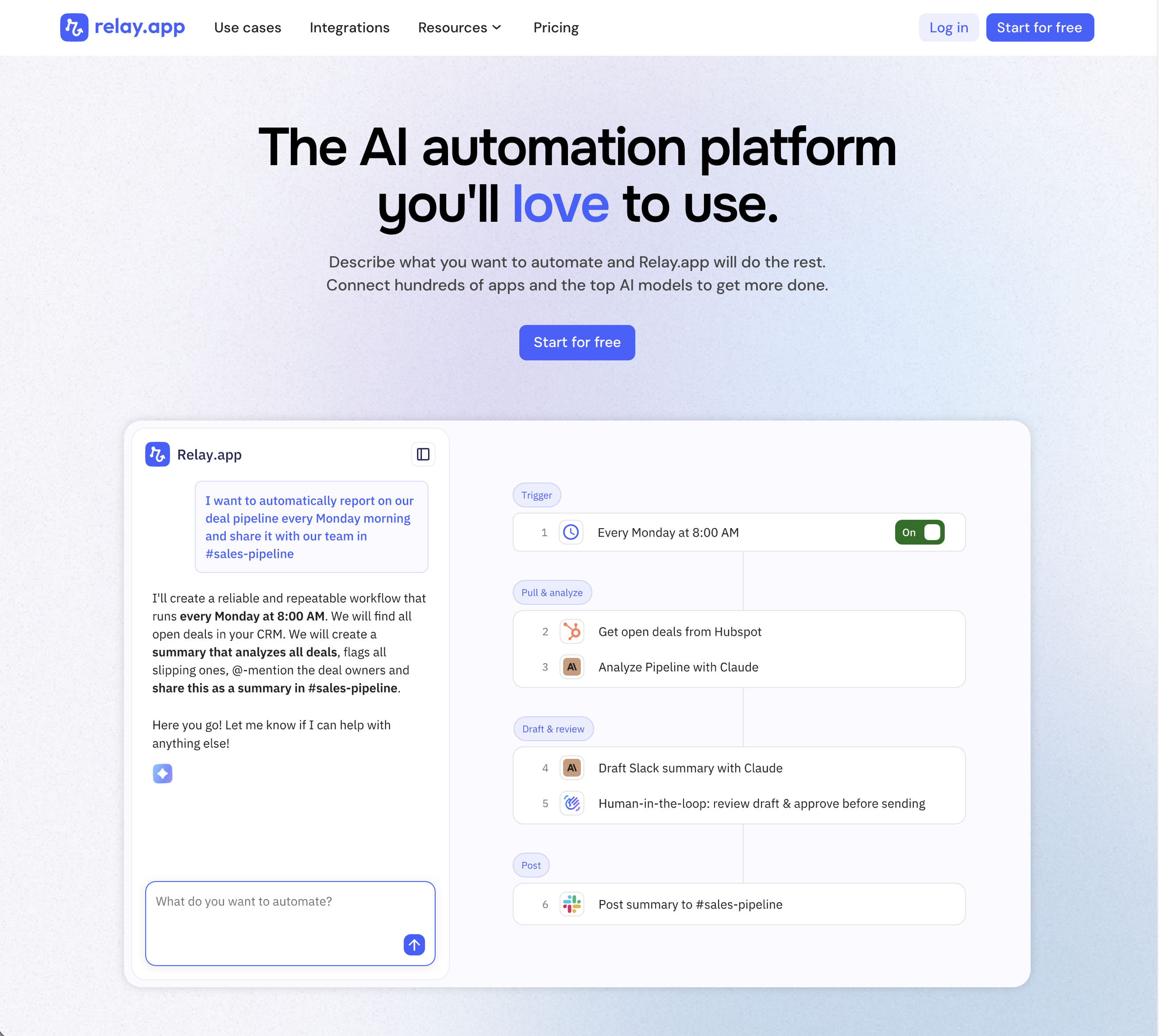
Relay.app is the most intuitive way to automate with AI. Just describe what you want to automate, and Relay.app will build a reliable, visual workflow for you. Relay.app connects with 200+ apps and all the top AI models. Non-technical users who have struggled with less user-friendly tools like Zapier or Make can easily create AI workflows in minutes, while longtime automation experts have all the advanced tools they need to build complex flows.
Product details
Designed to be intuitive to use: Relay.app is thoughtfully designed for individuals and teams of all technical abilities, from novice to expert.
An AI assistant optimized to build workflows for you: Chat with the AI assistant to build, test, and optimize workflows. It will proactively spot issues and make suggestions for you.
Hundreds of native integrations, plus custom API calls: 200+ deeply built, first-class native integrations. Don't see your app on the list? Just describe what you need and Relay.app's AI assistant will write a custom API call for you.
Collaborative building: Share workflows and app connections across your team for seamless multiplayer automation.
Human-in-the-loop oversight: Bring a teammate in when you need real life approvals, data entry, or manual review.
Universal AI credits for any AI model: Access the best models from OpenAI, Anthropic, and more using included AI credits.
Predefined processes for token efficiency: Set up a token-free structure for repeated work and limit AI tool calls to just the places you need them.
Technical power: Advanced users can go further with rich native tables, custom JavaScript steps, MCP servers, and custom HTTP requests.
Pricing
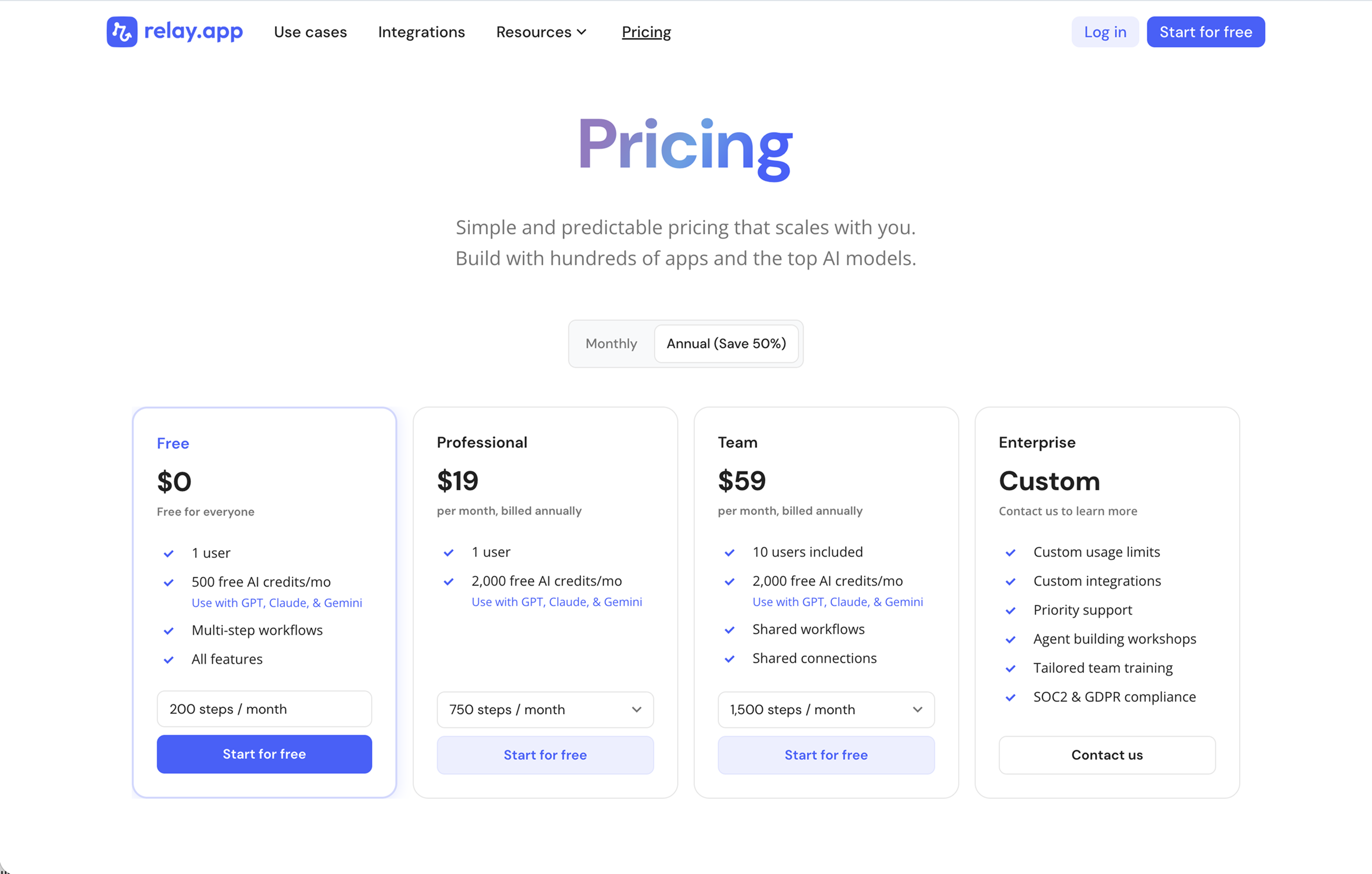
Relay.app's plans scale with your usage and team, starting with a generous free tier. All plans include free test runs that refresh every week so you can make sure everything works perfectly before you start paying.
Free: $0/month for 1 user, 200 steps, and 500 AI credits
Professional: $19/month (billed annually) for 1 user, 750 steps, and 2,000 AI credits
Team: $59/month (billed annually) for up to 10 users, 1,500 steps, and 2,000 AI credits
Enterprise: Custom pricing for organizations with advanced usage or security requirements
What this looks like in practice
Once everything is wired up, it should just… work. An invoice arrives in your inbox. Within seconds, it's been read by AI, classified, renamed, moved to the right folder, and logged in your tracking table. If the AI is unsure, you get a quick notification to confirm. That's it.
No dragging files around. No renaming. No "which folder was that supposed to go in?" conversations. Just documents, filed correctly, every single time.
If you've been putting off organizing your digital filing system, this is your nudge to finally do it. Relay.app has a free plan with more than enough steps and AI credits to test this out in minutes.
Give it a try. Your future self will thank you.
Annika Crowley
Founding Designer

Annika is the Founding Designer at Relay.app. Prior to Relay.app, Annika led design for Gmail & Google Chat, where she designed AI tools like Smart Compose. Before Google, Annika worked at startups including an AI calendar company called Timeful.
FAQs
Which Relay.app plan should I start with?
Relay.app has a free plan, so start there. Once you reach the free plan's step or AI credit limit, upgrade to a paid plan. The difference between the Professional and Team plan is the number of users. Upgrade to Professional if it's just you, and upgrade to Team if you're working with others. And we suggest going with annual billing because it comes with a good discount! Learn more at www.relay.app/pricing.
What does human-in-the-loop mean?
Human-in-the-loop means adding checkpoints in your workflows where a person can review, approve, or provide input before the automation continues. This is particularly useful for AI-powered workflows, where an AI output needs human judgment for high-stakes decisions. Relay.app lets you add approval steps, data input forms, and AI output reviews anywhere in a workflow, all manageable from Slack or email.
How do Relay.app's AI credits work?
Access to top models like GPT, Claude, Gemini, Perplexity, and more is included with your Relay.app plan. The Relay.app AI Agent will pick the best model for you according to your use case. Each time an AI step runs, it uses AI credits from your plan. More expensive models cost more credits, so you can change models if an AI task is costing too many credits. If you already have an API key with a model provider, you can use that instead to handle billing through the model provider directly.
Can Relay.app handle specific use cases better than a general AI agent like ChatGPT or Claude?
Yes, for structured and repeatable use cases. General AI agents are powerful conversational tools, but they aren't designed to integrate with your apps, trigger automatically, or include team-based approvals. Relay.app connects to 100+ apps and lets you build workflows for specific use cases, like auto-triaging support tickets, routing sales leads, or generating reports on a schedule, with human-in-the-loop checkpoints built in. It's the difference between asking an AI to do something once and having a system that does it reliably every time.
Do I need technical skills to debug and maintain automations in Relay.app?
No. Relay.app's AI assistant can proactively detect issues in your workflows and suggest fixes, so you don't need to understand error codes or API responses. You can also chat naturally with the AI assistant and ask questions about what happened in any past run. This makes Relay.app one of the easiest platforms to maintain long-term, even for non-technical users.
Can Relay.app's AI assistant help me edit and fix my workflows?
Yes! Relay.app has the most capable AI assistant of any workflow automation platform. It doesn't just help you build workflows from scratch; it can also edit existing workflows, proactively identify and fix errors, and suggest improvements. This means you can spend less time debugging and more time perfecting the output you want.